Your private AI testing team.
Our AI agents replay the requests your customers actually send against every build and grade whether it is ready for production: behavior, performance, spec adherence, security, and runtime health. Speedscale engineers confirm the findings. You get a clear answer, and exactly what it takes to get to ready.
Runs as SaaS, or entirely in your own cloud with BYOC and no data reported back to Speedscale.
The production context layer
The secret to reliable AI agents is production context.
Models keep getting better. What they still lack is your production reality: how customers call your APIs, what users actually do, and how your infrastructure responds. The production context layer captures that reality and keeps it current, so independent agents test every change against it, and every release adds to what they know.
AI or human agents, as many as each release needs
- End-to-End Browser
- Code Review (human agent)
- Functional Validation
- Canary Analysis
- Security
- Incident Root Cause (human agent)
- Contract Testing
- Performance
- Dependency Upgrades
- Break/Fix (human agent)
- Test Generation
- Mock Maintenance
Production context layer
Recorded, masked, and replayable: real requests, responses, timing, and dependencies that any agent can run anywhere
- API traffic Every request, response, and dependency call
- User behavior The journeys real customers actually take
- Infrastructure Latency, databases, queues, and runtime health
Recorded from production
Why AI code review is not enough
Reviewing the code is not the same as proving the change.
LLM code review reads the same diff, repository, and tests the coding agent already worked from. It is a useful second read, but it mostly re-checks the original agent's work with the original agent's assumptions. Neither one has seen how your customers actually use the service, so neither can tell you whether the change will hold up in production.
LLM code review
- What it sees
- The diff, the repository, and the tests the coding agent wrote
- What it answers
- Does this code look right?
- What it catches
- Style issues, obvious logic slips, and known risky patterns
- When dependencies misbehave
- Assumes downstream services return what their docs promise
Replay against production context
- What it sees
- Real requests, responses, dependencies, and timing from production
- What it answers
- Does this change still behave like production?
- What it catches
- Behavior regressions, latency, contract drift, and failure paths the code never mentions
- When dependencies misbehave
- Simulates bad, unexpected, slow, and failing responses the same way on every run
Your dependencies have bad days. Test for them on purpose.
Code review assumes downstream services return what their docs promise. Speedscale mocks every dependency from recorded traffic, then lets you make it misbehave, so each change meets the same bad data on every run instead of whatever staging happens to return that day.
- Malformed payloads
- Unexpected fields and types
- Empty or partial data
- Errors and rate limits
- Slow and timed-out responses
What the research says
-
Models miss their own mistakes
LLMs failed to fix errors in their own output 64.5% of the time on average, yet fixed the same errors when they came from someone else.
Self-Correction Bench, 2025 -
Plausible is not correct
MIT CSAIL researchers found generated code often looks plausible but calls non-existent functions or fails CI, because every codebase is different.
MIT CSAIL, 2025 -
Passing tests is not shipping
Maintainers would reject about half of AI pull requests that passed their automated tests, most often because the change did not actually work or broke other code.
METR, 2026 -
Faster, but less stable
AI adoption raised delivery throughput but also delivery instability, with more change failures and more rework.
Google DORA, 2025
Keep the code review. Add the proof: replay every change against real customer traffic, so each release ships with evidence instead of another opinion.
Teams that test with real customer traffic
Capture real application behavior once, then use it to decide whether every release is ready for production.




















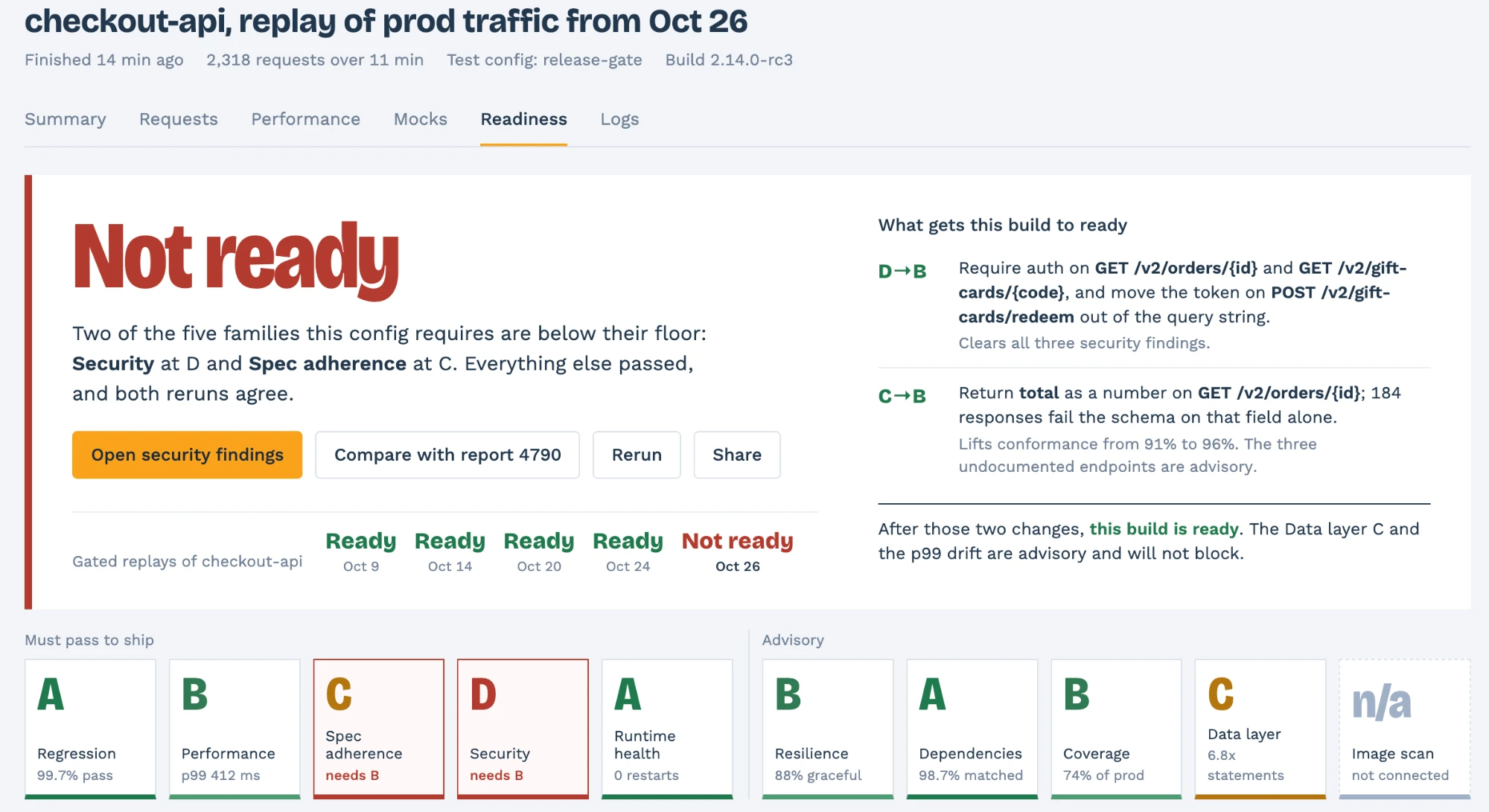
Production readiness, not just pass or fail
One verdict per release: ready, or not yet.
Passing regression tests is not the same as ready to ship. Every replay is graded across the checks your release gate requires, against floors you set, and confirmed on rerun so the verdict holds.
Must pass to ship
Five grades that gate the release
Regression, performance, spec adherence, security, and runtime health, each graded A to F against the floor in your test config. One below its floor and the build is not ready.
Advisory
Signals in view, not in the way
Resilience, dependency matching, coverage of production traffic, data-layer behavior, and image scans stay visible without blocking the release.
The path to ready
The exact changes, not just a red build
Every blocking grade comes with the change that clears it, like requiring auth on an endpoint or fixing a field that breaks the schema. Agents draft it, engineers confirm it.
Every gated replay is tracked per service, so you see the moment a service stops being ready.
How readiness is measured
Your customers write the tests.
Real customer traffic as the input
The requests your customers send, with responses and timing, captured once with sensitive fields masked.
Dependencies as mocks
HTTP, gRPC, Postgres, MySQL, and Redis, served from recordings. No shared test environment.
Diffs, not assertions
Every response compared to what production returned, with P50 to P99 latency in the same run.
4919 requests replayed
4917 identical
2 changed
POST /api/checkout
- "tax": 4.20
+ "tax": 4.2000000001
Who is behind the report
AI does the volume. Engineers make the call.
Your team ships the code. Our AI agents build replay suites from your customers' traffic, tune the mocks, and grade every build. Speedscale engineers review the findings and own the SLAs.
AI agents
Suites built from customer traffic
For every service under management, scoped with you during the proof of concept.
AI agents
Mocks kept matched
Re-tuned as your APIs change, so the suite never quietly rots.
Agents + engineers
Every failure checked twice
Agents analyze each failed run. Engineers confirm it, under an agreed false-positive threshold.
Speedscale engineers
People on the hook
SLAs on triage, support, onboarding, and signal quality, with service-credit remedies.
Escaped defects, release frequency, and rollback rates are reported against your baseline.
Private by design
Your cloud or ours. Your team or ours.
Run Speedscale as SaaS, or bring your own cloud and keep captured traffic in storage you control. Then decide how much of the testing work to hand over, from full control to a team that owns it.
SaaS · We host it
Nothing to operate
Speedscale runs the platform and stores captured traffic for you. The fastest path from proof of concept to every release covered.
$0.01 per MB ingested
BYOC · Bring your own cloud
Your cloud, your control
Your traffic stays in your own cloud account, under your retention, access, and network policies. No data is reported back to Speedscale.
$0.01 per GB RAM
Platform · Full control
Your team builds, runs, and triages the suites.
Assisted · We get you running
A named engineer builds your first suites with you.
Managed · Full service
Our agents and engineers own the suites and readiness reports.
Every plan works with either deployment. Start in one and move to the other as your requirements change. Compare plans
Start where you are
Run it yourself, or hand us the suite.
In your CI · your team runs it
Platform or Assisted
Usage-based: $0.01 per MB ingested, or $0.01 per GB RAM with BYOC. Add a named engineer for onboarding.
Compare plansEvery release · done for you
Managed
Per service plus usage. Our agents and engineers own the suites, triage, and readiness reports.
Scope your Managed planKnow a release is ready before it ships.
We establish a baseline during your proof of concept, then agree on the metrics that matter for your services.