Traffic Replay Alternatives: API Tests vs. Session Replay
Watching a visitor struggle with checkout and sending that checkout’s API requests to a new backend build are different jobs. Both are called replay. They need different recordings, tools, and success criteria.
If your goal is to test an API change, choose a tool that can send requests to the candidate service and evaluate its responses. If your goal is to understand a visitor’s experience, choose browser session replay. A recording viewer is not automatically a backend regression test.
What kind of replay do you need?
| Goal | Recording and execution | Useful evidence |
|---|---|---|
| Backend regression testing | Send captured API requests to a candidate service | Response assertions, errors, and reproducible test results |
| Load testing | Drive a defined request workload at controlled concurrency or rate | Throughput, latency percentiles, and error rate |
| Dependency isolation | Answer the application’s outbound calls from recorded responses | Mock matches and the application’s behavior under those responses |
| Browser session analysis | Reconstruct recorded browser activity for inspection | Clicks, navigation, errors, and user friction |
The first three can be part of an API testing workflow. The last helps investigate what users experienced. It can suggest a test case, but viewing a past session does not execute the changed backend or establish that a fix works.
Alternatives for API traffic replay
Speedscale and proxymock
Speedscale records supported application traffic and uses it for replay tests and dependency mocks. Use it when the test needs to exercise the service with captured inputs while controlling what its dependencies return. Its replay documentation describes the workflow and the role of test configurations.
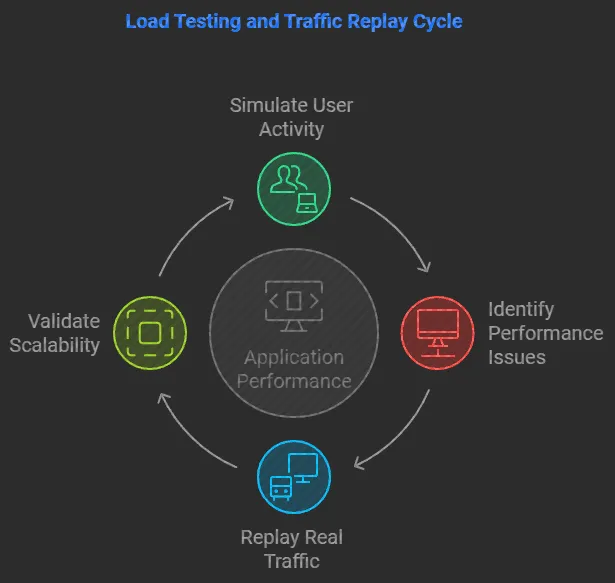
For a local first step, proxymock lets you record a service, inspect the requests, and run mocks or replay tests from the recording. Follow the local recording guide. Check protocol and SDK coverage before assuming that every dependency in a workflow was captured.
GoReplay
GoReplay captures and forwards HTTP traffic into a test environment. Consider it when you need HTTP request replay and can supply the surrounding environment and checks yourself. Evaluate the capture location, encrypted-traffic handling, and response validation against the edition and configuration you intend to use.
Forwarding a request into staging does not by itself isolate that service’s outbound dependencies. Decide whether those calls should reach real test services or mocks, and define how the replay result becomes a pass or failure. The GoReplay comparison provides a starting evaluation checklist.
mitmproxy
mitmproxy distinguishes client-side replay from server-side replay. Client-side replay resends saved HTTP requests. Server-side replay answers matching client requests from saved responses. This distinction matters when choosing between exercising the application and replacing a dependency.
The documented client replay is sequential, so it should not be assumed to reproduce the original workload’s concurrency. Check proxy configuration and TLS trust before recording HTTPS traffic. Use the mitmproxy versus proxymock comparison to work through the local replay choice.
Browser session replay tools serve another purpose
Hotjar, now part of Contentsquare, Inspectlet, and Mouseflow offer tools for examining website behavior and recorded sessions. Evaluate them when the question is where visitors encounter friction or abandon a flow.
These are alternatives within the browser analytics category. Do not treat a session viewer as a substitute for an API workload runner without verifying that the specific product can execute your intended test. A recording can help identify the failing journey; an automated browser test or API replay must then exercise the changed application to validate the fix.
If your goal is a repeatable browser journey, use a browser testing workflow with assertions and controlled test data. That is a third execution model: it drives a browser rather than simply watching a historical session or resending captured API requests.
Compare tools using a real workflow
Start with one representative request sequence. Identify the service under test, the dependencies that should remain real, and the dependencies that should be simulated. Write down the response fields and latency or error thresholds that determine success before comparing tools.
Check whether the recording includes the protocol, headers, bodies, and ordering your test requires. Authentication tokens expire, generated identifiers change, and captured traffic covers only the paths you exercised. Add explicit tests for new functionality and failure cases absent from the recording.
For load testing, define the load schedule separately from the captured request set. Replaying realistic payloads does not automatically reproduce production arrival rates or concurrency. Measure the load generator as well as the application so a saturated generator is not mistaken for a service limit.
Protect data and control side effects
Use a test destination and test credentials. Recorded writes can create orders, send notifications, or modify data again if the replay reaches a live dependency. Choose mocks or disposable resources deliberately, and reset state between runs when the test depends on it.
Review recordings for credentials and sensitive payloads before sharing them. Network isolation and mock configuration are separate controls: a request that bypasses a mock proxy can still reach the real service.
Choose the evidence you need
Use browser session replay to investigate a user’s experience. Use API replay to exercise a service with captured requests. Use dependency mocks when the service needs controlled responses from external systems. The categories can work together, but a successful result in one does not establish the others.
Start the traffic replay tutorial with one service and inspect the recorded inputs, dependency behavior, and response comparisons before scaling the workflow.