New: Debug encrypted microservice traffic with Speedscale's eBPF collector Read the announcement

Free CLI for API mocking and traffic replay

Record real traffic. Mock dependencies. Replay changes.

Install Proxymock and get to your first successful record, mock, or replay workflow in under 10 minutes. Validate AI-generated code with real production traffic before merge, without brittle hand-written stubs.

10-minute first success No hand-written stubs Java / .NET / Node.js / Go / Python
brew install speedscale/tap/proxymock

Need team workflows, CI replay, or cloud storage? Request a demo.

FIRST SUCCESS
# 1. Install
brew install speedscale/tap/proxymock

# 2. Record real traffic
proxymock record --app-port 8080

# 3. Run with recorded mocks
proxymock mock --in-dir ./proxymock/recorded

# 4. Replay the same traffic against a change
proxymock replay --in-dir ./proxymock/recorded \
  --test-against http://localhost:8080

Why Proxymock?

Record Real Traffic

Capture the requests and responses your app actually sees instead of guessing at response shapes by hand.

Mock Without Stub Drift

Turn captured traffic into local mocks so your test environment stays aligned with production behavior.

Replay Changes Before You Ship

Run recorded traffic against local builds or CI jobs to catch regressions with the same requests users already sent.

Fits Existing Stacks

Use the same record, mock, and replay workflow whether you run Java, .NET, Node.js, or a service in Kubernetes.

CI-Friendly

Add replay checks to pull requests and give reviewers evidence when a change breaks real request patterns.

Works for AI Agents Too

The same captured snapshots can be used by Claude Code, Cursor, and Copilot after your core local workflow is working.

10-minute quickstart

The fastest path is simple: install Proxymock, record one real workflow, run your app against the recorded mocks, then replay that same traffic against a change.

1. Install

Install the CLI locally with Homebrew and keep the workflow on your machine.

2. Record

Capture one working request flow so the mock data reflects reality.

3. Mock

Run your app with recorded responses instead of live dependencies.

4. Replay

Compare a code change against the same recorded traffic before merge.

Core workflow

brew install speedscale/tap/proxymock
proxymock init
proxymock record --app-port 8080
# start your app and exercise one real request flow
proxymock mock --in-dir ./proxymock/recorded
proxymock replay --in-dir ./proxymock/recorded --test-against http://localhost:8080

Run proxymock init once, choose the browser sign-in flow, and keep manual API key copy for CI or headless environments. See the installation docs and the initialization guide for the full flow.

Pick your stack

Each tab opens the docs, shows the matching logo, and links into the demo-app section plus the Proxymock workflow.

View technology support
Java logo

Language guide

Java

Java demo app command with Proxymock proxy environment variables.

Mode: set proxy env vars, then run your app command.

Simple mode Beginner-safe

1. Set env vars

export JAVA_TOOL_OPTIONS="$JAVA_TOOL_OPTIONS \
  -Dhttp.proxyHost=127.0.0.1 \
  -Dhttp.proxyPort=4140 \
  -Dhttps.proxyHost=127.0.0.1 \
  -Dhttps.proxyPort=4140"

2. Run app

./mvnw spring-boot:run

Testing & Mocking

Turn recordings into fast, deterministic tests and use production‑like mocks to develop without external dependencies.

Run tests

proxymock replay --test-against localhost:3000 --for 1m --vus 10

Regression, contract and load from real traffic, quickly fire it up from your terminal.

Start mock server

proxymock mock -- go run main.go

Realistic latency and errors; add transforms for chaos and data shaping.

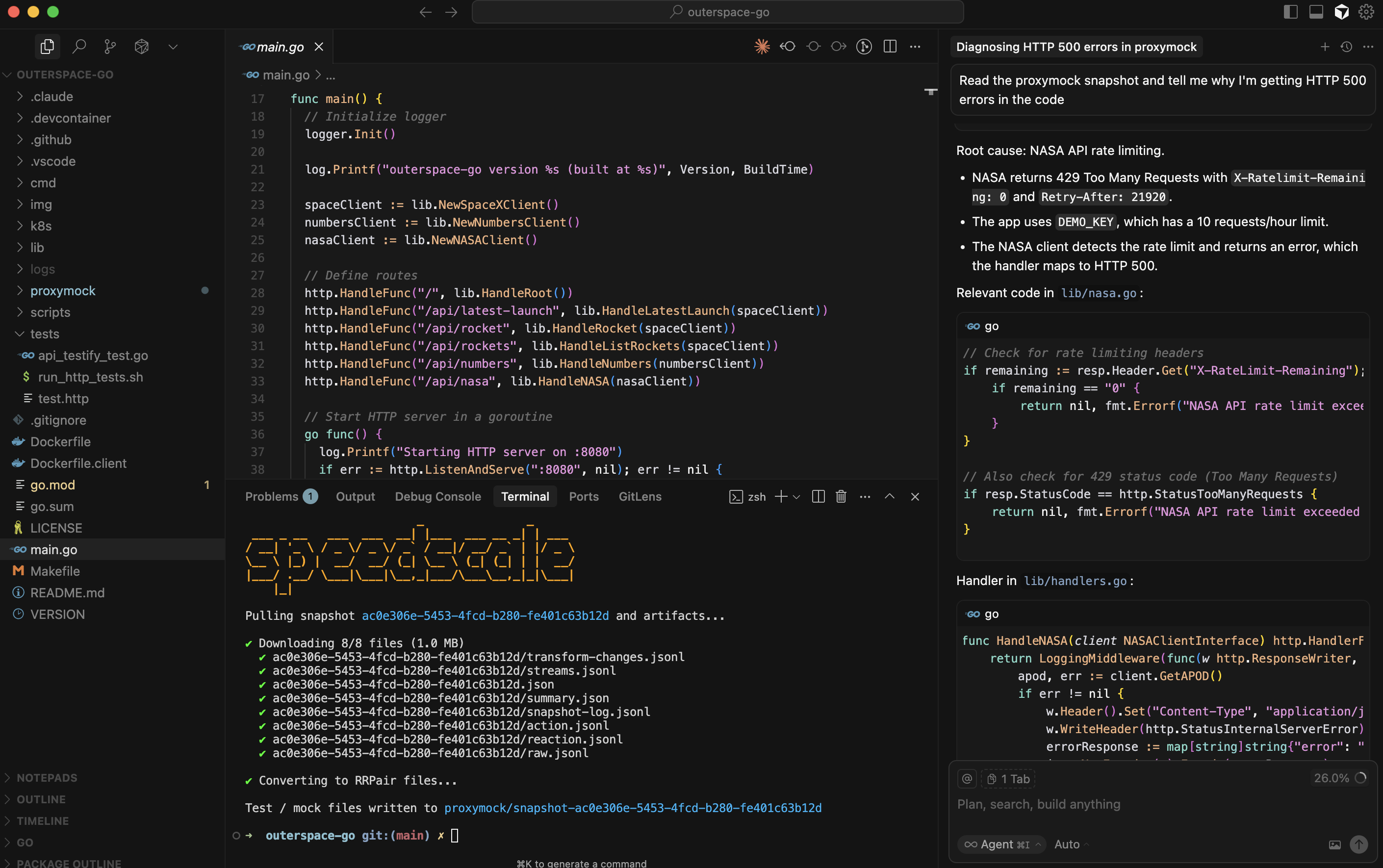
Close the Observability Gap for AI Agents

  • Give Claude Code, Cursor, and Copilot access to real traffic snapshots

  • AI agents can replay traffic, inspect responses, and validate changes

  • No cloud costs—production context runs locally on your machine

Proxymock MCP integration screenshot

AI Code Validation Workflow

From capture to confidence in four steps.

1

Capture Traffic

Record real API calls from staging or production

2

AI Generates Code

Cursor, Claude, or Copilot writes your changes

3

Replay & Compare

Validate AI code against captured traffic

4

Ship with Confidence

Fix regressions before they reach production

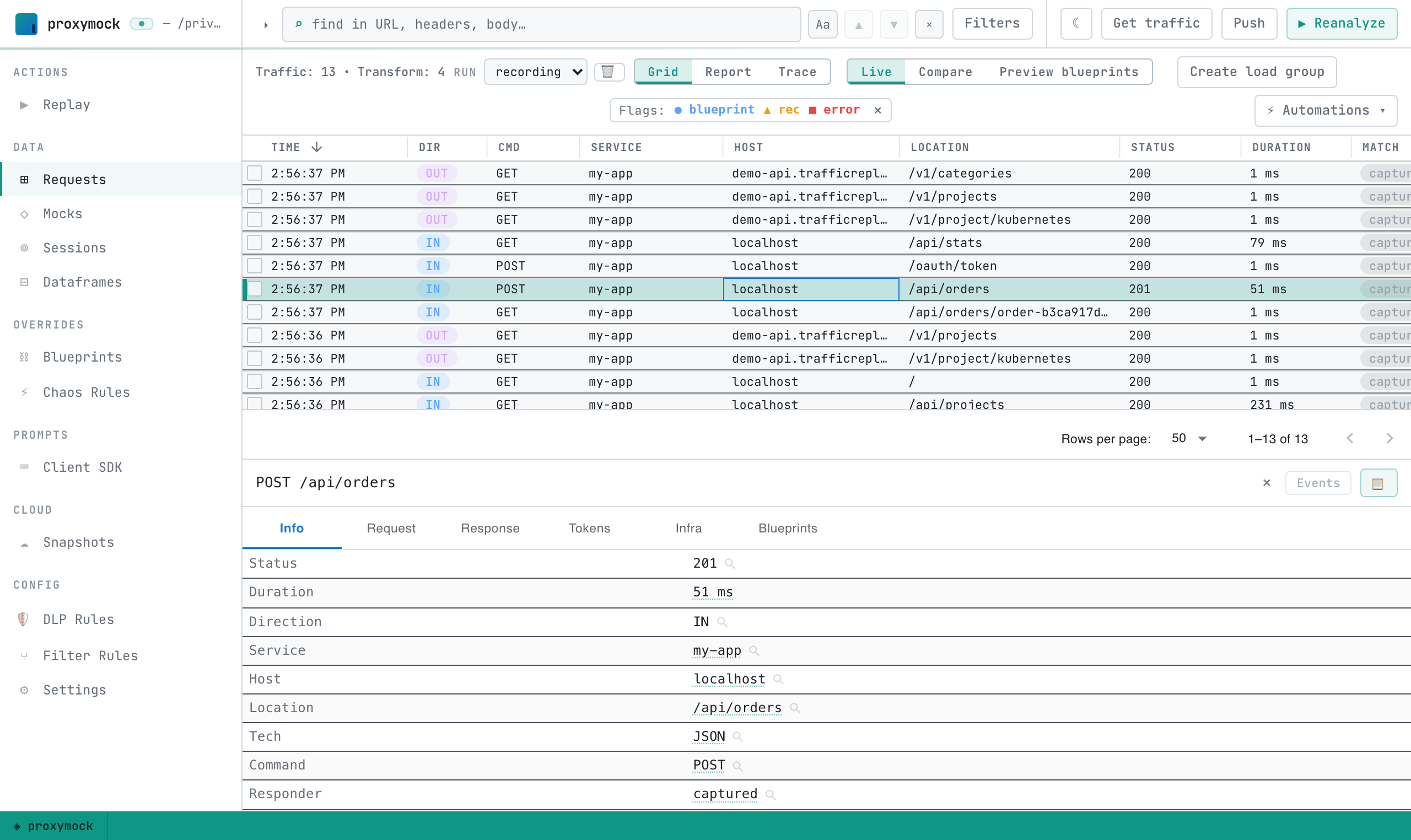
Proxymock inspect experience screenshot

Deep Visibility

  • Get visibility into full details of calls

  • See API, gRPC, GraphQL, DB queries, etc.

  • Store traffic data as part of the repo

CI Pipeline

Add Proxymock to your pipeline to catch issues before deploy. See full examples in our CI/CD docs.

Start mock server

proxymock mock \
  --verbose \
  --in $PROXYMOCK_IN_DIR/ \
  --log-to proxymock_mock.log &

Replay and test

proxymock replay \
  --in "$PROXYMOCK_DIR" \
  --test-against localhost:$APP_PORT \
  --log-to $REPLAY_LOG_FILE \
  --fail-if "latency.max > 1500" \
  -- $APP_COMMAND