
Speedscale vs Coder: Ephemeral Developer Environments for Different Needs
In 2025, developer productivity tools have evolved to address different challenges in modern software development. Speedscale and Coder are two distinct platforms that, while both aim to increase developer productivity, serve fundamentally different purposes. Speedscale focuses on creating realistic testing environments using production traffic replay, while Coder provides cloud-based development workspaces for remote teams.
This comprehensive comparison explores how these tools differ in their core functionalities, ideal use cases, and the benefits they provide to developers. We’ll also examine whether they target the same developer persona or cater to different roles within a software development ecosystem.
Understanding Speedscale and Coder
What is Speedscale?
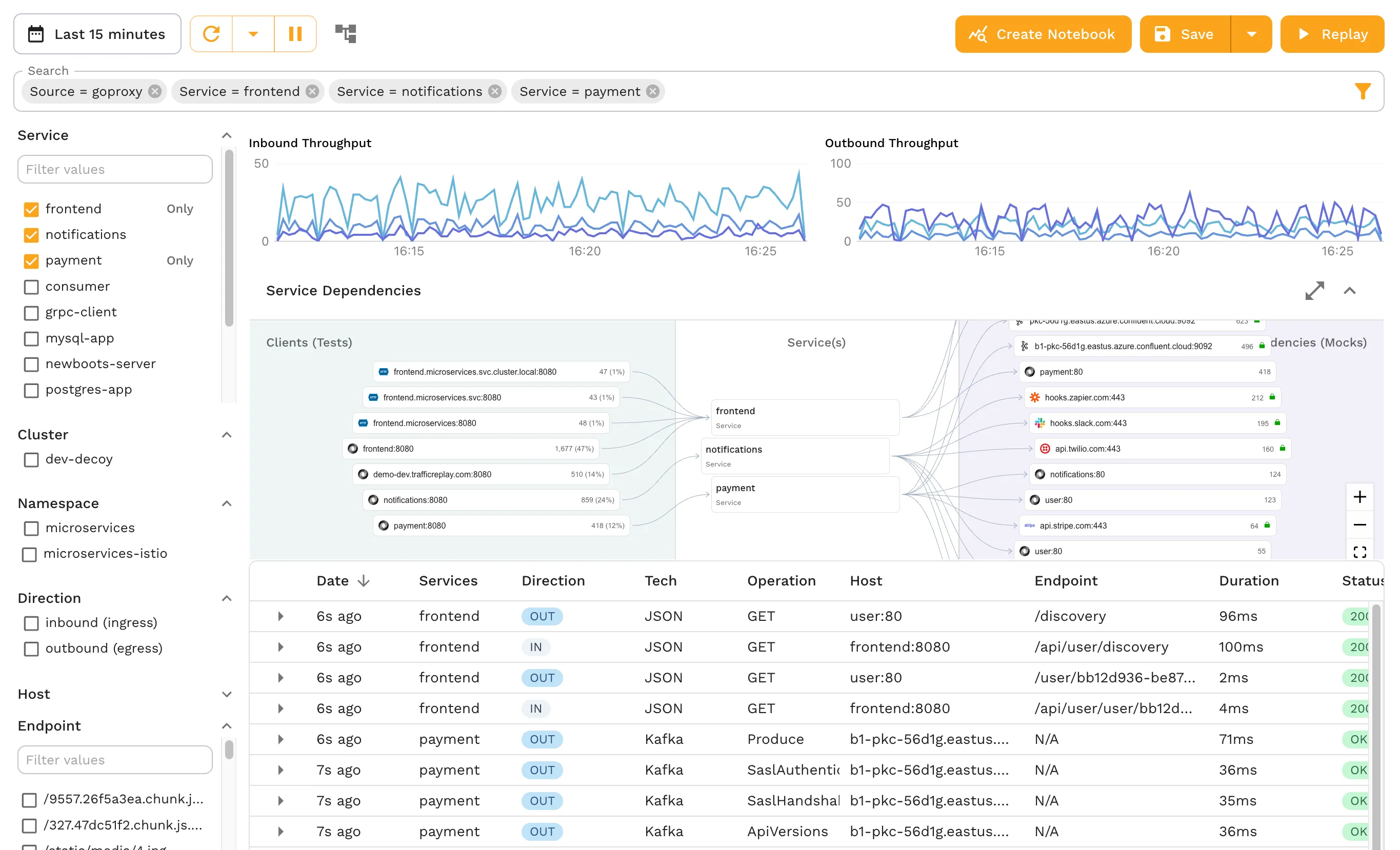
Speedscale is a production traffic replay and API mocking platform that helps development teams simulate realistic traffic conditions and validate their applications’ performance. The primary value proposition of Speedscale is its ability to capture actual production traffic and replay it in development or testing environments, essentially bringing production conditions to developers.
By observing real traffic patterns, Speedscale provides deep insights into how applications behave under different loads, facilitating high-quality testing without complex scripting. It focuses on performance, reliability, and scalability testing, especially for applications running in Kubernetes or containerized environments. The platform eliminates the need for complex, shared staging environments that are often volatile and difficult to maintain.
What is Coder?
Coder is a platform that offers cloud-based development environments (CDEs). It allows developers to move their development workspace into the cloud, enabling them to code, test, and debug applications using browser-based tools. Coder focuses on collaboration, security, and scalability by centralizing development environments. The platform provides streamlined management for coding environments, making it easier for teams to maintain consistency across their development infrastructure.
Ideal Use Cases
When to Use Speedscale
Speedscale is ideal for developers and teams working on microservices, cloud-native applications, and teams heavily using Kubernetes for their infrastructure. Modern application development increasingly revolves around distributed systems, and developing against such systems can be complex. With microservices, each component can have its own dependencies, configurations, and high traffic demands.
Speedscale excels in these scenarios:
- Microservices Testing: Replicate real-world conditions by autonomously identifying and mocking necessary endpoints, testing components by simulating external and internal traffic
- Performance Validation: Simulate loads that mimic user traffic in production-like environments, validating system behavior before deployment
- Early Bug Detection: Replay real traffic to detect bugs and performance bottlenecks early in the development lifecycle
- CI/CD Integration: Automate testing in continuous delivery pipelines, ensuring changes won’t fail under high user traffic
- Kubernetes Testing: Validate applications in containerized environments with realistic traffic patterns
When to Use Coder
Coder is designed for developers who want to code in cloud-based environments without managing complex local development setups. Teams spread across different geographies, companies prioritizing security, or those embracing remote work benefit from Coder’s centralized approach.
Coder excels in these scenarios:
- Remote-First Organizations: Eliminate local environment setup, ensuring consistency across team members regardless of location
- DevOps Teams: Standardize development environments, reducing “works on my machine” problems with dependency management and configuration
- Education and Training: Provide instant access to unified environments for students or new hires, simplifying onboarding and reducing setup friction
- Regulated Industries: Maintain better control over code and data access by hosting environments in the cloud, mitigating risks from local storage
- Large Development Teams: Centralize environment management, making it easier to roll out updates and maintain security standards
Key Benefits of Speedscale
Production Traffic Replay
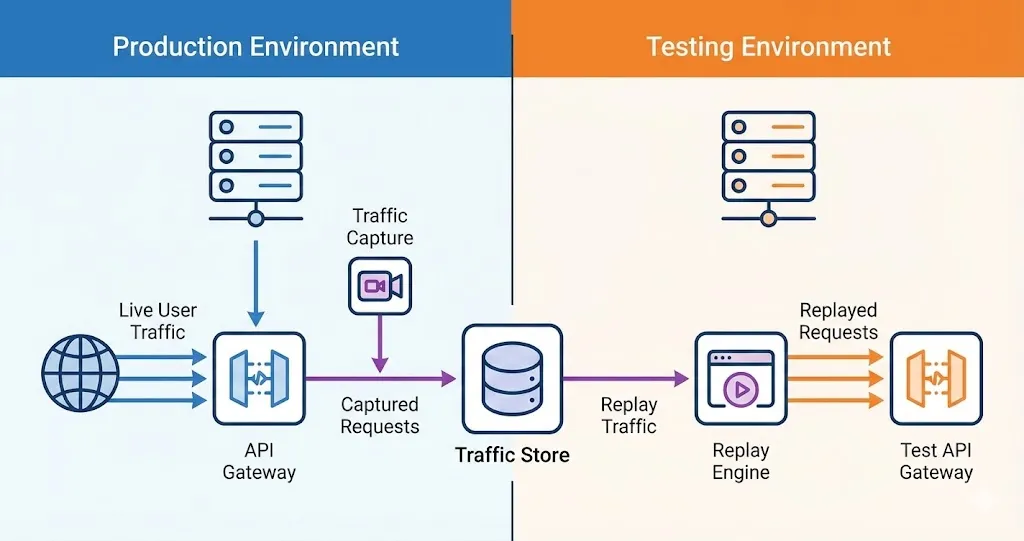
One of the most significant advantages of Speedscale is its ability to mimic production traffic to create realistic test environments. Instead of relying on hypothetical scenarios or manually created scripts, Speedscale captures and replays actual traffic patterns that mirror real-world system usage. This capability significantly improves test quality and results in more accurate performance assessments.
This approach allows engineers to have individual access to fit-for-purpose environments rather than sharing large, complex staging environments. Developers can test independently without conflicts or resource contention.
Deep Observability
Speedscale provides comprehensive observability into cloud-native environments. It collects extensive data, including logs and metrics from the system, enabling developers to identify potential bottlenecks, memory leaks, and other issues in real-time. This proactive approach to testing helps teams catch bugs before they reach production.
CI/CD Integration
Speedscale seamlessly integrates into CI/CD pipelines, allowing developers to automate performance and scalability testing as part of their deployment workflows. This automation reduces manual effort while maintaining high code quality standards.
Considerations
Setting up Speedscale for complex distributed systems may require Kubernetes expertise. Teams unfamiliar with microservice observability may need time to fully leverage its benefits. As a specialized tool, Speedscale is most valuable for teams working with cloud-native architectures.
Key Benefits of Coder
Centralized Environment Management
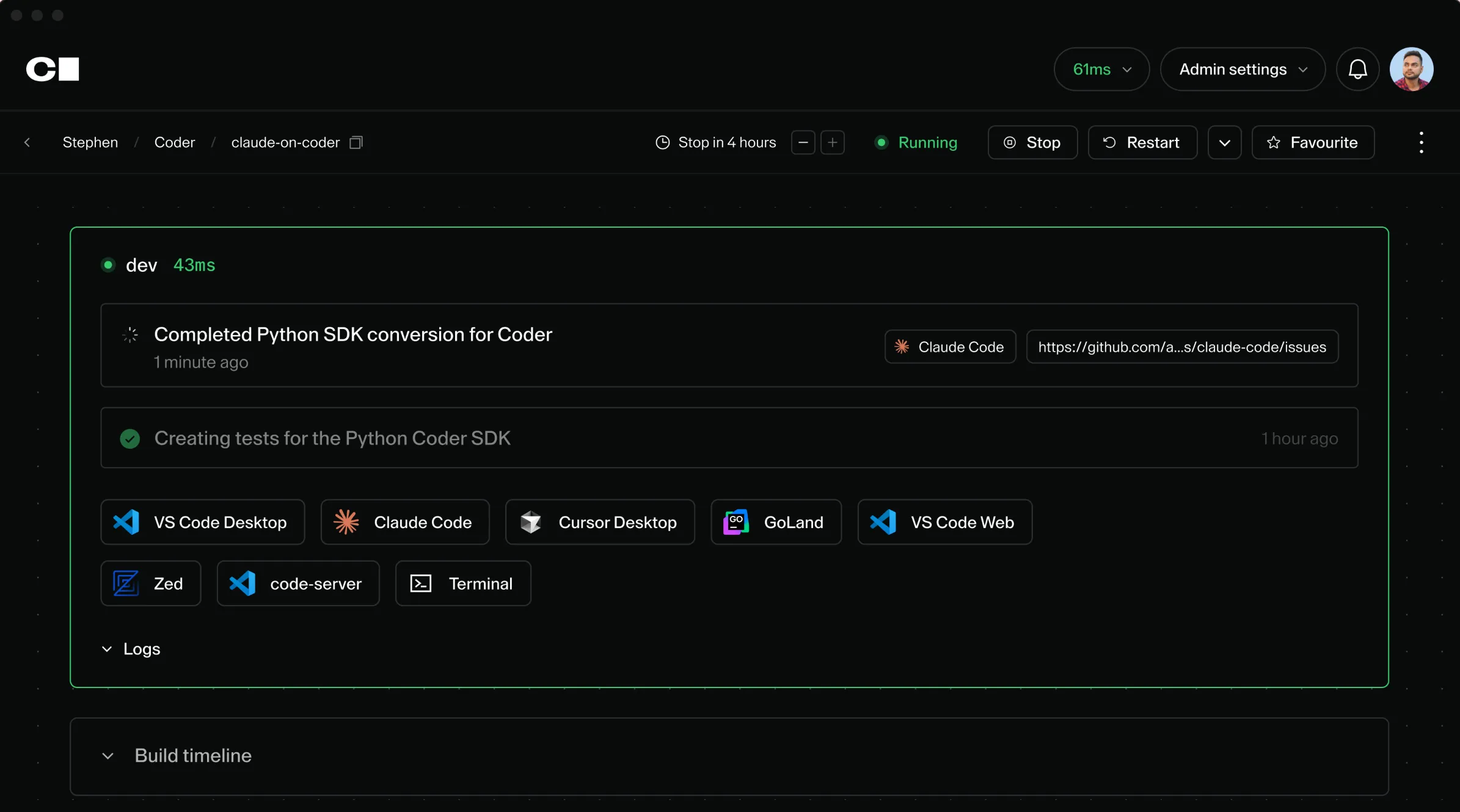
Coder’s centralized development environment is a significant time-saver. By moving everything to the cloud, Coder eliminates hours of configuration for local machines with tools, libraries, and dependencies. Developers can start coding immediately, reducing onboarding time and boosting productivity.
Enhanced Collaboration
Coder enables seamless collaboration between team members. Teams can share environments, maintaining consistent development practices. Developers can jump into each other’s workspaces to assist with debugging or pair programming, fostering cohesive development processes.
Security and Access Control
Security is a key strength of Coder. In industries where data privacy is critical, cloud-hosted code means organizations can better control access and ensure sensitive data isn’t stored on local machines (for non-airgapped environments). This centralized approach simplifies compliance and security auditing.
Considerations
Cloud development environments require stable internet connections, which may pose challenges in some locations. While Coder supports many programming languages and frameworks, highly specialized workflows may require additional customization beyond out-of-the-box capabilities.
Target Developer Personas
While both Speedscale and Coder target developers, they cater to different personas and pain points within the software development lifecycle.
Speedscale’s Primary Users
Speedscale is built primarily for:
- Backend Developers: Those working on API-driven microservices who need realistic test data and traffic patterns
- DevOps Engineers: Teams managing complex deployment pipelines and infrastructure
- Site Reliability Engineers (SREs): Engineers focused on system reliability, performance, and uptime
- QA Engineers: Testing professionals who need to validate system behavior under various load conditions
These personas need on-demand access to realistic, full-fidelity environments with production-like data. Speedscale allows them to iterate quickly, test independently, and experiment safely with production-like conditions. It’s most valuable for those working in cloud-native environments or managing distributed systems, where understanding component behavior under stress is critical.
Coder’s Primary Users
Coder is designed for broader development teams, including:
- Frontend Developers: Teams building user interfaces who need consistent development environments
- Backend Developers: Those who want simplified environment setup and maintenance
- Full-Stack Developers: Engineers working across the stack who value quick onboarding
- Remote Teams: Distributed teams prioritizing collaboration and security
- Students and New Hires: Those learning codebases who benefit from instant environment access
Coder fits developers looking to reduce friction in maintaining local environments, particularly in remote-first or geographically distributed organizations.
Quick Comparison: Speedscale vs Coder
| Feature | Speedscale | Coder |
|---|---|---|
| Primary Focus | Production traffic replay & API testing | Cloud-based development environments |
| Best For | Backend devs, SREs, DevOps engineers | All developers, especially remote teams |
| Key Strength | Realistic production data & traffic | Consistent, centralized environments |
| Integration | CI/CD pipelines, Kubernetes | IDEs, version control systems |
| Learning Curve | Moderate (Kubernetes knowledge helpful) | Low to moderate |
| Collaboration | Individual testing environments | Shared, collaborative workspaces |
| Security Focus | Test data isolation | Code and data access control |
| Internet Dependency | Low (works locally) | High (cloud-based) |
Pros and Cons
Speedscale Advantages
- Real-world traffic-driven environments: Test with actual production patterns
- Deep observability: Comprehensive insights for cloud-native applications
- Eliminates staging complexity: No need for shared, volatile staging environments
- CI/CD friendly: Seamless automation integration
- Comprehensive testing: Performance, scalability, and reliability validation
Speedscale Considerations
- Requires Kubernetes knowledge for optimal setup
- Most valuable for cloud-native and microservices architectures
Coder Advantages
- Fast onboarding: New team members start coding immediately
- Enhanced collaboration: Shared environments for pair programming
- Strong security: Centralized access control for regulated industries
- Environment consistency: Eliminate “works on my machine” problems
Coder Considerations
- Requires stable internet connectivity
- Some specialized workflows may need customization
Conclusion
While both Speedscale and Coder enhance developer productivity, they address fundamentally different challenges. Speedscale excels at providing hyper-realistic testing environments with production traffic replay and deep observability for cloud-native applications, ensuring performance and reliability at scale. Coder simplifies development by providing cloud-based environments that promote collaboration and reduce local setup overhead.
Choose Speedscale if you need:
- Production traffic replay for realistic testing
- API mocking and service virtualization
- Performance and scalability validation
- Individual, on-demand test environments
- Deep integration with Kubernetes and CI/CD
Choose Coder if you need:
- Centralized cloud development environments
- Fast onboarding for new team members
- Consistent environments across distributed teams
- Enhanced security through centralized access control
- Simplified environment management
In 2025’s increasingly complex development landscape, both tools offer unique benefits. Speedscale helps backend developers and SREs bring production fidelity to their testing workflows, while Coder supports broader teams with infrastructure for remote, collaborative development. Many organizations may even benefit from using both tools in different parts of their workflow.
Frequently Asked Questions
Can Speedscale and Coder be used together?
Yes, Speedscale and Coder serve different purposes and can complement each other. You could use Coder for your development environment and Speedscale for testing with production traffic within that environment.
Does Speedscale require Kubernetes?
While Speedscale is optimized for Kubernetes environments, it can work with containerized applications in general. Kubernetes knowledge helps optimize the setup.
Is Coder only for remote teams?
No, while Coder excels for remote teams, any organization can benefit from centralized environment management, faster onboarding, and consistent development setups.
How does Speedscale capture production traffic?
Speedscale uses non-intrusive observation to capture API traffic, requests, and responses from your production or staging environments, which can then be replayed in test environments.
What IDEs does Coder support?
Coder supports popular IDEs including VS Code, JetBrains products, and other browser-based development tools.
Is Speedscale a performance testing tool?
Speedscale goes beyond traditional performance testing by using actual production traffic patterns for realistic load testing and API validation, making it more accurate than synthetic test scripts.