
Your Flaky Tests Are a Data Problem, Not a Test Problem
Your tests are not flaky. Your test data is.
That 401 Unauthorized that fails every Monday morning? The OAuth token in your test fixture expired 72 hours ago. The order_id that works in staging but not in CI? It was hardcoded six months ago and the format changed from integer to UUID in January. The timestamp assertion that passes at 2pm and fails at midnight? You are comparing a hardcoded 2026-01-15T14:30:00Z against Date.now().
These are not test infrastructure problems. Retrying them will not help. Quarantining them will not help. The tests are telling you the truth: your test data is stale, static, and disconnected from what the real APIs actually return.
This post shows a different approach. Instead of managing test data by hand, you record real API traffic with proxymock, and then let QABot automatically detect and fix the dynamic values that cause flakiness between runs.
The Four Kinds of Flaky Test Data
Before we fix anything, let’s name the problem precisely. Test data flakiness falls into four categories, and each requires a different fix.
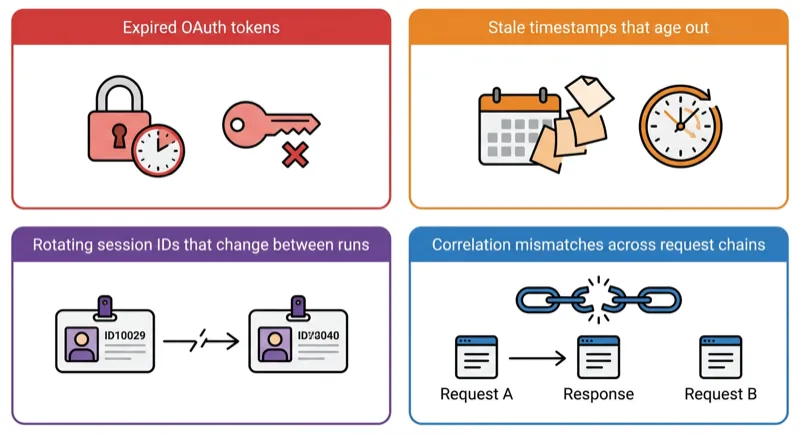
1. Expired Tokens
OAuth access tokens, JWTs, and API keys have expiration times. A token that worked when someone recorded the test fixture three weeks ago is now expired. The test sends a valid request with an invalid credential and gets a 401.
{
  "access_token": "eyJhbGciOiJSUzI1NiIsInR5cCI6IkpXVCJ9...",
  "token_type": "Bearer",
  "expires_in": 3600
}
That expires_in: 3600 means this token was dead an hour after it was captured. Every test run after that is testing your error handling, not your business logic.
2. Stale Timestamps
Tests that assert on time-dependent fields break when the clock moves. A response recorded on January 15 contains "created_at": "2026-01-15T14:30:00Z". Your test checks that created_at is within the last 24 hours. It passes on January 15. It fails on January 16. It fails forever after that.
// This test is a time bomb
assertThat(order.getCreatedAt())
    .isAfter(Instant.now().minus(Duration.ofHours(24)));
3. Rotating IDs
Session IDs, request IDs, correlation IDs, and trace IDs change on every request. A test fixture that hardcodes "session_id": "sess_abc123" will fail the moment the upstream service generates "session_id": "sess_def456" and your code tries to use the old one to make a follow-up request.
{
  "session_id": "sess_abc123",
  "cart_items": [...]
}
The second request in the test sends sess_abc123. The server has never seen that session. 404.
4. Correlation Mismatches
This is the most subtle one. Request A returns an ID. Request B uses that ID. If the mock for Request A returns a different ID than what Request B expects, the chain breaks.
POST /orders       → {"order_id": "ord_789"}
GET  /orders/ord_789  → 200 OK

# But if the mock returns ord_999 for the POST:
POST /orders       → {"order_id": "ord_999"}
GET  /orders/ord_789  → 404 Not Found
Hand-written mocks get this wrong constantly because the two stubs were written independently. Nobody checked that the order_id in the POST response matches the one in the GET request.
What Everyone Else Tells You to Do
Search for “fix flaky tests” and you will find the same advice everywhere:
- Retry. Run the test again and hope it passes. This masks the problem.
- Quarantine. Move the flaky test to a separate suite and run it nightly. This hides the problem.
- Add sleeps. Sprinkle
Thread.sleep(5000)to wait for eventual consistency. This slows your CI and still fails unpredictably. - Mock everything by hand. Write deterministic stubs. This works until the real API changes and your stubs drift (the mock drift problem).
None of these address the root cause: the test data itself is wrong.
The Fix: Record Real Traffic, Then Keep It Fresh
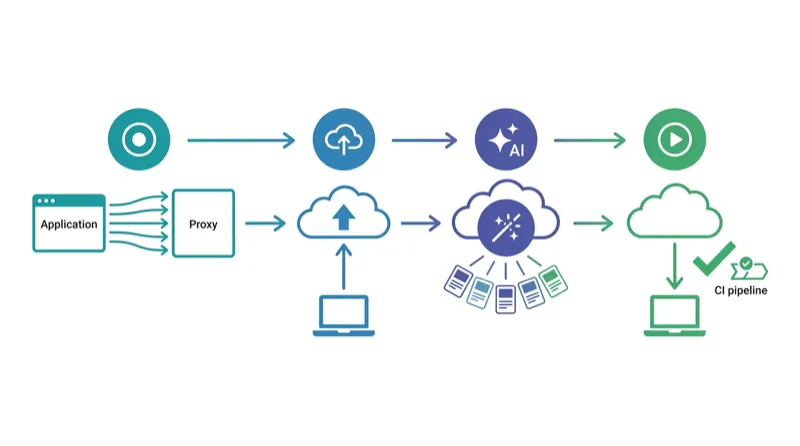
The approach is two steps:
- Record real API interactions with proxymock so your test data reflects what the APIs actually return
- Transform the dynamic parts (tokens, timestamps, IDs) so the data stays valid across runs
Step 1: Record with proxymock
Instead of hand-writing JSON fixtures, record from your running application:
# Install proxymock
brew install speedscale/tap/proxymock

# Record traffic from your running app
proxymock record -- java -jar myapp.jar

# Exercise the app — run your integration tests, hit the endpoints, use the UI
curl http://localhost:4143/api/checkout
curl http://localhost:4143/api/orders

# Stop recording (Ctrl+C)
# Recordings are saved as human-readable Markdown files
Now you have real responses from Stripe, Auth0, your inventory service, and every other dependency, captured from what they actually returned, not from what someone guessed they return.
Replay those recordings as mocks:
# Run your app with mocked dependencies
proxymock mock -- java -jar myapp.jar

# Run your test suite — all external calls hit proxymock instead of real APIs
./gradlew test
This eliminates flakiness from third-party instability (rate limits, outages, slow responses) because your tests hit proxymock, not the real services. If you are testing a Spring Boot app, see our Spring Boot API testing guide for a full walkthrough. But you still have the dynamic data problem: those recorded tokens will expire, those timestamps will age, and those session IDs will not match future requests.
That is where QABot comes in.
Step 2: Push to Speedscale Cloud and Let QABot Analyze
Once you have a local recording, push it to Speedscale Cloud where QABot can analyze the traffic and recommend transforms:
# Push your local recording to Speedscale Cloud
proxymock cloud push snapshot
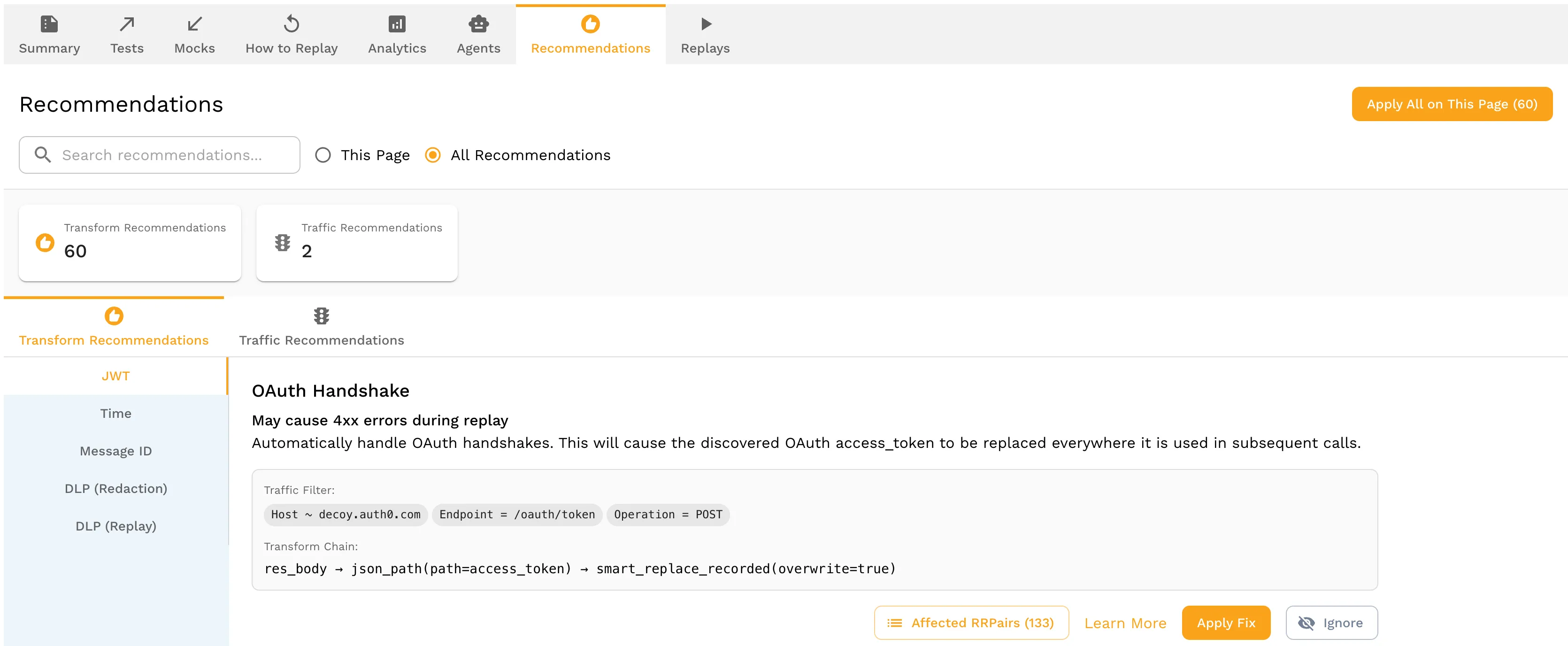
In the Speedscale dashboard, open the snapshot and navigate to the Recommendations tab. QABot has already analyzed your traffic and detected patterns that will cause flakiness:
- OAuth tokens — QABot identifies JWT tokens by their three-part base64 structure, detects the
expclaim, and recommends a transform that re-signs the token with a valid expiration on every test run
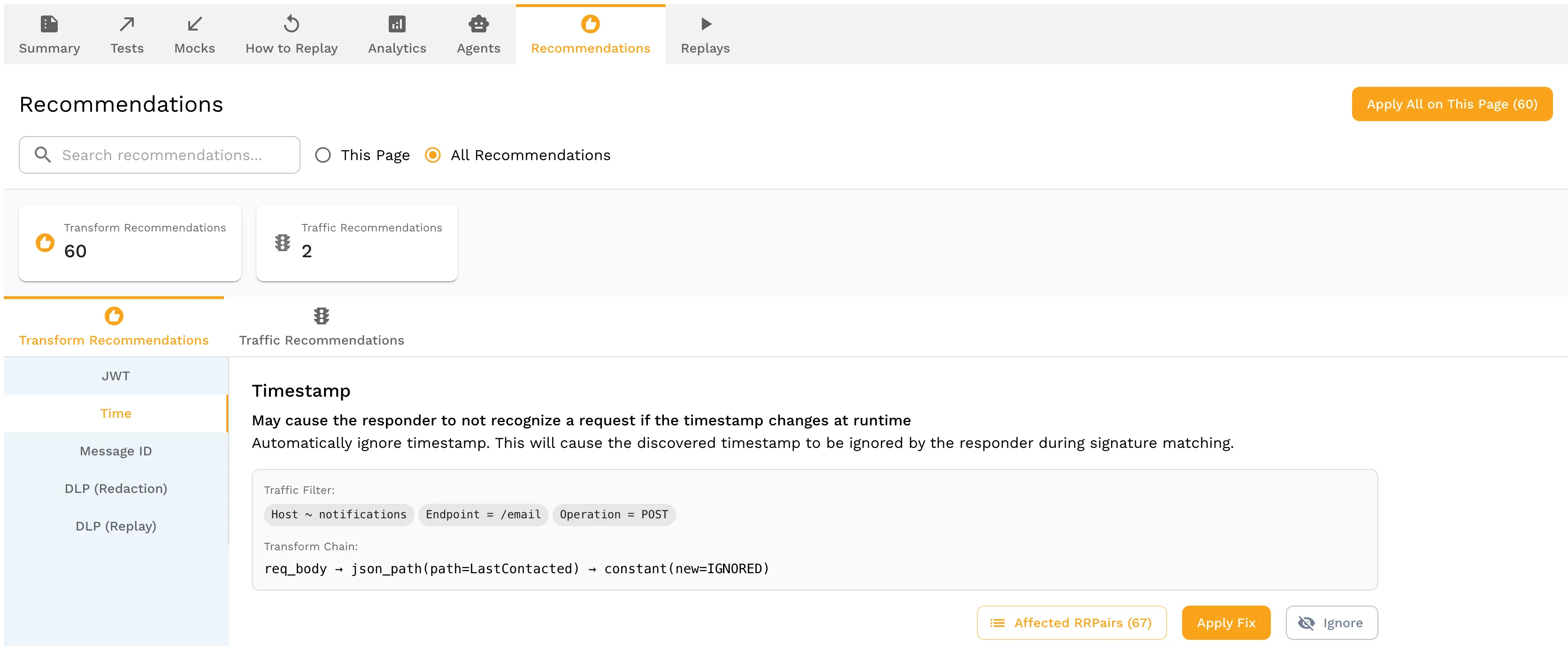
- Timestamps — QABot finds ISO 8601 dates, Unix timestamps, and date strings in responses and recommends ignoring them during signature matching so stale dates don’t cause false mismatches
- Session/correlation IDs — QABot traces ID propagation across request-response chains and recommends extraction transforms: “take the
session_idfrom the response to POST /auth and inject it into the request to GET /cart” - Request IDs — QABot identifies UUIDs and random strings that change per-request and recommends generators that produce valid formats
Each recommendation shows what QABot found, why it will cause flakiness, and the suggested transform. Click Apply to accept a recommendation, or adjust the transform parameters before applying. Once you have accepted the recommendations, the transforms are attached to your snapshot and applied automatically on every replay.
Step 3: Replay with Transforms Applied
Back on your local machine, pull the updated snapshot with its transforms and use it for mocking:
# Pull the snapshot with QABot transforms applied
proxymock cloud pull snapshot --latest

# Mock with auto-refreshed data
proxymock mock -- java -jar myapp.jar

# Tests pass today, tomorrow, and next month
./gradlew test
No expired tokens. No stale timestamps. No correlation mismatches. The test data is real and it stays fresh.
What This Looks Like in CI
Here is a GitHub Actions example. The pattern is the same for GitLab CI, Jenkins, or any other CI system:
name: Integration Tests
on: [push, pull_request]

jobs:
  test:
    runs-on: ubuntu-latest
    steps:
      - uses: actions/checkout@v4

      - name: Install proxymock
        run: |
          curl -sL https://install.speedscale.com/proxymock | bash

      - name: Pull snapshot with QABot transforms
        run: |
          proxymock cloud pull snapshot --latest

      - name: Run tests with recorded mocks
        run: proxymock mock -- ./gradlew test
No external service dependencies in CI. No token refresh scripts. No “retry 3 times and hope” logic. QABot’s transforms are applied automatically when you pull the snapshot from Speedscale Cloud. For more on CI integration, see automating API mocks in your CI pipeline with proxymock.
When to Re-Record
Recordings should be refreshed when:
- An external API changes its response format (new fields, changed types)
- You add a new dependency to your service
- Your test coverage expands to new endpoints
Re-recording is a proxymock record command, not a week of rewriting JSON fixtures. QABot re-analyzes the new recording and updates the transforms automatically.
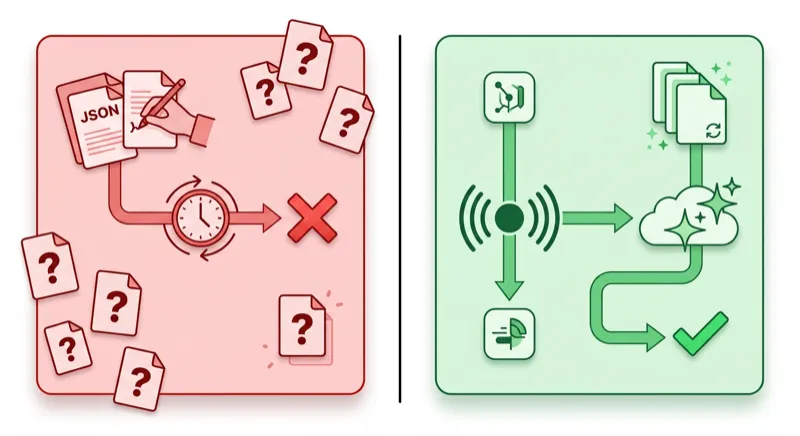
proxymock vs Hand-Written Fixtures: Side by Side
| Dimension | Hand-Written Fixtures | proxymock + QABot |
|---|---|---|
| Data source | Developer’s guess at API response | Actual recorded API response |
| Token handling | Hardcoded, expires immediately | Auto-regenerated per run |
| Timestamps | Static, stale after day 1 | Relative, always current |
| ID correlation | Two independent stubs, often mismatched | Traced across request chain |
| Maintenance | Manual update when API changes | Re-record in minutes |
| Protocols | HTTP only (typically) | HTTP, gRPC, Postgres, MySQL, Kafka, and more |
| CI setup | Mock server + fixture files + token scripts | proxymock cloud pull + proxymock mock |
FAQ
How does QABot know which values are dynamic?
QABot uses structural analysis, not guesswork. It identifies JWTs by their three-part base64 structure and checks for exp/iat claims. It finds timestamps by matching ISO 8601, RFC 2822, and Unix timestamp patterns. It traces ID propagation by matching values that appear in a response and then reappear in a subsequent request. Values that change between two recordings of the same flow are flagged as dynamic.
Does this work with .NET and Node.js?
Yes. proxymock operates at the network level, not the language level. It works with any application that makes HTTP, gRPC, or database calls: Java, .NET, Node.js, Python, Go, PHP. The proxymock mock command wraps your application process regardless of runtime.
What if QABot gets a transform wrong?
The generated transforms are saved as YAML files in your repo. You can inspect and edit them. If QABot incorrectly identifies a static value as dynamic (or misses a dynamic one), you adjust the YAML and commit the change. Over time, QABot’s detection improves as it sees more recordings from your specific service.
Can I use this alongside WireMock?
Yes. If you already have WireMock stubs for contract tests or specific fault injection scenarios, keep them. Use proxymock + QABot for integration and regression tests where you need realistic data across many dependencies. The two approaches complement each other. See our WireMock vs MockServer vs proxymock comparison for guidance on when to use which tool.
Is QABot part of proxymock or Speedscale?
QABot is in beta as part of the Speedscale Cloud platform. The proxymock CLI is free for recording and replaying traffic locally. QABot’s analysis and recommendations live in the Speedscale dashboard. You push your local recordings with proxymock cloud push snapshot, review the recommendations in the dashboard, and pull the transformed snapshots back down for local or CI use. Sign up for the beta or book a demo to see it in action.
Start Fixing Flaky Tests in 5 Minutes
- Install proxymock:
brew install speedscale/tap/proxymock - Record your app’s traffic:
proxymock record -- your-app-command - Exercise your app (run tests, hit endpoints, use the UI)
- Replay as mocks:
proxymock mock -- your-app-command - Run your test suite and see flaky tests stabilize
For automatic token, timestamp, and ID handling, sign up for the QABot beta, push your recording with proxymock cloud push snapshot, and review the recommendations in the Speedscale dashboard.
Your tests are not the problem. Your test data is. Fix the data and the flakiness disappears. Book a demo to see QABot in action on your own traffic.