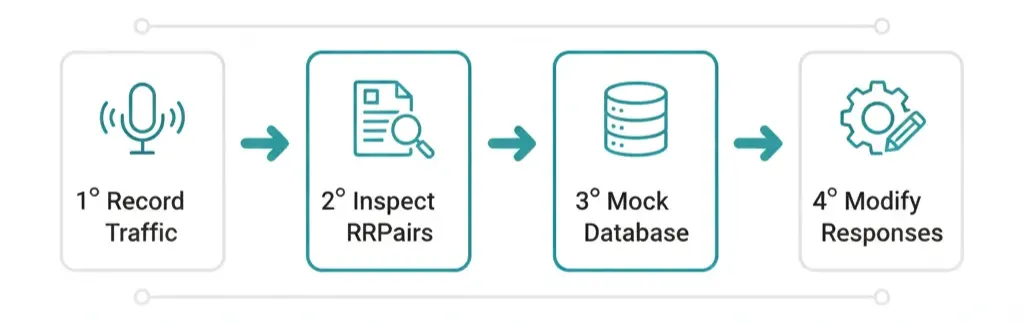
Mock PostgreSQL with Recorded Traffic and proxymock
Every developer who’s worked with PostgreSQL knows the pain: testing against a real database slows everything down.
You need the database running locally, loaded with the right data, and configured to match production as closely as possible. Every time you run a new test or build, you’re forced to repeat that setup migrate schemas, seed test data, and clean everything up again.
It’s time-consuming, brittle, and hard to scale across a team.
As Matt points out in his video, database testing often becomes the biggest bottleneck in modern development pipelines. Whether you’re running integration tests on your laptop or spinning up ephemeral environments in CI/CD, managing a real PostgreSQL instance just to run basic CRUD tests wastes time and resources.
Typical Solution
Developers usually take the “just clone it” approach.
They copy the PostgreSQL database, sanitize production data, spin up a Docker container or local instance, and load the dataset. It works, but it’s inefficient. Each time the schema changes or a test modifies data, the process needs to start over.
Here’s what the typical workflow looks like:
- Start PostgreSQL locally (often via Docker).
- Run migrations.
- Load sample or scrubbed production data.
- Run the tests.
- Reset the database and repeat.
It’s a familiar pattern — and a huge time sink.
This approach also doesn’t guarantee test stability. Two developers might run the same test with slightly different datasets and get different results. And in CI/CD pipelines, starting a PostgreSQL container and loading data for every job increases run times significantly.
In short, it’s slow, inconsistent, and expensive.
Our Solution: proxymock
With proxymock, you can replace all that overhead with a single, elegant solution.
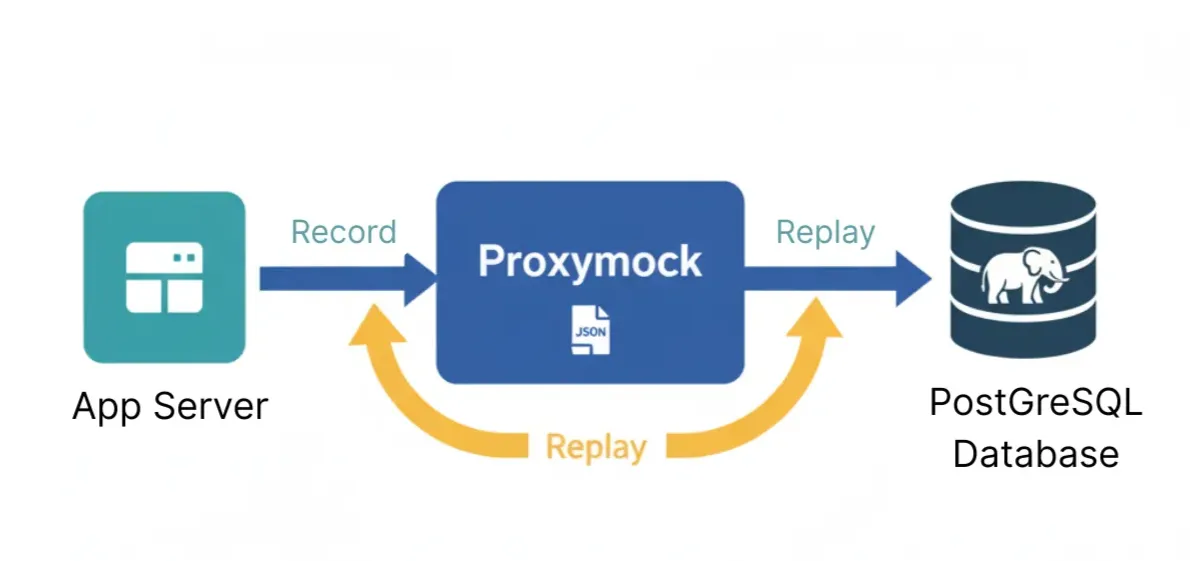
Instead of running a local PostgreSQL instance, you can record your real database interactions once and then mock them during future runs.
Route the application’s supported PostgreSQL connections through the recorder to capture the exchanges you exercise. The mock later returns responses for matching requests, allowing those application paths to run without a live database.
You get the realism of live database responses without the complexity of maintaining one.
In practice, this means you can:
- Run local or CI tests instantly without starting PostgreSQL.
- Reproduce production-like results deterministically.
- Avoid data drift between runs.
- Simplify setup and teardown for developers and pipelines alike.
It is a substitute for selected dependency exchanges, not a PostgreSQL clone.
Step 1: Record PostgreSQL Traffic
The first step is to record your app’s real interactions with PostgreSQL. Run this command in a dedicated terminal window:
proxymock record --map 15432=postgres://localhost:5432 --app-port 8080
This tells proxymock to:
- Listen on port 15432 for PostgreSQL traffic.
- Forward all requests to the real PostgreSQL instance at 5432.
- Capture every SQL query, result set, and timing metric in RRPair files (Request/Response Pairs).
Think of it as a “black box recorder” for your database — it records once so you can replay infinitely.
Step 2: Configure Your Application
Now you’ll configure your application to route traffic through the proxy instead of directly to PostgreSQL.
In a new terminal window, run your app with modified environment variables:
PGUSER=<user> PGPORT=15432 go run main.go
Here, we’re telling the app to connect through port 15432, where proxymock is listening. Your real PostgreSQL instance is still running at 5432, but proxymock now intercepts every command.
This setup works for any PostgreSQL client — not just Go. Python, Node.js, Java, Ruby — all follow the same pattern.
Step 3: Inspect What You Recorded
Once you’ve generated traffic (by running queries, tests, or your app), browse what proxymock captured in a local web UI:
proxymock web --in .You’ll see all the SQL statements your app executed, along with the data returned by PostgreSQL.
Behind the scenes, each captured interaction is stored as JSON, even though PostgreSQL uses a binary wire protocol. This makes it easy to review or edit.
A typical RRPair might include:
- The original SQL query or prepared statement.
- The response rows and metadata.
- Timing details like latency or execution duration.
You can even modify the JSON files manually to simulate different query results.
Step 4: Run the Mock Server
Keep the application pointed at the mapped listener on port 15432. Stop the recorder before starting the mock on that same listener:
proxymock mock --in ./proxymock --map 15432=postgres://localhost:5432The mock reads the saved exchanges under the input directory. It does not create a default listener on port 5432 merely because the command is running. Exercise the recorded path and inspect matches. A matching response tests the caller against the fixture; it does not execute the SQL in a database engine.
Step 5: Modify or Transform Responses
Sometimes, you’ll want to modify what your mock returns. Maybe you want to simulate an error, or test how your app handles empty results.
You can edit the JSON manually, or automate the process using Speedscale’s transformation system:
proxymock cloud push snapshot
proxymock cloud pull snapshot <id>
In the Speedscale UI, you can configure transformations — like changing returned values, introducing latency, or injecting errors — and then pull those updates back into your mock.
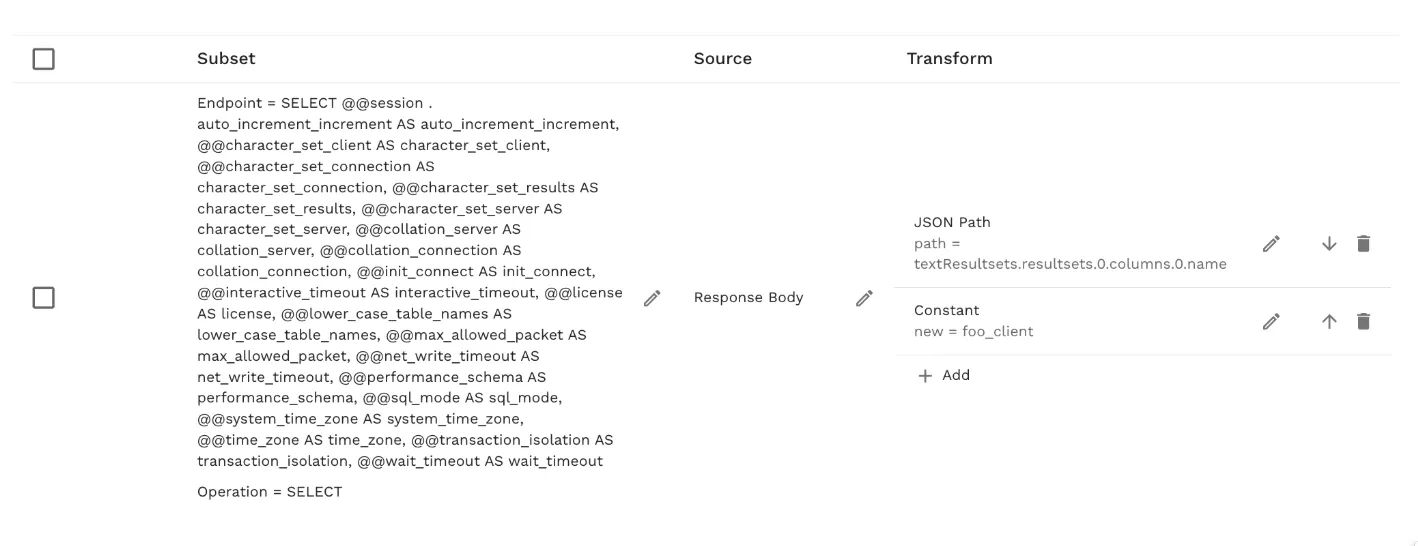
More information about transforms can be found here: https://docs.speedscale.com/guides/replay/mocks/edit-sig/
Value
Database mocks can remove database provisioning from tests of application behavior. Measure that saving against the cost of recording, reviewing, and maintaining the fixtures for your own suite. Keep real-database checks for migrations, SQL behavior, transactions, and performance rather than treating a mock as a replacement for every database test.
Conclusion
Database mocking doesn’t have to be complex or fragile. With proxymock, you can record once, replay infinitely, and eliminate one of the most persistent bottlenecks in testing.
If you’re ready to speed up your local and CI workflows:
- Watch Matt’s video to see how database mocking transforms testing speed.
- Read the full proxymock docs for deeper details.
- Install proxymock and try mocking your PostgreSQL database today.
Simplify your stack. Speed up your builds. Keep database mocks focused on caller behavior, and keep real-database tests for the behavior owned by PostgreSQL.
Frequently asked questions
Does a recorded mock behave like a mutable PostgreSQL database?
No. It returns responses associated with recorded exchanges; it does not run the PostgreSQL storage engine. A recorded INSERT followed by a SELECT can supply examples for that path, but it does not establish arbitrary read-after-write behavior, constraints, transaction isolation, or query planning. Use a real database when those properties are the test’s subject.
What happens when the application sends a new query?
A query absent from the recording may not match a useful fixture. Inspect the request, bound values, session setup, and mock diagnostics rather than assuming any SQL will work. Record the new path or configure a deliberate response, then rerun the scenario. A returned fixture is not evidence that real PostgreSQL accepts or correctly executes the query.
Which tests should still run against real PostgreSQL?
Run migrations, constraints, transactions, locking, and database performance checks against PostgreSQL itself. Recorded-query replay can send the captured statements to a disposable candidate database to expose errors after a schema or version change. Mocked application tests answer a different question: how the application behaves when the dependency supplies the configured responses.
Sources: PostgreSQL recording, Testing a real database with recorded queries, Mock matching and diagnostics.