
Load Test One Endpoint While Another Holds Steady
What happens to transaction posting when statement traffic gets expensive?
That’s the question a bank’s platform team actually needs answered before a busy month-end. It’s also a question most load tests can’t ask, because they turn one dial for the whole recording. Statements get heavier, posting gets heavier, and the average latency across both looks fine right up until customers can’t move money.
- Turning up load on a whole recording can’t tell you which workload is hurting which. Give each endpoint or journey its own schedule.
- Put the goal on the traffic you care about, in the time window you care about, and make missing evidence fail the test.
- Mocking a dependency buys control, not necessarily speed. Our mock was 2.6% slower than a fast local dependency in 30 matched runs.
One load test dial misses the question
Increasing the load on an entire recording is useful. It does not isolate which workload interferes with another.
For the bank, I want to ramp statement requests while holding transaction posting steady. Then I want a latency goal on posting alone. A healthy average across both endpoints would hide exactly the result I care about.
Speedscale’s endpoint and session load plans give selected traffic its own schedule and its own goals. A filter defines each group. A group can hold one endpoint, several endpoints, or complete recorded user journeys, and each group gets its own stages, ramps and start offset.
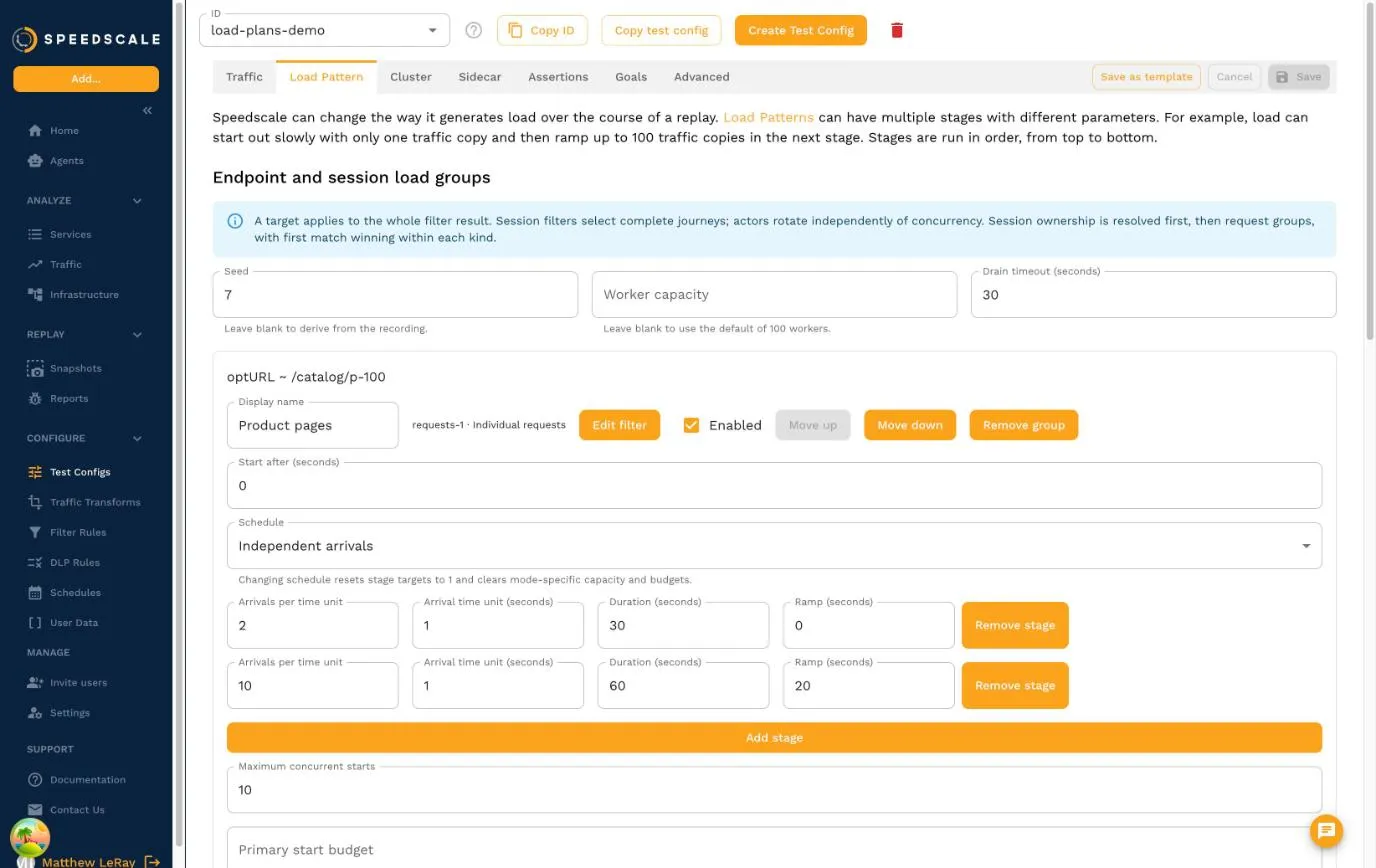
The screenshot is from our storefront demo rather than the bank, but the shape is the same: one group of product page requests, scheduled independently of everything else in the recording.
Decide what you are increasing
Threads, sessions, request starts and achieved throughput answer different questions, so pick the one that matches yours.
JMeter users will recognize separating workloads into Thread Groups. k6 makes the scheduling distinction explicit with open and closed workload models: independently scheduled arrivals behave differently from workers that wait for the previous iteration to finish.
Load plans apply those ideas to recorded traffic. Arrivals start requests or complete journeys on a fixed schedule, no matter how slowly the app responds. Concurrent sessions keep a chosen number of journeys active. Adaptive TPS adjusts a group’s workers within a reserved budget to reach a request-rate target. Traffic copies and recorded multiples scale what the recording already did.
A ramp belongs to the selected workload, not the whole test. Chaos rules still apply where they match, so you can raise statement traffic, inject dependency latency and keep posting steady in the same experiment.
If the generator can’t deliver the starts you asked for, that’s evidence too. Missed starts fail the run by default, and a healthy group doesn’t quietly absorb another group’s shortfall.
A session is a journey
Filtering by a single session isolates one user. Most load tests need a population.
A session group selects every recorded user whose journey matches its filter, and each start replays that complete journey: log in, look at accounts, post a transaction. A request-level goal can still measure only transaction posting inside those journeys.
Population and concurrency are separate settings. One hundred eligible users can rotate through ten concurrent journey slots, and one user is never running two journeys at once. You choose whether to rotate through users, reuse an available one first (sticky), or run each user exactly once.
Concurrency doesn’t create new users. Cloning a journey for more users needs explicit identity fields and transforms that produce accounts the target accepts. Generating a new customer ID does not provision a bank account. If you’ve isolated a single user before, the Datadog Synthetics walkthrough shows the session model this builds on.
Make failure mean something
A test needs an explicit statement of success. k6 expresses that with thresholds. Load plans scope the same idea to a group of replayed requests and a window of time.
For the bank: hold posting at two starts per second while statements ramp from five to twenty. Require posting p95 response-header latency to stay below 500 milliseconds during the final twenty seconds, when the statement load is highest. Require enough samples to judge it, because too few samples fail the goal rather than passing it.
The report keeps planned starts, actual starts, HTTP attempts, failures, latency and journey drain separate for every group. An HTTP 200 does not prove a throughput target was met, and missing evidence never produces a pass.
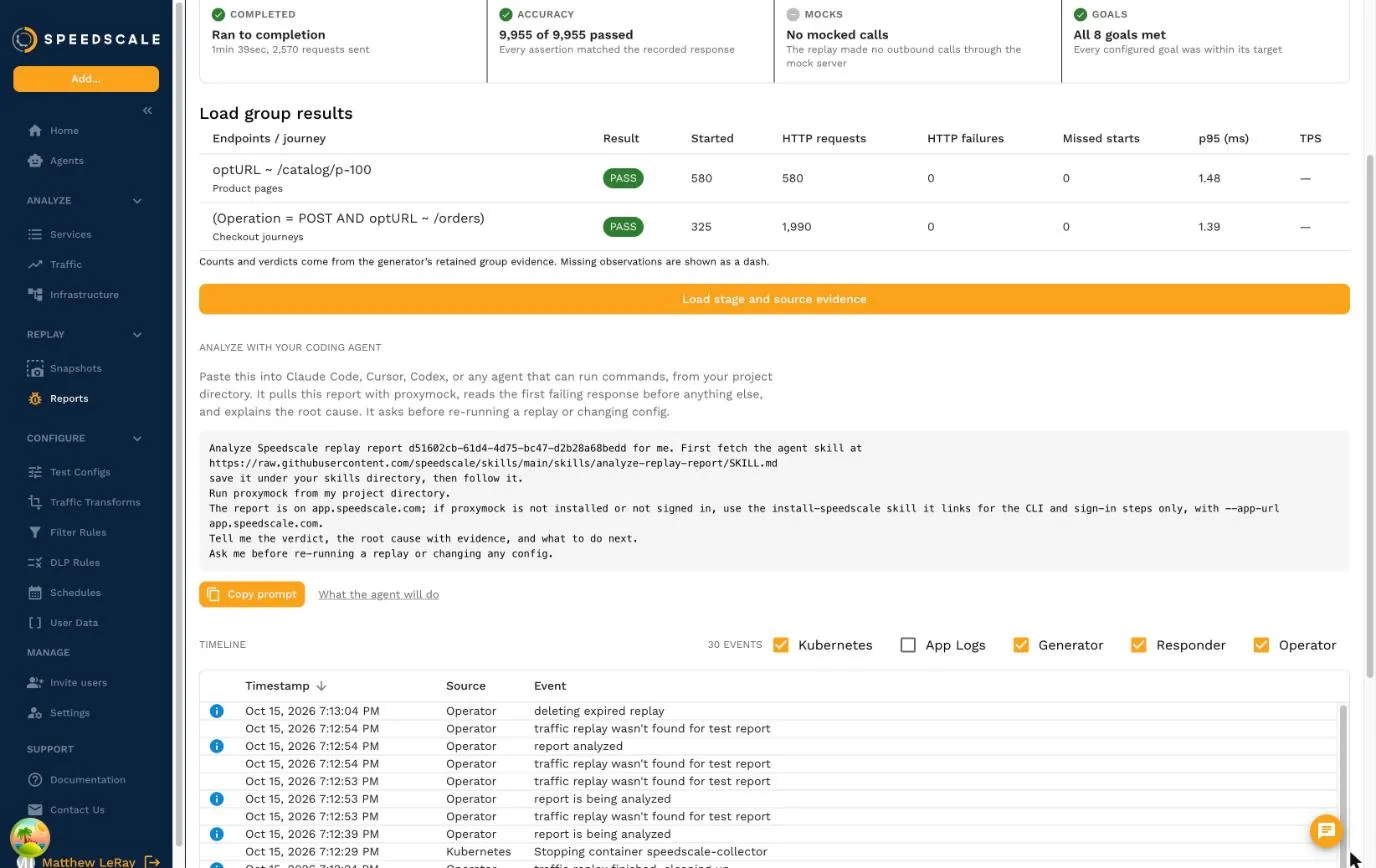
That distinction caught a real integration gap during development. Our Kubernetes generator delivered exactly 100 statement requests and 50 posting requests, but an older analyzer in a staging environment dropped their throughput verdicts. The acceptance check failed instead of trusting a green-looking summary.
Keep the bank real
The demo behind this post exercises individual endpoints and complete journeys, with shared and isolated contention paths, identity checks, worker limits and intentional goal failures. proxymock supplies a controlled statement dependency for the fast local loop. The bank’s own journal independently records what reached the app. Our Kubernetes acceptance suite separately exercises the real operator, generator and cloud report path.
Neither path substitutes for the other. A local mock can’t establish that an operator preserves the plan or that a cloud report keeps a failed goal.
I expected the mock to make the local loop faster. It didn’t. Across eight matched real and mock trials covering reset, discovery, complete session work and journal assertions, the median was 143.19 ms with the real local dependency and 149.46 ms with the mock. Capture, startup, cluster setup and uploads were excluded.
A repeat with 30 matched pairs on the tagged engine came out the same way: 133.88 ms median and 136.90 ms p95 live, against 137.35 ms and 140.41 ms mocked, so the mock was 2.59% slower. Another local test shared the host during that run, so treat it as a descriptive comparison, not a capacity benchmark.
That result supports no claim of faster delivery. What the mock bought was control: a dependency that behaves the same every time while the bank, authentication, transaction handling and workload generator stay real. We’ll measure slower and less predictable dependencies separately, where the trade is likely to look different. Combining load tests with mocks covers when that trade pays off.
Start with one interference test
Pick the endpoint your users can’t afford to lose. Give it a steady workload and a scoped goal. Then increase a different workload that shares its database, cache or thread pool, and watch the goal.
Use request groups when endpoint pressure is the question. Use session groups when login, account identity, ordering and state are part of it.
The sessions demo includes the banking app, its statement dependency and both grouped tests:
cd sessions-demo
PROXYMOCK_BIN=/absolute/path/to/proxymock make bank-load-workers
The endpoint and session load plan guide has both banking plans and the dashboard and Kubernetes steps. For the bigger picture of replay-based load testing in a cluster, see Speedscale load testing and our Kubernetes load testing guide.
I still want shorter test cycles. First, I want a failed experiment to tell us what failed.