Remember when “going shopping” meant getting in the car?
This fall, filling the tank feels like applying for a small loan. U.S. regular gasoline averaged about $4.48 a gallon for the week of September 21, 2026. A round trip to the store starts competing with free shipping. And free shipping never needs a parking spot.
That doesn’t tell us how many shoppers will move online this holiday season. It does give retailers another reason to make sure checkout can handle the customers who arrive. Holiday load testing needs to account for what those customers buy and what happens when a payment partner slows down.
Your checkout page is the mall. The question is whether it’s ready for the crowd.
Fewer trips, bigger carts
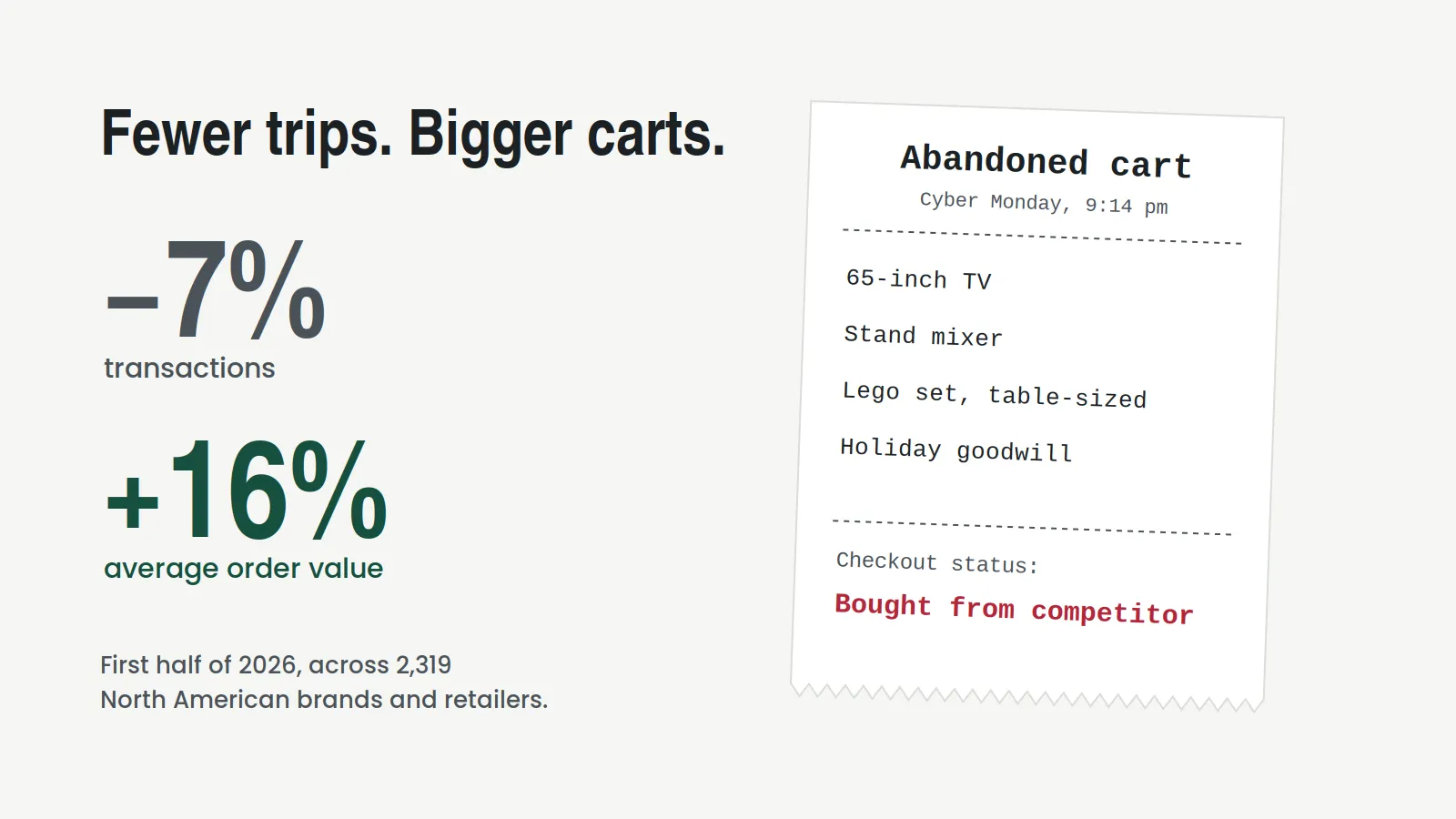
Across 2,319 North American brands and retailers in impact.com’s first-half 2026 analysis, transactions fell 7% year over year while average order value climbed 16%. In that dataset, people made fewer purchases and spent more each time.
Those figures describe the brands measured through impact.com’s platform. They don’t establish that gasoline prices caused the change, or predict every retailer’s holiday results. But they give an engineering team a useful question: does our checkout test include the larger baskets we’re actually seeing?
A cart with one product and no promotion is a poor rehearsal for a cart with multiple items, stacked eligibility checks, split shipments, and a financing option. More work can happen behind a single click on “Place order.”
Black Friday falls on November 27 this year. That’s a good deadline for testing those paths before customers test them for you.
Peak is a season now
The 2025 holidays set a record: $257.8 billion spent online from November 1 through December 31. Twenty-five separate days cleared $4 billion, up from 18 the year before. Your systems have to hold up across repeated promotions and sustained demand throughout the season.
The same Adobe report found that traffic from generative AI tools to retail sites jumped 693.4% year over year. That’s referral traffic: shoppers clicking through from an AI tool. It doesn’t mean all those visits were autonomous agents placing orders. Check your own entry points and request mix before assuming last year’s scripted shopping journey still represents this year’s traffic.
Then there’s checkout, which now has more partners than a square dance. Adobe measured $20 billion in buy-now-pay-later spending during the 2025 holiday season. Payment processors, BNPL providers, tax calculators, fraud checks, and shipping-rate APIs each add a dependency whose bad day can become yours.
What a bad night costs
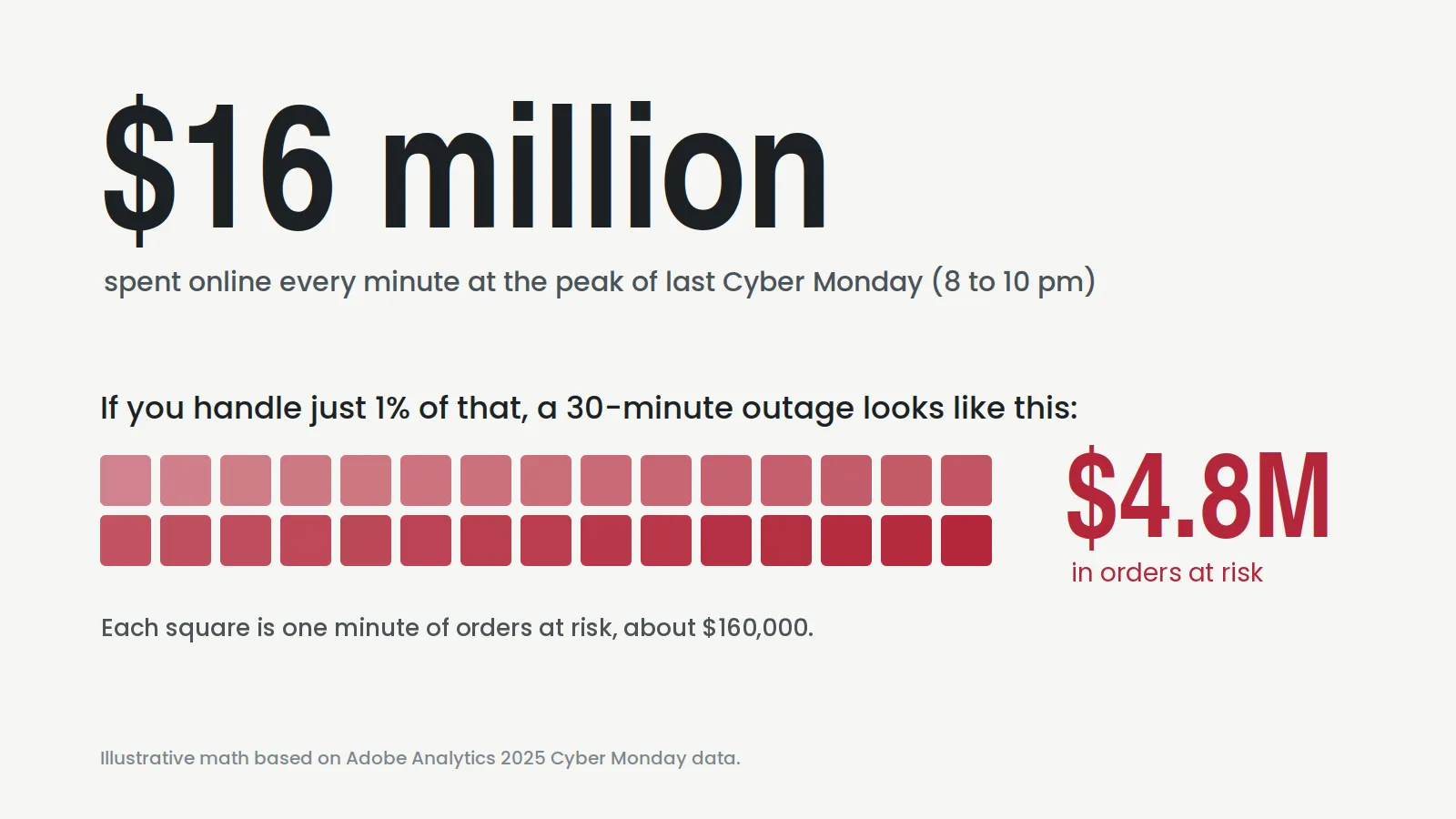
The outage. At the peak of Cyber Monday 2025, between 8 and 10 pm, U.S. shoppers spent $16 million every minute.
For illustration, suppose a retailer handled 1% of that spending and its checkout stopped for 30 minutes. The order value exposed would be $16 million × 1% × 30, or $4.8 million. That’s a scenario, not a measured loss or a forecast. Some shoppers might return; others might buy elsewhere. Use your own peak order rate, average order value, and recovery assumptions to estimate the risk.
The slowdown. You don’t have to go down to lose orders. A checkout can technically work while it spins a little too long waiting for a payment API.
In the 2020 Google-commissioned Milliseconds Make Millions study, a 0.1-second improvement in mobile site speed was associated with an 8.4% increase in retail conversions and a 9.2% increase in average order value. That historical result is a reason to measure speed carefully. It isn’t a formula you can reverse to predict the revenue impact of an 800-millisecond slowdown on your own checkout.
Picture a BNPL provider adding that delay during a promotion. Your availability check still passes. Your customers still wait. A checkout latency goal and a completed-order check can catch a problem that a simple “HTTP 200” monitor misses.
The bigger cart. When order values rise, each abandoned checkout puts more money at risk. The customer with a TV, a stand mixer, and a Lego set the size of a coffee table has plenty of reasons to try another tab if yours gets stuck.
But we have observability!
Great. You should. Dashboards, traces, alerts, and a solid on-call rotation are essential. They help you detect trouble and explain what happened. They don’t demonstrate that a new checkout release will survive peak load before it reaches production.
Detection takes time to become a fix. Even great teams need to move from “that graph looks weird” to “fixed”: paging people, checking the last deploy, blaming DNS, un-blaming DNS, and finding the real cause. Better instrumentation can shorten that process. Customers may still be waiting while it happens.
Slowdowns can slip under the alarms. A threshold chosen for normal traffic may tolerate delays that matter during a promotion. Review endpoint latency, payment completion, and error rates together, using goals that reflect what checkout needs to accomplish.
New code needs a rehearsal. The new promo-code logic, checkout redesign, or change an AI assistant wrote in October may never have faced your expected peak volume or a slow payment provider. Watching the current release won’t answer how the next one behaves under those conditions.
We call this “The Observability Gap”. Holiday readiness adds a question to the monitoring plan: what happens when this change meets representative traffic at peak?
The code freeze is a confession
Every November, someone sends the email: “CODE FREEZE IN EFFECT.” Deploy buttons go gray. For a while, the most powerful person in the building is whoever holds the emergency-change approval form.
A freeze can be a sensible way to limit change during a busy period. But it can also become a substitute for evidence about which changes are safe. And it has costs:
- Revenue-driving features sit in a branch like a gift you forgot to wrap, including the ones built for this year’s shoppers.
- November bugs get workarounds because fixing them requires an emergency approval.
- January brings a larger release backlog, with more changes to validate together.
The question leadership needs answered is specific: will this release complete orders at our expected peak load, including when dependencies misbehave?
A scripted load test can help answer that, provided its scenarios represent the workload. Repeating one happy path 50,000 times won’t cover a checkout with different baskets, payment methods, and failure paths. And a staging environment connected to a partner sandbox may never see the delays and errors that matter in production.
Test checkout with production traffic
With Speedscale, we capture and replay real API traffic against new code before it ships. That gives the test requests drawn from what the service actually handled, including the request and response variations represented in the recording.
Start with a representative capture and prepare the test data, credentials, and sensitive-data handling for an isolated environment. A recording is evidence of past behavior. Add cases for new promotions and paths it doesn’t contain.
Then configure a load test with a ramp, an expected peak, and enough sustained traffic to expose resource exhaustion. Measure whether the application reaches the target throughput while meeting your latency and error goals. Turning up traffic without checking the achieved rate can leave you with a reassuring report from a test that never reached its target.
Partner APIs need their own rehearsal. Service mocking uses recorded responses to simulate supported dependencies. For calls routed to mocks, you can exercise checkout without sending that load to the real payment provider or waiting for its sandbox team.
You can also rehearse the bad day on purpose. Speedscale’s API chaos testing can change response latency and inject failures in mocked HTTP dependencies. Give the payment mock a three-second delay. Make the BNPL mock return errors. Check whether checkout times out cleanly, offers another payment method, and avoids duplicate orders when requests retry.
Those are application behaviors you can verify in a test. The effect on real shopper conversion still needs production measurement. Better to discover a broken fallback on a Tuesday in October than during the biggest shopping night of the year.
Your nine-week holiday load-testing plan
As of September 24, Black Friday is 64 days away. There’s time to build a useful rehearsal before the freeze discussion starts.
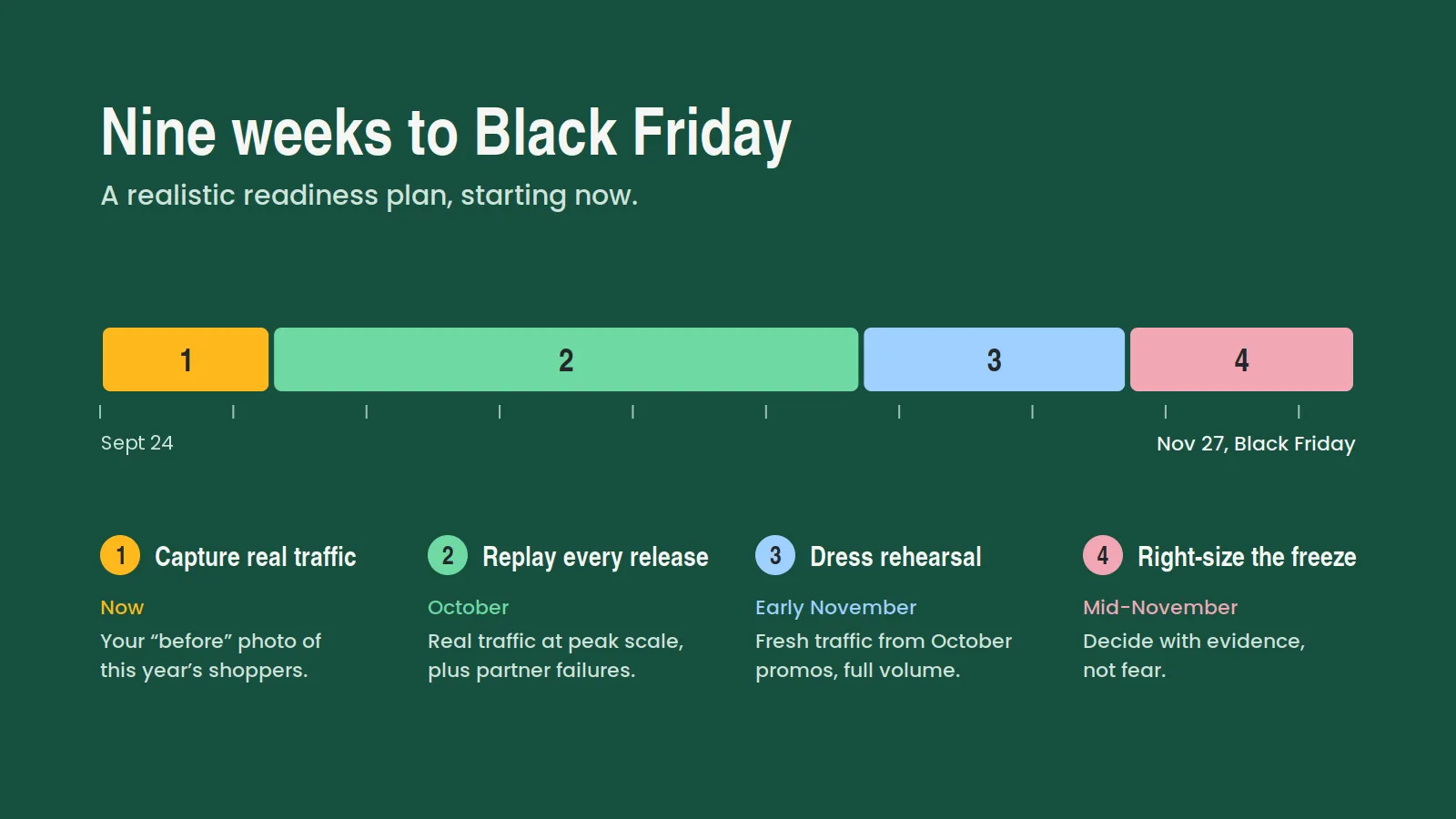
- Now: Capture real traffic. Collect representative checkout requests and dependency responses. Check that the sample includes your current basket sizes, payment methods, promotions, and failure paths. Establish baseline latency and completed-order results.
- October: Replay every significant release. Run the traffic against each change at projected peak load. Rehearse partner failures and agree on pass criteria for timeouts, retries, and alternate payment paths.
- Early November: Dress rehearsal. Capture fresh traffic from October promotions and run a full-scale rehearsal in your test environment. Include a sustained-load phase and check recovery after the spike ends.
- Mid-November: Right-size the freeze. Review the results with engineering and operations. Use the evidence, remaining coverage gaps, rollback readiness, and staffing to decide which changes can ship and which should wait.
Give checkout a rehearsal before the crowd arrives
Gas prices and shopping habits will keep changing. Your team can test the parts it controls: whether checkout completes orders, whether dependencies can stall it, and whether a release makes either behavior worse.
Start a Speedscale trial and replay a slice of checkout traffic against your next release. Bring a peak-load target and one partner-failure scenario. Leave with evidence for the freeze decision.
Give your customers a checkout that holds. And give your on-call engineer the gift they actually want: a Thanksgiving where the only thing that crashes is Uncle Rick after his third plate.