Differential testing for APIs and microservices: catch what CI misses
We recently upgraded the ClickHouse driver in our indexer to fix a rare connection bug. Every test passed. CI was green, dev and staging looked fine, and we didn’t change a line of indexer code. We shipped it, and nothing happened.
Then the alerts started. The indexer queues for a few of our highest-volume customers had old messages sitting in them. That happens sometimes when a customer sends a traffic spike, and it wasn’t happening across the board, so it looked like load. We waited for the queues to catch up. They didn’t. We added more indexers, and that didn’t help either.
The indexer writes RRPairs, metrics and logs to several backends: S3, ClickHouse and RDS. Only one of those paths had slowed down, logs going into ClickHouse. The new driver version started honoring an async option our code had passed for years and the old version had quietly ignored, so every log insert now waited for ClickHouse to flush its buffer before returning. The customers who fell behind were the ones with exactly that traffic mix: a lot of logs, at high volume. Everyone else never noticed.
Our tests all asked whether the code worked, and it did. None of them asked whether the new build behaved like the old one under the traffic it actually gets. That’s differential testing. Same inputs, two versions, compare the outputs. For an API or microservice the inputs are requests, the outputs are the responses, the calls it makes downstream and how long all of it takes, and the two versions are usually what’s in production and what you’re about to ship.
Addy Osmani’s post on how the Claude Code team thinks about verification names differential tests as one of the three kinds of test worth investing in, under the heading “the old system is the oracle.” Its example is a large migration, and for inputs it suggests “randomly generated inputs or a sample of production traffic.”
Most teams aren’t migrating, though. The old system is just “the system,” and it’s the test environment that doesn’t look like it. For a service, the comparison is the easy part. The hard part is an environment where the comparison means something, and that comes down to one decision: which dependencies are real and which are mocked.
How it works for a service
If you’ve used shadow traffic or tap compare, the steps will look familiar. The difference is where the reference comes from:
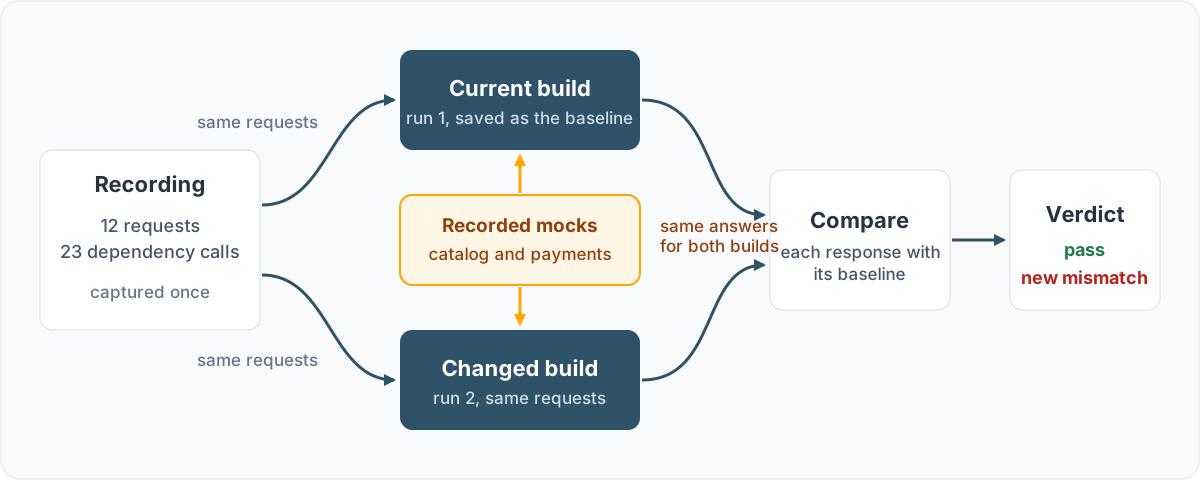
- Record real requests, along with the responses and downstream calls the current build produced.
- Replay the requests against the current build and save the result as your baseline.
- Replay the same requests against the changed build. Dependencies outside your control answer from the recording, the same way they did for the baseline.
- Compare status, body, the calls each build made downstream and timing. Skip the fields that are supposed to change, like timestamps and generated IDs.
- Fail the build on any difference the baseline didn’t have.
Timing is the one teams skip. Our ClickHouse upgrade didn’t change what the indexer wrote. It made one kind of write slower, and only the customers whose traffic was heavy on that kind of write felt it. You find that with traffic that has the real mix in it.
Cimpress uses this to check a .NET upgrade of its catalog service. Jeff Kwan, their Principal Architect, described the problem this way:
Today, I know my endpoint for this ID produces this result. Tomorrow, when I make a change in the code, I need to know, ‘Did I get the same result?’ It sounds simple, but there’s actually a lot of complexity behind answering this question confidently.
Jeff started from a Speedscale snapshot of the catalog service and replayed 824 recorded requests against it on .NET 3.1 and on .NET 10, locally, with 1,222 recorded mocks standing in for upstream services. Both versions matched on all 824 requests.
Decide what to mock
The comparison assumes both versions see the same world, and for a service that world includes every dependency it calls. The best-known tools sidestep this. Twitter’s Diffy (now archived) ignores POST, PUT and DELETE by default “for safety reasons,” per its README, and GitHub’s Scientist post says GitHub only used it on read operations. Sensible defaults, but they skip the requests where dependencies matter most.
Mock what’s out of scope
Some dependencies can’t be part of the test:
- You can’t run a real financial transaction against Stripe or a similar processor every time a test runs.
- You depend on third parties. IHG mocks out Salesforce, Amadeus (a third-party booking system) and AWS cloud APIs, which is everything outside of their control.
- You can’t scale up the test environment. At one customer, the cloud team had put a limit on the QA AWS account to prevent runaway costs, so we mocked DynamoDB, and the first full-scale test showed that their own app didn’t scale.
- You need other teams’ APIs. An e-commerce platform we work with can’t exercise a storefront service without SKU, product catalog, master data and customer records, each owned by a different team. With those mocked, a team can load test its own service without asking four other teams for capacity.

Service mocking brings those under your control. With proxymock the mocks come from the same recording as the requests, so the calls your service made in production get the answers production gave, including the failures you could never trigger on demand. Both builds get the same recorded answer to the same call, so when a response differs, your change did it.
Keep what you own real
Mocking everything is a mistake too. A recorded mock answers at the speed it was recorded, so a mocked ClickHouse would have hidden our indexer slowdown completely. The bug was in how our code used a database we own.
So the release gate we built afterward draws the line at scope. ClickHouse and Postgres (RDS in production) are ours, and the change was in how we talk to them, so they run for real in the test. The indexer’s work comes from AWS: messages from SQS and data files from S3. Those are outside our control, so they come from a recording of our dev indexer’s traffic. S3 reads replay from recorded mocks with passthrough off. SQS needs a queue that actually drains, so it runs in an emulator loaded from the same recording.
Every release now pushes the same recorded files through the previous build and the candidate, and compares drain time along with errors, row counts and whether all the work finished. Against the build that shipped the driver upgrade, it took 45 seconds to drain what the build before it drained in about 4. CI timing is noisy, so the gate only fails when every candidate run is more than 1.3x slower than the slowest run of the previous build.
A worked example
Our indexer isn’t something you can clone, so here’s a small version of the same problem you can run. The differential-testing lab in our public mock-lab repo is a Go checkout service that calls a product catalog and a payment processor. The recording has twelve requests and the 23 dependency calls behind them. The traffic is synthetic, and the lab ships each change as a patch so the results are repeatable. I ran everything below on proxymock v2.5.1437, and the lab’s README has every step.
A client upgrade that only changes timing
The catalog belongs to the checkout team, so it stays real. The payment processor doesn’t, so it’s mocked. upgrade.patch stands in for a catalog client upgrade: the new client sends every read with Cache-Control: no-cache, so the catalog skips its cache. Each read takes 15 ms instead of 2 ms, and every response stays the same.
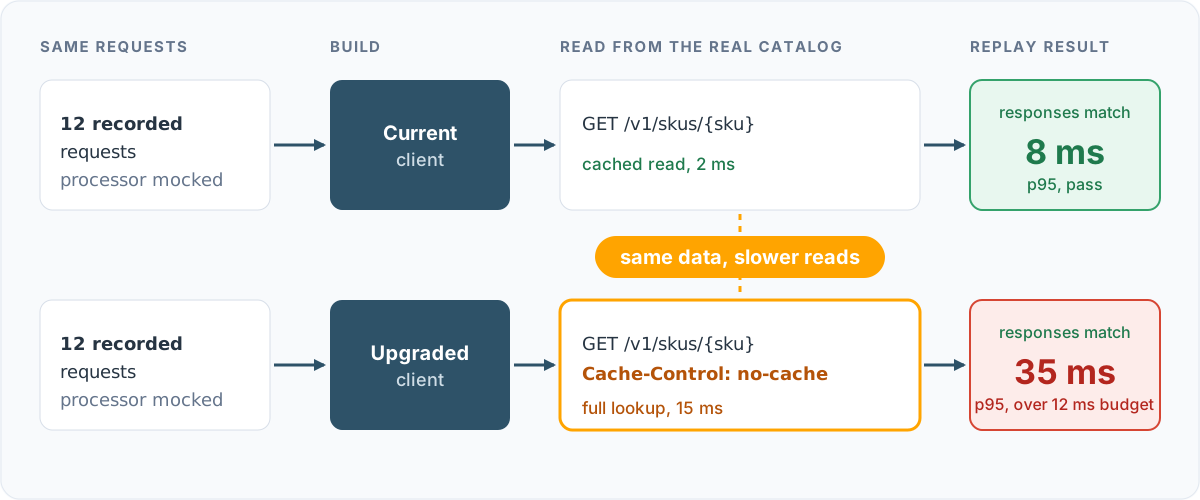
Start the service with only the processor mocked. NO_PROXY sends catalog calls straight to the catalog, and --no-passthrough makes any processor call that isn’t in the recording fail, so the service can’t quietly reach a real one:
NO_PROXY=localhost:8091 proxymock mock --in proxymock/recording --no-passthrough \
  --out proxymock/results/mocked-scope -- go run .
Save a baseline from the current build, apply the upgrade, and replay the same requests with two gates, one on responses and one on latency:
proxymock replay --in proxymock/recording --test-against localhost:8080 \
  --baseline proxymock/results/scope-baseline --fail-on-new-mismatch \
  --fail-if "latency.p95 > 12" --out proxymock/results/scope-upgrade
Replay verdict: proxymock/results/scope-upgrade/replay-verdict.json (pass)
✘ failed eval "latency.p95 > 12.00" - observed latency.p95 was 35.00The unit tests pass. Every response matches the baseline, so the verdict is pass. The latency budget fails the command with exit code 1: p95 went from about 8 ms to 35 ms. Set the budget from your own baseline. Here 12 ms is about one and a half times the baseline p95. proxymock report --baseline lists every endpoint that got slower, and here that’s all of them, because every one reads the catalog.
Now run the same upgrade with the catalog mocked too. It passes both checks at a p95 of 5 ms, because the mock answers at recorded speed. That’s our indexer problem in miniature.
The same gate catches correctness bugs
The lab’s other exercise mocks both dependencies and ships candidate.patch, a refactor of the pricing helper and the payments client that passes its unit tests. The response gate fails it with exit code 3:
NEW MISMATCH: POST /api/checkout recorded 201 -> observed 402
NEW MISMATCH: POST /api/checkout recorded 503 -> observed 402
The first is a one-cent bug. The refactor moved tax into floating point and truncates it, so the new build asked the processor for one cent less than the recording:
< http:requestBodyJSON: {"amount_cents":13856,"card_token":"tok_amex", ...}
> http:requestBodyJSON: {"amount_cents":13857,"card_token":"tok_amex", ...}
No recorded charge matches, so the mock has no answer and the checkout fails. A real processor would have taken the charge, and the customer would have been undercharged with nothing failing. Against the lab’s stand-in processor, which accepts any amount, the response comparison reports body tax 9.07 -> 9.06 (+1 more) on its own.
The second is the processor outage in the recording. The current build tells the customer the payment is unavailable and can be retried. The refactored client reports it as a declined card. You can’t ask a real processor to go down for your test run, but a recording that has the outage in it replays it against every build. The lab’s repair.patch fixes both, and the gate exits 0.
What it’s worth
Add up what the ClickHouse upgrade cost us. Nobody wrote a bug. It took a while to even suspect the upgrade, because it looked like a traffic spike. Then it took a revert, a patch to four call sites, a redeploy and hours more for the backlog to drain, and some customers waited on their data the whole time. Our test suite did its job. It answered whether the code worked. A replay gate asks the other question, whether this build behaves like the last one, and it asks on every merge, where a wrong answer costs a red pipeline. For an engineering leader, that’s the trade: a recording per service and some tuning, in exchange for fewer releases you debug in production.
What it costs
Somebody has to capture a recording for each service, and capture it again when the dependencies change. The first replay on a real service usually has mock misses, where your service sends something the recording doesn’t have, like a fresh timestamp or an idempotency key. The mock match rate guide walks through tuning them.
proxymock is free for local recording, mocking and replay. Running it in CI needs a paid account and an API key, which the CI guide lists as prerequisites.
A recording also holds whatever was in the traffic, including tokens and customer data. It stays on your machine unless you push or share it, so treat it like any extract of production data. If you capture from a cluster, Speedscale’s DLP rules redact sensitive fields before the data leaves your environment.
Timestamps, IDs and other noise
Two runs of the same build never produce byte-identical responses. Diffy handles this by running two copies of the old build and treating their differences as noise, which means running three deployments.
In the lab, every paid checkout returns a new order ID and timestamp, and the baseline still passes, because proxymock learns which response fields vary between repeated observations and leaves them out of the comparison. Fields like a price or a total vary too, from one cart to the next. With --baseline, proxymock still reports one of those fields when the new build produces a value the baseline never did, which is how the tax change showed up. For values that have to flow from one request into the next, like an auth token, a blueprint carries them forward.
If a diff tool flags every timestamp, people stop reading the diffs. Get this part right before you put a gate in CI.
Where it doesn’t help
If you’re changing an endpoint on purpose, the old response is the wrong answer key. Keep differential testing on the 99 cases that aren’t changing and write a new check for the one that is.
It also only tells you the two builds behave the same. It can’t tell you either one is right. If the recording contains a bug, a matching response is a matching bug.
And a recorded mock is a picture of the dependency on the day you recorded it. When the dependency changes, the mock doesn’t, and your comparison stays green. We wrote about that failure in Your Mock Is Lying. Re-record on a schedule, and keep a contract check against the real dependency running somewhere.
How it relates to other kinds of testing
The term comes from William McKeeman’s 1998 paper “Differential Testing for Software,” which fed the same program to several compilers and looked hard at the ones that disagreed. You’ll also see it called back-to-back testing, or differential fuzzing when a fuzzer generates the inputs. The related terms overlap, and this is how I’d separate them.
| Approach | What the result is compared with | Where the inputs come from | What happens to dependencies |
|---|---|---|---|
| Differential testing with replay | Recorded responses and timing from the current build | Recorded production or test traffic | Out-of-scope ones mocked from the same recording |
| Regression suite | Assertions written by hand | Test cases written by hand | Whatever the test environment has |
| Shadow traffic or tap compare | A second live deployment | Mirrored live traffic | Real, so writes are usually skipped |
| Snapshot or golden master test | A stored output file | Test cases written by hand | Usually stubbed in code |
Regression testing is the goal, and differential testing is one way of getting there. If you’re comparing live deployments today, the alternatives to traffic shadowing and the guide to traffic replay go further into the tradeoffs. The same idea works below the API too: you can compare the SQL a service runs between two releases.
Try it
The lab above takes a few minutes and needs Go and proxymock. No Docker, no cluster. If you’d like your coding agent to run the comparison for you, this walkthrough shows the same loop driven from Cursor.
To start on your own service, run it under the recorder:
proxymock record --app-port 8080 -- \
  <the command that starts your service>
Send requests to port 4143, where proxymock forwards to your app, then stop it with Ctrl-C. Check that the outbound calls made it into the recording: not every client honors the proxy, and databases need the --map flag. The language reference and database guides cover both. If the service runs in Kubernetes, Speedscale can capture its traffic in the cluster, and proxymock cloud pull snapshot brings it down to replay locally or in CI.
Then follow the lab. Decide which dependencies are in scope, save a baseline from known-good code, and replay every change with --baseline, --fail-on-new-mismatch and a latency budget. Read the baseline’s verdict before you trust the gate. The CI guide has pipeline examples for GitHub, GitLab, Jenkins and others.
Then see what the first diff turns up. On Digibee’s first regression replay it turned up a defect in how their APIs were returning IDs.
Frequently asked questions
What is differential testing in software testing?
Differential testing sends the same inputs to two implementations that should behave the same and reports any difference in their outputs. For a service, the two implementations are usually the current build and the changed build, and the inputs are recorded requests.
How is differential testing different from regression testing?
Regression testing is the goal: make sure a change didn't break existing behavior. Differential testing is one way to get there. A typical regression suite checks assertions someone wrote by hand. A differential test uses the old version's actual responses as the expected result, so it covers fields nobody thought to assert on.
Do I need two live versions of the service running side by side?
No. You can record the first version's responses once and replay the same requests against each new build. The comparison is the same, and it runs on a laptop or in CI without mirroring production traffic.
How do you handle timestamps and IDs that change on every run?
Compare only the fields that are stable. proxymock learns which response fields vary between repeated observations and leaves them out of the comparison, and a blueprint can carry values like tokens and order IDs from one request into the next.
Which dependencies should I mock in a differential test?
Mock the ones outside your control or too expensive to run in a test, like payment processors, third-party APIs and other teams' services. Keep the ones you own and are changing real, because a recorded mock answers at recorded speed and hides a change in how your code uses them.
Can differential testing catch performance regressions?
Yes, if you compare timing as well as responses, and keep the dependencies you own real. A dependency upgrade can leave every response unchanged and still make a common code path slower. Replay the same traffic against the old build and the new one, and compare latency and throughput along with status and body.
What can't differential testing catch?
It tells you the behavior is the same, not that it's correct. If the old version had a bug, the new one will match it and pass. It also only covers requests that are in the recording, and it's the wrong tool for an endpoint whose response you're changing on purpose.