Use AI and traffic replay to test AI-generated code
When I ask an AI agent to change code, I also want it to run the application and test what it changed. Asking it to write some tests is a start. But if it invents the expected responses from the same assumptions it used to write the code, those tests can miss the same mistake.
Traffic replay gives the agent something concrete to test against: requests and responses captured from a working application. The agent can run those requests against its changes, inspect the differences, and repeat the test after a fix. I can open the same results and check its work.
In this walkthrough, I use Cursor and proxymock with a local Go app. The recording and replay each start with a short prompt. The agent handles the tool calls, and the result includes the actual requests and responses, down to the calls that didn’t match.
Give the agent a baseline before it changes the code
For an existing application, record working behavior before asking the agent to change it. Exercise the API flows you need to preserve and save that recording. Otherwise, you risk capturing the new bug and treating its response as the expected result.
That recording does two jobs. The agent can read it to understand the payloads your app handles. It can also use it as a test input, sending the captured requests through the running application and comparing the responses.
We’ve explored the first benefit in Which Bugs AI Agents Fix Better With Traffic. Here I want to focus on the second: getting the agent to execute a test against recorded behavior.
The video demonstrates the recording and replay setup using mock-lab. It doesn’t show a new feature being implemented. Once this test is working, you can use the saved baseline to check subsequent AI-generated changes.
Ask AI to record the application
Clone mock-lab and open it in Cursor. I use Go in the video; the repository includes examples in six other languages too.
git clone https://github.com/speedscale/mock-lab.git
cd mock-lab
Install the Go runtime and follow the proxymock setup instructions. Give the coding agent access to the local tools so it can run the app and proxymock. Then use the recording prompt from the video:
Record the Go code into traffic.The agent finds the tools, runs the recording workflow, and exercises the app. Recording should run from languages/go, so its files stay with that application. This first capture uses the live downstream API.
Check which recording the agent created. The lab also has committed recordings, and you want to know which one will become your baseline. For your own application, check that it contains the flows affected by the change you’re about to request.
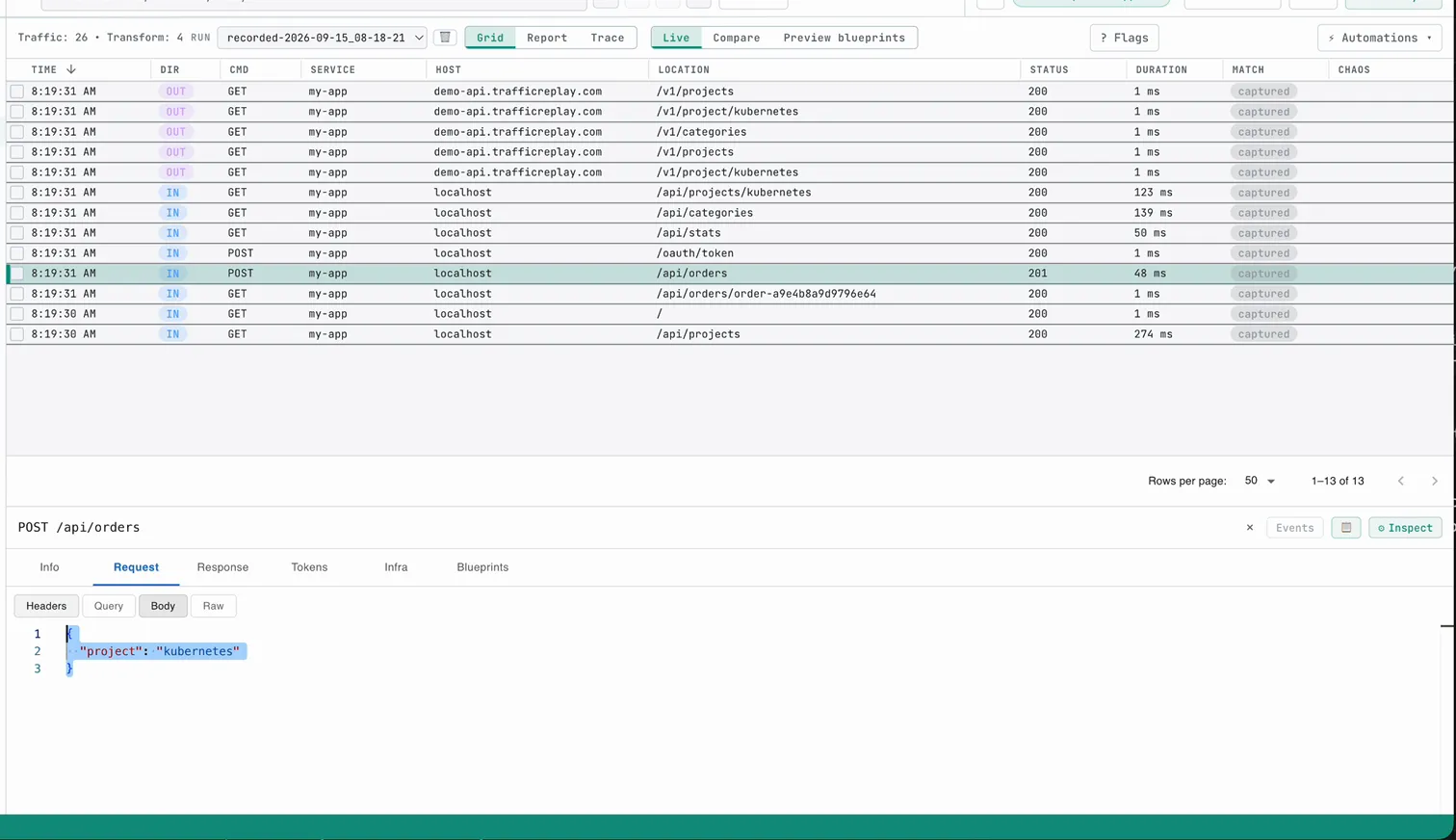
The capture contains both inbound requests to the app and outbound calls to its dependency. That lets proxymock replay the inbound requests while supplying recorded responses for downstream calls. The agent can test locally without depending on that live backend during the replay.
Ask AI to test the code with traffic replay
My next prompt in the video is:
Test the Go code with the fresh recording.Cursor uses the recording to run the test. It starts the app with mocked downstream responses, replays the captured requests, and reports whether the application’s responses match. We’ve used a similar Cursor integration-testing workflow with traffic pulled from a cluster; this example starts with a local capture.
For a code change in your own project, make the baseline requirement explicit. This is a suggested follow-up prompt, extending the setup shown in the video:
Test this change by replaying the saved baseline against the updated app.
Keep the original recording unchanged. Report which requests differ and why.
If the change introduced a regression, fix it and rerun the same replay.
The important instruction is to rerun the same baseline. If the agent replaces the expected responses with whatever its new code returns, you’ve lost the comparison you wanted.
An intentional API change needs new expectations based on your requirements. Keep the old recording for behavior that should remain compatible, and add separate tests for the new behavior.
Give failures back to the agent, then rerun
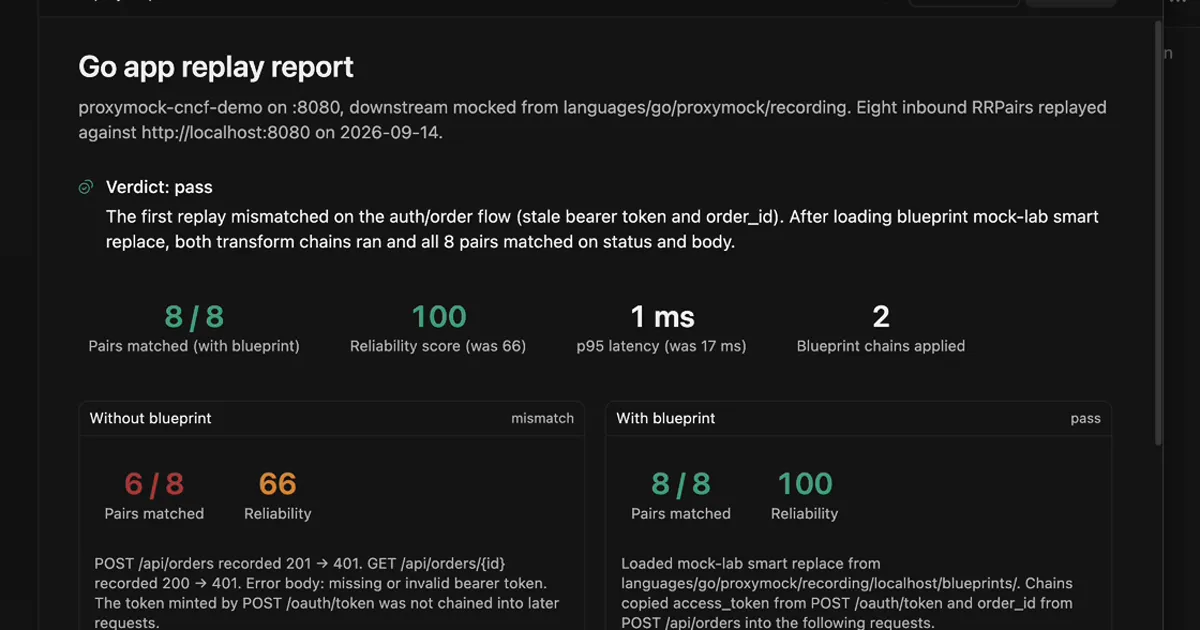
The opening report in the video shows why the agent needs to inspect failures. Six of eight pairs matched initially. The two protected requests used stale authentication and order IDs from the recording.
Cursor applied a blueprint that carried the fresh access_token and order_id into later requests. After that replay configuration correction, all eight matched. For the details of token correlation, see Fixing 403 auth errors when you replay traffic.
The agent has to distinguish that kind of setup issue from an application regression. A handler returning the wrong payload needs a code fix. A replay sending yesterday’s token needs fresh values chained through its requests. The response data gives the agent something to investigate in either case.
After a fix, ask for the replay result again. A description of the edit doesn’t tell you whether the application now passes the test.
Check the evidence behind the answer
In the completed run, Cursor reports eight of eight inbound pairs matching on status and body. I open the replay in proxymock’s web viewer to see the individual calls.
From a terminal at the repository root:
cd languages/go
proxymock web
Select the replay output, then open a request. You can inspect its response alongside the match result instead of relying entirely on the agent’s summary.
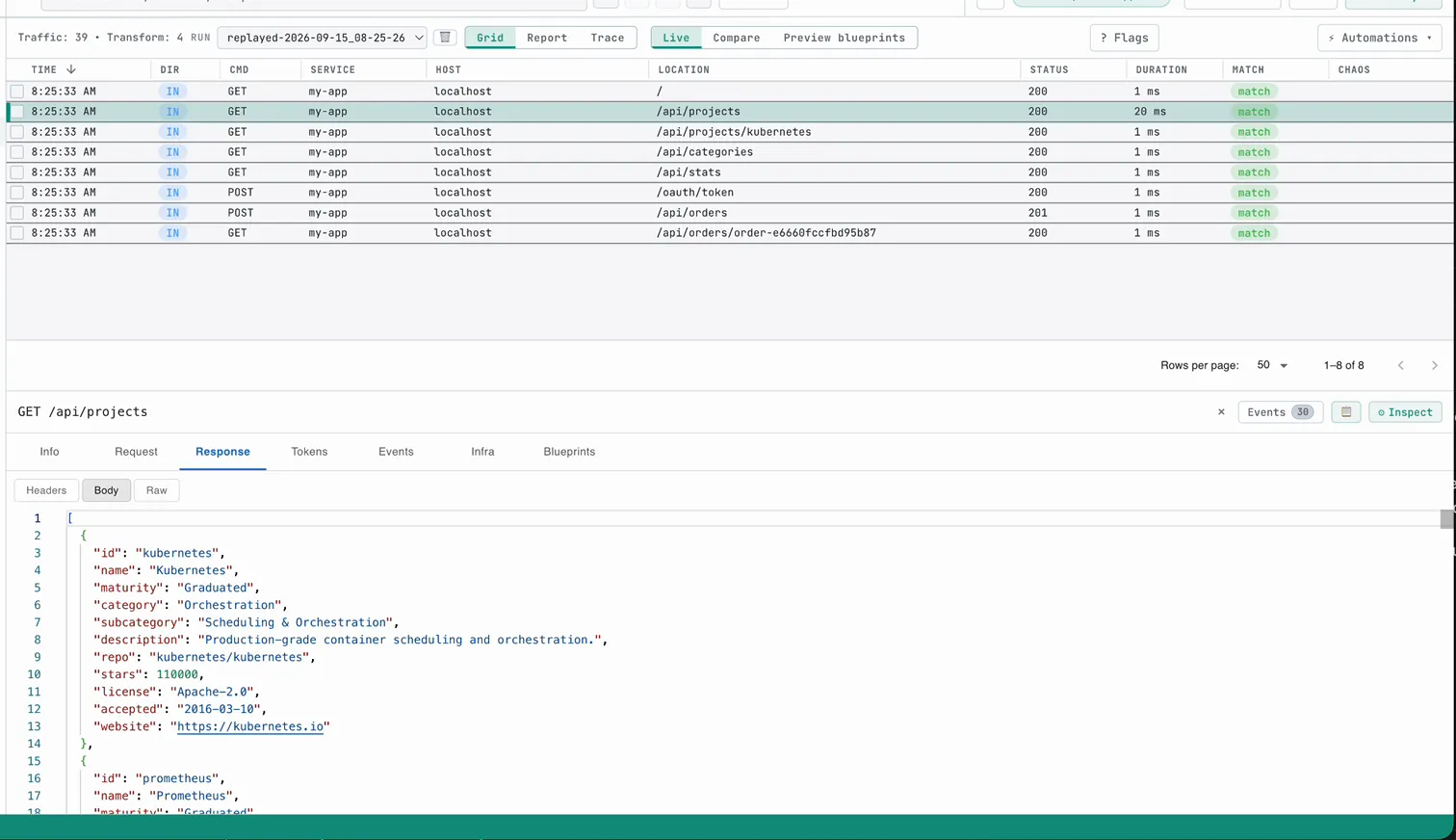
This checks the captured cases. Keep unit tests for logic and add tests for new requirements or error conditions the recording doesn’t cover. For an existing API flow, though, you now have a repeatable check the agent can run after each change.
Try the Go app in mock-lab with the two prompts above. Once the baseline replay works, ask your agent to make a change and test it against that same recording. That’s the workflow I want when I’m using AI to write code.