Building Speedy: An Autonomous AI Development Agent
How we built an AI agent that implements Jira tickets, creates merge requests, and tracks them on its own, and our journey to get to that point.
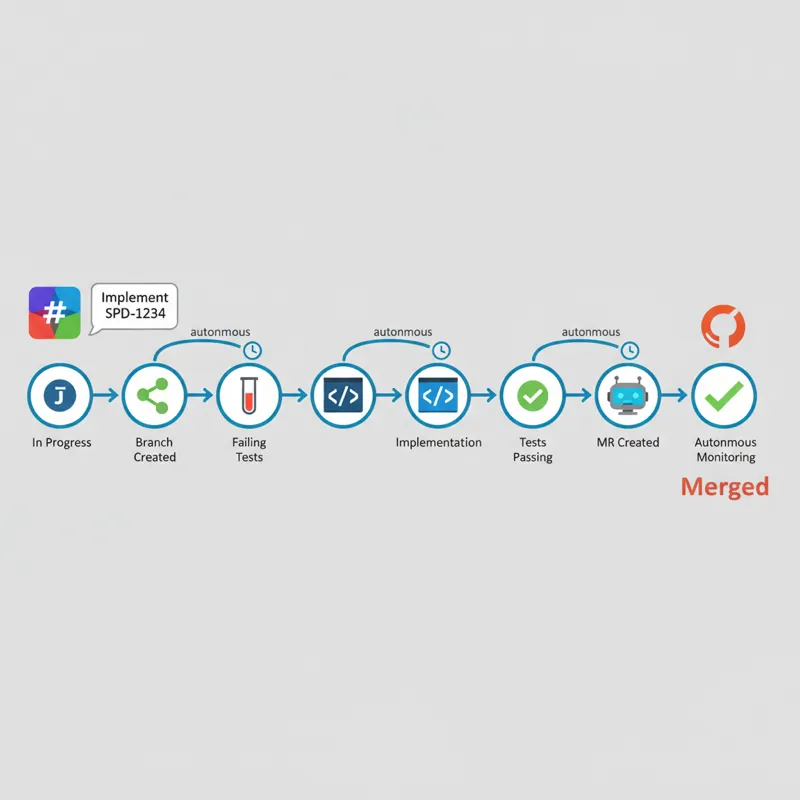
The Vision: “Implement SPD-1234”
You send “Implement SPD-1234” in Slack, walk away, and come back to work several hours later to find that your ticket has been moved to “In Progress,” a git branch has been created with failing tests, your code has been implemented to pass these failing tests, your merge request has been created with proper description and checklists, auto-merge is on, failures in your CI pipeline are investigated and fixed, and your comments on your merge request are addressed—all without your intervention. This is Speedy, our autonomous development agent on OpenClaw, powered by Claude.
The Problem We Solved
We are an engineering team with a long list of well-defined tickets, i.e., tickets where we know exactly what we need to do, what changes to make, etc. However, these tickets remain in “To Do” status because we do not have anyone on our team who can work on them. These are not complex tickets, just simple implementations, but they do require several steps, including:
- Reading through what we need to do
- Finding the relevant code
- Writing tests
- Implementing
- Creating a proper merge request
- Making sure our CI pipeline is working
- Addressing comments on our merge request
Most tickets take less than an hour of focused work, and some just 10 minutes. But even those quick wins matter: it’s all boring, repetitive work that still requires context-switching and mental overhead. Split across interruptions, these tickets linger for days or weeks. We needed a developer who never context-switched and never slept.
Architecture: The Core Components
OpenClaw: The Gateway
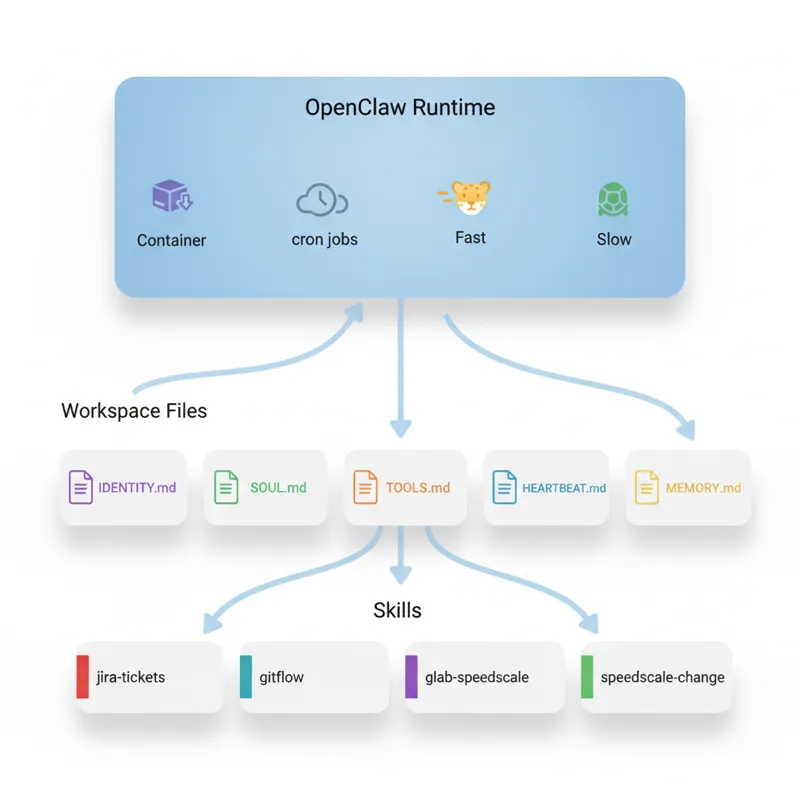
OpenClaw is an orchestration platform that runs an AI agent. Think of OpenClaw as a container for an AI agent with:
- Persistent filesystem access
- Communication channel integrations (Slack, email, etc.)
- Cron-based heartbeat monitoring
- Model tier selection (Sonnet for routine work, Opus for complex reasoning)
- Sub-agent spawning for parallel work
The OpenClaw framework doesn’t define what Speedy does, only how to run it. The what is defined by the workspace files and skills.
Workspace Files: The Agent’s Identity
The workspace/ directory defines who Speedy is, what it does, and what its personality is.
IDENTITY.md: Name, Role, Vibe
- **Name:** Speedy
- **Role:** Development Agent
- **Vibe:** Fast, focused, test-driven. Ship quality code at velocity.
- **Emoji:** ⚡SOUL.md: Core Principles, Workflow Philosophy
- TDD is religion: tests first, always
- Context is king: understand before touching code
- Autonomy over hand-holding: don’t ask permission to run tests
- Clean commits, clear MRs
TOOLS.md: Configured repo paths, Jira project prefix, GitLab org/repo
HEARTBEAT.md: Instructions for periodic monitoring
- Check tracked MRs for build failures
- Respond to review comments
- Update tracking file with latest status
MEMORY.md: Long-term learnings (grows as the agent completes tickets)
Skills: Modular Capabilities
Skills are instruction files (SKILL.md) with YAML frontmatter that OpenClaw loads on-demand. Each skill has a name: and description:, which OpenClaw uses to determine which skill to run based on user messages.
1. jira-tickets — Jira Operations via acli
acli jira workitem view SPD-1234
acli jira workitem transition --key SPD-1234 --status 'In Progress' --yes
acli jira workitem comment create --key SPD-1234 --body '=== bot ===\nTaking a look.'
Critical convention: Bot comments always start with === bot === to differentiate between bot actions and human actions (the bot uses personal credentials).
2. gitflow — Git Worktree Workflow
- Branch naming:
SPD-XXXX-short-description(nofeature/prefix) - Worktree directories:
../YYYY-MM-DD_SPD-XXXX-desc(date prefix for chronological order) - Always branch from updated master
- Clean up after merge
3. glab-speedscale — GitLab MR Management
- MR title:
[SPD-xxx] component: description - Description: mandatory format with checklist
- Auto-merge, pipeline monitoring, review comment handling
=== bot ===prefix on all comments
4. speedscale-change — The Orchestrator
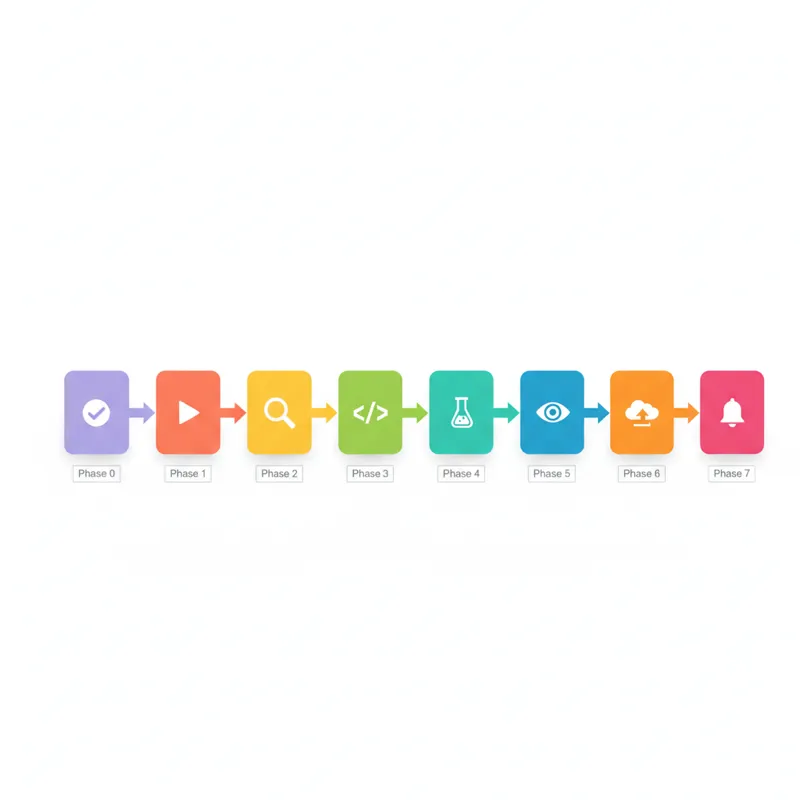
This skill has 8 phases in total. The workflow is as follows:
| Phase | What Happens |
|---|---|
| 0. Confirm Intent | Confirms receipt of ticket, asks to proceed |
| 1. Start | Reads ticket, checks if done, transitions to In Progress |
| 2. Investigate & Plan | Creates worktree, investigates code, generates analysis, reviews with peer |
| 3. Implement | TDD loop: fails tests first, then code |
| 4. Verify | Executes verification strategy developed in Phase 2 |
| 5. Review | High-level sub-agent reviews code quality |
| 6. Submit | Pushes code, creates MR, auto-merges, adds to tracking |
| 7. Notify | Sends message to human with outcome |
The orchestrator delegates to sub-agents frequently to allow them to explore code, implement solutions, and review code in Phase 2.
The Heartbeat: Autonomous Monitoring
The heartbeat is a cron job that periodically wakes the agent to check on open MRs tracked in memory/speedy-mrs.json. On each heartbeat:
- Load tracked MRs from the JSON file
- For each tracked MR:
- Check if it’s still open (if closed/merged → remove from tracking)
- Build status: If failing → investigate and fix (up to 10 attempts)
- New comments: If yes → research, respond with code changes or explanations
- Update tracking file with latest status
- Response:
- If nothing needs attention →
HEARTBEAT_OK(suppressed by OpenClaw) - If issues found → alerts via Slack
- If nothing needs attention →
And the entire process from “Implement SPD-1234” to the end happens on its own, requiring zero input (apart from hitting the wall).
The Implementation Journey: What Worked, What Didn’t
The workflow logic is simple. The hard part was tuning.
Challenge 1: Communication Channels
The initial approach: The agent would respond wherever it was invoked.
The problem: Mixed signals—Slack notifications scattered across multiple threads and DMs, hard to track what was happening.
The fix: Created a dedicated OpenClaw agent for this workflow. All Slack communication happens through this agent. If you’re dedicating the agent to a single workflow, you may not need this, but for shared agents, it’s vital.
Challenge 2: Memory Files as Source of Truth
Early approach: The agent was reading memory files but did not update them when corrected.
The problem: The agent was repeating the same mistake twice because it did not update the memory files.
The fix: Added clear instructions in SOUL.md and individual skills about memory files and the need to update them when corrected or when new patterns are learned. Also, introduced progress tracking thoughts/progress.md to the workflow, ensuring the agent keeps track of new information.
Challenge 3: Heartbeat Configuration
Early approach: The agent was instructed to “check on MRs periodically.”
The problem: The agent was inconsistent in the frequency of the heartbeat. At times, it would check too frequently, and at other times, it would not check at all.
The fix: Introduced clear heartbeat configurations for the agent:
- Maintains the
memory/speedy-mrs.jsonfile - Clearly defines what “check” entails
- Has a defined limit for the number of times it should attempt to fix before escalating to the human
- Has the
HEARTBEAT_OKresponse
Challenge 4: MR Comment Formatting
Early approach: The agent was instructed “add a bot prefix to comments.”
The problem: The agent was inconsistent in the formatting of the comments.
The fix: Changed the way the agent was instructed to act from “remember to add the bot prefix” to scripted actions:
# Instead of: "Make sure to add === bot === prefix"
# Use: Always use this exact command pattern
glab mr note 6026 --repo speedscale/speedscale --message "=== bot ==="
Your comment here"
Lesson learned: Declarative guidance is great for high-level strategy. Imperative scripts are better for precise formatting and API interactions.
Challenge 5: Dependency Setup
Early approach: Assumed tools were available.
The problem: Random failures when bash commands failed:
:warning: :hammer_and_wrench: Exec: glab mr note list 6026 --repo speedscale/speedscale -F json failed: ERRORThe fix: Explicit setup verification in README.md and TOOLS.md:
- Document required CLIs (
acli,glab) - Document installation and verification scripts
- Document authentication configuration must exist before work begins
Additional dependencies:
gcloud authfor pulling Docker images- Git properly configured with user/email
- Repository cloned and on master branch
Challenge 6: Bot Identification
Early approach: Bot used personal Jira/GitLab credentials.
The problem: Bot actions looked identical to human actions—audit trail was ambiguous.
The fix: The === bot === prefix convention on ALL comments (Jira and GitLab). This is now a hard requirement enforced in the skills. If the agent forgets, the next heartbeat or manual review catches it.
Challenge 7: Test Quality
Early approach: “Write tests” in TDD instructions.
The problem: Agent wrote implementation-focused tests that verified “the code I wrote is the code I wrote” instead of testing observable behavior.
The fix: Explicit guidance in Phase 3 of the speedscale-change skill:
- Test the “what”, not the “how” — verify observable behavior through public APIs
- Prefer
_testpackages — test from the outside to ensure you’re testing the public interface - Ask: “If I refactor the internals but keep the same behavior, would these tests still pass?”
- Phase 5 review sub-agent explicitly evaluates test quality and flags brittle tests
Challenge 8: Session Management and Orchestration
Early approach: Let the agent handle tasks directly when asked.
The problem: OpenClaw has sessions, and the agent just does whatever you ask directly. This makes it difficult to manage multiple things at once. When you’re communicating over Slack, there’s no good UI or multiple terminals to manage parallel work streams. The main agent would start doing implementation work directly, consuming its context window and losing the high-level orchestration view.
The realization: The main bot needs to be the orchestrator, not the implementer.
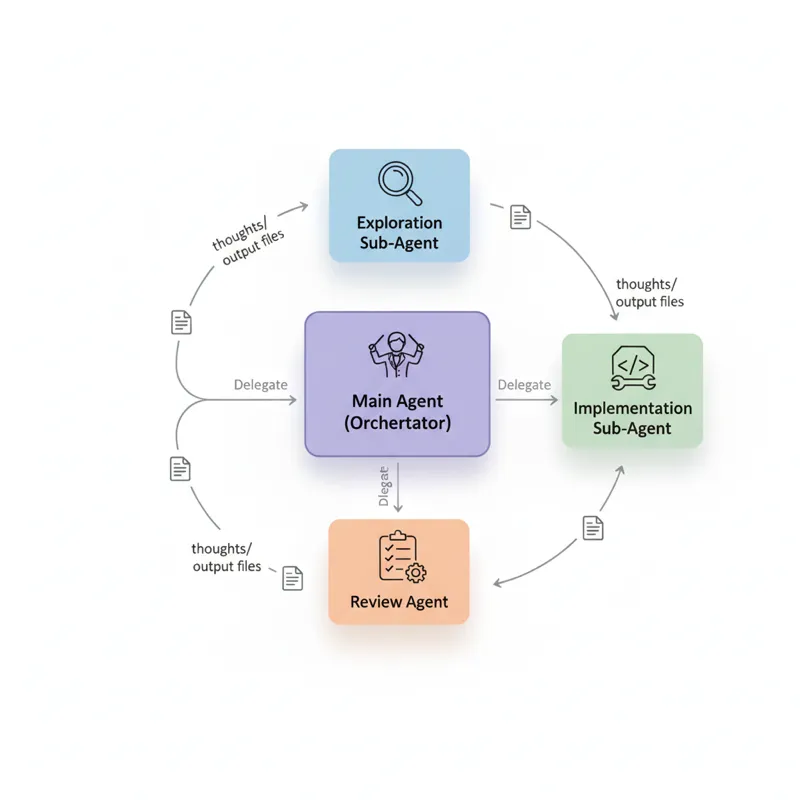
The fix: Built the pattern into the skills—always launch sub-agents for the actual work. The main bot just kicks them off and waits:
- Phase 2 (Investigate): Main bot spawns multiple exploration sub-agents to search different parts of the codebase
- Phase 3 (Implement): Main bot spawns an implementation sub-agent to write tests and code
- Phase 5 (Review): Main bot spawns a review sub-agent (using a higher-tier model) to critique the work
The main bot’s job is coordination:
- Load the right skills
- Spawn sub-agents with clear instructions
- Wait for them to complete
- Synthesize their outputs
- Decide on next steps
- Track progress in
thoughts/progress.md
Why this matters: The main bot retains its context for the big picture: ticket requirements, phase, gate, and user communication. The sub-agents do all the heavy lifting (exploring thousands of lines of code, writing implementations, running tests) without polluting the orchestrator’s context.
Lesson learned: Your main agent should be like a project manager, not a developer. Your developer (sub-agent) should be doing work, and your manager (main agent) should be making decisions and delegating work.
Key Design Decisions
1. Sub-agents for delegation (The Orchestrator pattern)
Why: This was arguably the most critical design decision. By default, when you ask an AI agent to perform some work, it simply goes and does it. While this is fine when doing a single, isolated task, this breaks down when doing multi-step workflows, especially when working in Slack and having no UI controls over multiple parallel sessions.
The problem we solved: Without this pattern, our main agent would:
- Start exploring code and pollute its context window with thousands of lines of code
- Start writing implementation and pollute its context window
- Lose track of which phase it’s in
- Be unable to run multiple parallel sessions (everything sequential)
The solution: Implementing the orchestrator pattern in every skill. The main bot’s role is simply “kick off and wait” and never “do the work” itself.
How: OpenClaw creates isolated background sessions (sub-agents) with full filesystem and tool access. The sub-agent operates independently and notifies when done. The main agent:
- Loads up the skill
- Works out what needs doing
- Spawns a new sub-agent and gives it specific instructions
- Waits
- Reads output from the sub-agent (usually files in
thoughts/) - Makes decisions about next steps
Example workflow:
- Main agent: “I need to understand how authentication works. Spawning exploration sub-agent…”
- Sub-agent: Searches code, reads files, writes
thoughts/auth-investigation.md - Main agent: Reads the analysis, decides to spawn implementation sub-agent
- Sub-agent: Writes tests and code, documents in
thoughts/implementation-notes.md - Main agent: Reviews the results, spawns review sub-agent
- Review sub-agent: Reviews quality, writes
thoughts/review-round-1.md - Main agent: Synthesizes results, decides to ship or iterate
Key insight: The main agent is a project manager, not a developer. It never writes code directly—it coordinates developers (sub-agents) who write code.
2. The thoughts/ Directory
Why: Auditability. If a human (or future agent) visits the worktree after the agent is done, they should be able to reconstruct the process.
What goes here:
- Analysis files (root cause, affected files, risks)
- Review feedback and responses
- Abort reasons (if the agent gives up)
- Debugging notes and dead ends explored
- Progress tracker (living checklist)
Naming convention: YYYY-MM-DD_HH-MM-SS_description.md for markdown files.
3. Gates and Honest Abort Points
Why: Quality over quantity. If the agent isn’t confident, it’s better to escalate than to ship a broken MR.
Gates in the workflow:
- Phase 1: Ticket not found → confirm with user
- Phase 2: Too complex after investigation → abort, comment, move back to TODO
- Phase 3: Implementation stuck after many attempts → abort
- Phase 5: Review cycles > 10 → abort
On abort:
- Write reasoning to
thoughts/<timestamp>-abort-reason.md - Comment on Jira ticket with context
- Move ticket back to TODO
- Notify user in Slack
4. Model Selection by Task Complexity
Why: Cost and latency optimization without quality compromise.
Strategy:
- Code exploration, CLI investigation: Cheaper/faster model (Sonnet)
- Analysis synthesis, complex planning: Stronger model (Opus)
- Final review: Always use a higher-level model than the implementer
5. Scripted vs. Declarative Guidance
When to use declarative:
- High-level principles (TDD, clean commits)
- Strategic decisions (when to abort, how to prioritize)
- Behavioral guidelines (autonomy over hand-holding)
When to use scripts:
- Precise formatting requirements (bot prefix)
- API interactions with specific flags
- Multi-step operations that must happen in order
Lessons Learned
1. Iteration is Everything
The first version of this workflow was a single prompt. It worked… sometimes. The version in this repo is the result of weeks of tuning:
- Watching the agent fail and figuring out why
- Adding explicit guidance where it was vague
- Converting declarative instructions to imperative scripts
- Adding gates and abort points
- Refining the heartbeat behavior
Takeaway: Build the MVP, run it on real work, and iteratively refine based on failures.
2. Memory is Persistent, Use It
Early versions didn’t enforce memory updates. The agent would be corrected, acknowledge the correction, and then make the same mistake again in the next session.
Takeaway: Don’t forget to have the agent update the memory files when corrected or when learning new patterns.
3. Design for Orchestration, Not Direct Execution
The single most important architectural decision: the main agent should never do the work directly.
If we don’t design the orchestration pattern into our skills from the get-go, we’ll hit a wall when:
- The agent’s context is full of implementation details
- We can’t manage multiple parallel work streams (especially over Slack)
- The agent can’t keep track of where it is in the workflow
- Everything is sequential instead of parallel
Takeaway: The main agent is the project manager, the sub-agents are the developers, the main agent starts the workflow and waits, and the sub-agents do the implementation but never the main agent. This is particularly important if we’re working through the interface of Slack, where we have no UI for managing multiple sessions.
4. Shared Credentials Require Bot Identification
Using personal GitLab or Jira credentials was the easiest way to get the bot working, but it caused issues with auditing what changes were made by the bot or by the human. The === bot === prefix is the easiest solution.
Takeaway: If the agent is sharing credentials with the human, use the === bot === prefix in the agent’s actions. It’s critical for trust and debugging.
5. Skills Should Be Modular but Coordinated
Initially, the skills were designed as monolithic blocks of code, but this led to agent context bloat. Breaking the skills down into separate skills (jira-tickets, gitflow, glab-speedscale, speedscale-change) has improved modularity.
However, skills need to reference other skills. The speedscale-change orchestrator is designed to load the other skills in the workflow.
Takeaway: Modular skills + explicit orchestration = clarity and maintainability.
6. The Heartbeat is Underrated
The heartbeat changes the agent from “task executor” to “autonomous system.” The agent doesn’t simply go away after creating the MR; it watches, fixes, and reacts until the MR is merged.
Takeaway: If the agent is creating items with a lifecycle (e.g., MRs, tickets, deployments), consider adding a heartbeat to monitor the items. The cost is low, the benefit is high.
7. Test Quality Matters More Than Test Coverage
We wrote many tests in the early days, but they were implementation-specific and brittle. A refactor would break many tests, even if the behavior hadn’t changed.
Takeaway: Teach the agent to test the quality of the behavior through the public API. Use review sub-agents to catch brittle tests. Use _test packages to enforce external testing.
8. Dependencies Are Silent Killers
Occasional errors like “glab command failed” would consume many hours of debugging time. The solution ended up being embarrassingly obvious: document the tools needed and check they’re installed.
Takeaway: Create a setup checklist and verify the external tools needed for the task are present before commencing work.
What This Unlocked for Our Team
By implementing Speedy, we’ve gained:
- Backlog velocity: Tickets that would have taken weeks in “To Do” can now be completed in hours
- Context preservation: Engineers no longer need to switch context for routine tickets
- Consistent quality: TDD is enforced, auto-merge is used, and the agent’s review process provides quality control
- Audit trail: The
thoughts/directory provides full visibility of every decision - Continuous monitoring: Failures in the pipeline are corrected autonomously, and human attention is called upon only when the agent is stuck
The human role has changed from being an implementer to being a reviewer and strategist. Engineers define the tickets, Speedy implements, and the engineer reviews the MR if they want, but they don’t have to, as the self-review process (Phase 5) already detects the majority of the issues.
The Hard Truth: This Isn’t Turnkey
This is the actual workflow used by the Speedscale engineering team, published as a reference. Your team’s tools, conventions, and project structure are different, and this is meant as a starting point to adapt, not as a turnkey solution.
You’ll need to:
- Replace
SPDwith your Jira project prefix - Set the repository path, GitLab org/repo
- Adjust the skills according to your team’s workflow
- Configure the heartbeat according to your team’s monitoring needs
- Adjust the model according to your team’s requirements
Your mileage may vary. But the architecture is proven: workspace files, skills, and heartbeat.
What’s Next
Speedy works, but it’s not perfect. Here’s what we’re working on:
Better observability: Right now, tracking what Speedy does requires SSH-ing into directories and reading thoughts/ files. As one engineer put it: “I can’t even see what the subagent did directly, I’m just an archeologist trying to piece the picture together from old bones.” We need a proper dashboard to see agent progress, subagent activity, and decision history in real-time.
Durable work tracking: The current system relies on what the agent reports in Slack and files scattered across worktree directories. For long-term use, we need a real work-tracking system—something that survives agent restarts and makes it easy to audit what happened weeks later.
Smarter abort heuristics: When should the agent give up? We’re tuning the gates based on success/failure patterns, but there’s still guesswork involved.
Cross-ticket learning: Can the agent learn patterns from past implementations to improve future ones? Right now each ticket starts fresh.
Multi-agent orchestration: Can we run multiple Speedys in parallel on different tickets without conflicts? The current design assumes one agent at a time.
Try It Yourself
The complete source code is available on GitHub: speedscale/speedy-template
⭐ Star the repository and adapt it for your own team’s workflow.
The repository includes:
workspace/— Agent identity, behavior, and tool referencesskills/— Modular instruction files for Jira, Git, GitLab, and orchestrationREADME.md— Setup guide and reference documentation
Getting started:
- Clone the repository:
git clone https://github.com/speedscale/speedy-template.git - Follow the OpenClaw docs to create an agent
- Point it at the workspace and connect it to Slack
- Customize the skills for your team’s tools and conventions
Then type: “Implement [YOUR-TICKET]” and watch it go!