Postman supports API load testing through the Collection Runner’s Performance mode. It runs multiple virtual users against a collection and reports response times and throughput. A normal functional collection run checks request behavior; increasing its iteration count alone doesn’t configure a concurrent performance test.
This tutorial uses a local API you control. It shows how to choose a workload and interpret the result before increasing load. Don’t point the example at a public test-data API: you’ll measure that provider’s limits and send traffic it didn’t request.
Create a local API to test
Install Node.js and the Postman desktop app. Save the following as server.mjs in a scratch application directory:
import http from 'node:http';

const server = http.createServer((req, res) => {
  if (req.method === 'GET' && req.url === '/orders/42') {
    res.writeHead(200, { 'Content-Type': 'application/json' });
    res.end(JSON.stringify({ id: 42, status: 'paid', total_cents: 2500 }));
    return;
  }
  res.writeHead(404, { 'Content-Type': 'application/json' });
  res.end(JSON.stringify({ error: 'not_found' }));
});

server.listen(8080, '127.0.0.1');
Start it with node server.mjs. In Postman, create a collection called Local orders, add a GET request to http://127.0.0.1:8080/orders/42, and send it once. The response should contain order 42 with a paid status.
The tiny server is a setup check, not a production capacity benchmark. It has no database, authentication, or external dependency. Once the workflow works, substitute a development API and requests representative of your own service.
Add an assertion before adding load
Put the following in the request’s post-response script:
pm.test('Order response matches the contract', function () {
  pm.response.to.have.status(200);
  const order = pm.response.json();
  pm.expect(order.id).to.eql(42);
  pm.expect(order.status).to.eql('paid');
});
Send the request again and check that the assertion passes. A quick response containing the wrong body shouldn’t count as a successful test. For a real workflow, assert the business fields callers need, rather than every incidental field in the payload.
Before a longer test, consider how it changes state. Repeating an order-creation request with one fixed identifier can turn the run into a test of duplicate-key errors. Reusing one token can also produce authentication failures after expiry. Give each virtual user appropriate input and make setup and cleanup explicit.
Configure Postman’s Performance mode
In the desktop app, switch to Cloud View. Select your collection under Items > Collections, choose Run, and set Run type to Performance. Choose App, a Fixed profile, five virtual users, and a one-minute duration. These are example settings for checking your setup, not a recommended capacity target.
Start the run. Virtual users execute the selected requests in order and repeat that sequence while the test runs. Use the current Postman configuration guide if your interface differs. Cloud View is the workspace view; it does not mean the load comes from Postman’s cloud. The App method runs locally and is available on all plans. Hosted cloud runs require a paid plan. A cloud runner can’t reach the localhost server used here.
A virtual-user count doesn’t specify a fixed requests-per-second target. The request sequence and its response times affect how many requests each user completes. If responses get slower, completed throughput can fall even while the configured user count stays constant.
Read the result before increasing virtual users
Inspect the performance metrics: throughput, response-time percentiles, request errors, and assertion failures. Error percentage and assertion failure percentage measure different problems. A valid HTTP response can still fail your business assertion.
Suppose the average response time looks acceptable but P95 rises during the run. Inspect the slow requests and compare them with server telemetry. Averages can hide the slow tail that users experience. Save the workload settings with the results so the next run is comparable.
Also watch the load generator’s CPU and memory. When the machine creating requests is saturated, increasing virtual users can distort the result. Run your actual API and load generator on separate machines when you need to distinguish their resource limits.
The next test should answer a specific question. For example: does the development API still return correct order data at the expected user count? Set a performance threshold based on your service’s requirements, then rerun the same workload after a change. Don’t select a threshold only because the current implementation passes it.
Isolate downstream APIs when needed
An order service might call a payment gateway or a catalog API. Under load, those dependencies can introduce rate limits, charges, or changing responses. Decide whether the test is measuring the whole integration or the order service in isolation.
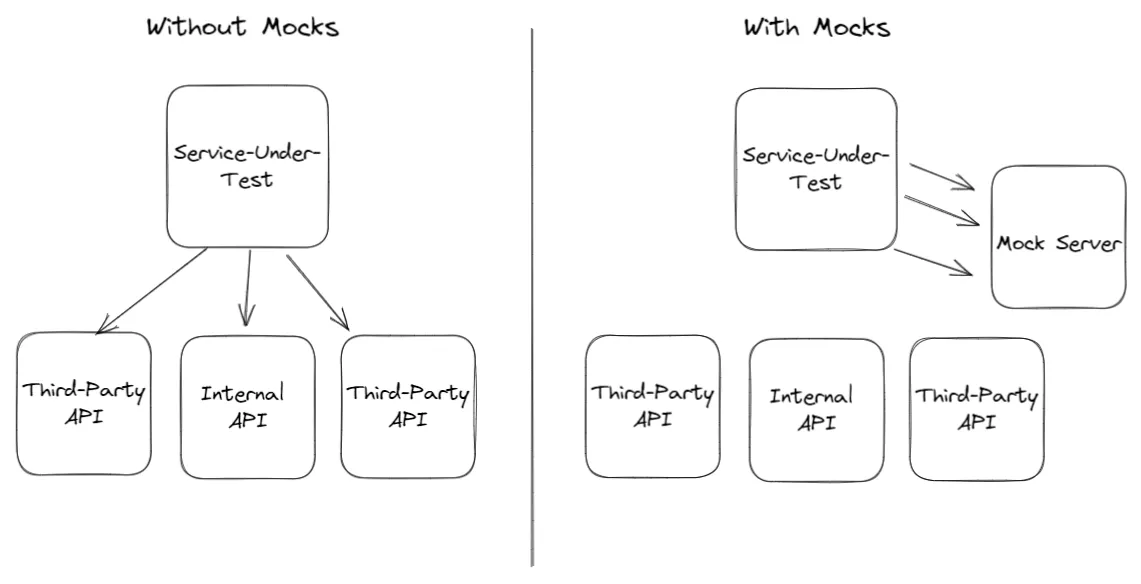
For an isolated test, proxymock can supply responses recorded from downstream interactions. Follow the quickstart to capture representative traffic, review sensitive values, and start dependency mocks. Use --no-passthrough when unmatched calls must not reach the live dependency.
Postman can generate the inbound HTTP load while proxymock supplies dependency responses. For a workflow that also checks the changed application’s responses against a saved baseline, use traffic replay. Keep the baseline unchanged when investigating a regression.
Repeat the test in CI
Use the performance runner supported by your installed Postman version and copy its generated CLI command into your pipeline. An ordinary Newman collection run is useful for functional assertions, but it isn’t the same configuration as this virtual-user test.
Keep the target URL, workload, and pass criteria visible in the job configuration. Store the result as a build artifact. A passing one-minute local example proves the setup works; it doesn’t prove the service can survive peak production traffic.
For a broader workload based on what your application actually receives, read how traffic replay works or try proxymock locally.
Postman and Speedscale in practice
Cimpress reduced a typical four-week testing process to three or four days with Speedscale. Its case study describes using production traffic for API and load testing. That result belongs to Cimpress’s workflow; it is not a promised outcome for this tutorial.
The video below shows how to create performance and regression tests from a Postman collection with Speedscale.
Start a free Speedscale Cloud trial to try the workflow with your application, or request a demo.
Frequently asked questions
Can Postman do load testing?
Yes. Use the Collection Runner Performance mode to run virtual users concurrently. A functional collection run with repeated iterations is a different test.
Can Postman run a load test in the cloud?
Postman supports cloud performance runs on eligible paid plans. This tutorial uses the desktop App runner because its target is a localhost API.
Are virtual users the same as requests per second?
No. Virtual users repeat a request workflow. Its length and response times affect the throughput the test produces.
Can I use proxymock with a Postman load test?
Yes. Postman can send inbound HTTP requests while proxymock supplies recorded responses for downstream dependencies. Configure unmatched-request behavior for the isolation the test needs.