Runtime Validation vs Static Analysis: Why You Need Both
Does Runtime Validation Replace Static Analysis?
Runtime validation does not replace static analysis. They solve different problems. Static analysis catches structural defects in code before it runs. Runtime validation catches behavioral failures by testing code against real production traffic. Enterprise teams adopting AI coding tools need both layers because AI-generated code introduces a new class of defects that neither layer catches alone.
According to CodeRabbit’s State of AI vs Human Code Generation report, AI-generated pull requests contain roughly 1.7x more issues than human-written ones. Many of those issues pass static checks cleanly. The failure shows up only when the code meets real data.
What Does Static Analysis Actually Catch?
Static analysis tools like SonarQube, ESLint, Checkstyle, and Qodo scan source code without executing it. They identify problems by examining the code’s structure, syntax, and known vulnerability patterns.
What static analysis is good at:
- Code smells and style violations. Unused variables, overly complex methods, inconsistent naming.
- Known vulnerability patterns. SQL injection via string concatenation, hardcoded credentials, insecure deserialization.
- Type errors. Mismatched types, null reference risks, incorrect method signatures.
- Dependency risks. Known CVEs in third-party libraries, license compliance.
Static analysis runs fast, integrates into every IDE, and catches a real category of bugs. It is a necessary layer. But it operates on code in isolation. It answers the question “is this code well-formed?” not “does this code work with real data?”
AI coding tools themselves are a form of static analysis when they review code. When Cursor, Claude Code, or Copilot evaluate whether generated code is correct, they are reading the code and predicting what it will do. They are not running it. They are guessing based on patterns from training data. This is the same as what SonarQube does, just with a more sophisticated pattern matcher. The code still never executes against real conditions.
What Does Runtime Validation Catch That Static Analysis Misses?
Runtime validation tests code against actual production traffic patterns. Instead of analyzing code in isolation, it replays real API calls, database queries, and service-to-service interactions against the changed code and compares the behavior to a known baseline.
Runtime validation catches failures that are invisible to static tools:
- Behavioral regressions. A function returns 200 OK but the response body is wrong because a field mapping changed. Static analysis sees valid code. Runtime validation sees the downstream service rejecting the response.
- Contract violations. An API endpoint now returns a date as a string instead of an epoch timestamp. The code compiles. The consuming service crashes.
- Edge case failures. Production traffic includes request patterns that no developer anticipated: empty arrays, Unicode in fields expected to be ASCII, concurrent writes to the same resource. AI-generated code almost never handles these because the AI has never seen your traffic.
- Performance regressions. A query that worked fine in development takes 8 seconds with production-scale data. Static analysis cannot measure execution time.
- Integration failures. Service A changed its response format. Service B’s AI-generated handler doesn’t account for it. Both services pass their own static checks independently.
The common thread: these failures require executing the code against real conditions. No amount of pattern matching on source text can detect them.
Why AI-Generated Code Makes This Worse
AI coding tools generate code from documentation, training data, and examples. They have never seen your production traffic, your actual API contracts, or your operational quirks. This creates a specific pattern of failures:
- The code looks correct. AI-generated code is syntactically clean. It passes linters, type checkers, and code review at a glance.
- Static analysis agrees. SonarQube finds no issues. The AI’s own review finds no issues. Both are reading code, not running it.
- The tests pass. Unit tests written by the same AI validate the AI’s own assumptions, not production reality.
- Production breaks. Real traffic hits an edge case the AI didn’t model.
Step 3 deserves special attention. When an AI writes code and then writes the tests for that code, you have the same engineer validating its own work. The tests confirm what the AI assumed, not what actually happens. The AI has no way to write a test for a production edge case it has never seen. Angie Jones, VP of AI Enablement at Block, addresses this directly in her testing pyramid for AI agents. She separates test layers by how much uncertainty they tolerate. At the base are deterministic tests that must be predictable. In the middle is what she calls “reproducible reality” — record real interactions once and replay them forever. At the top is “vibes and judgment” — subjective evaluation by another LLM. Her point is that the top layer should be the smallest. Most teams have it inverted: they rely heavily on the AI’s judgment about its own code and skip the reproducible middle layer entirely.
This is the context gap in AI code generation. The AI writes code for the general case. Production traffic is specific to your system.
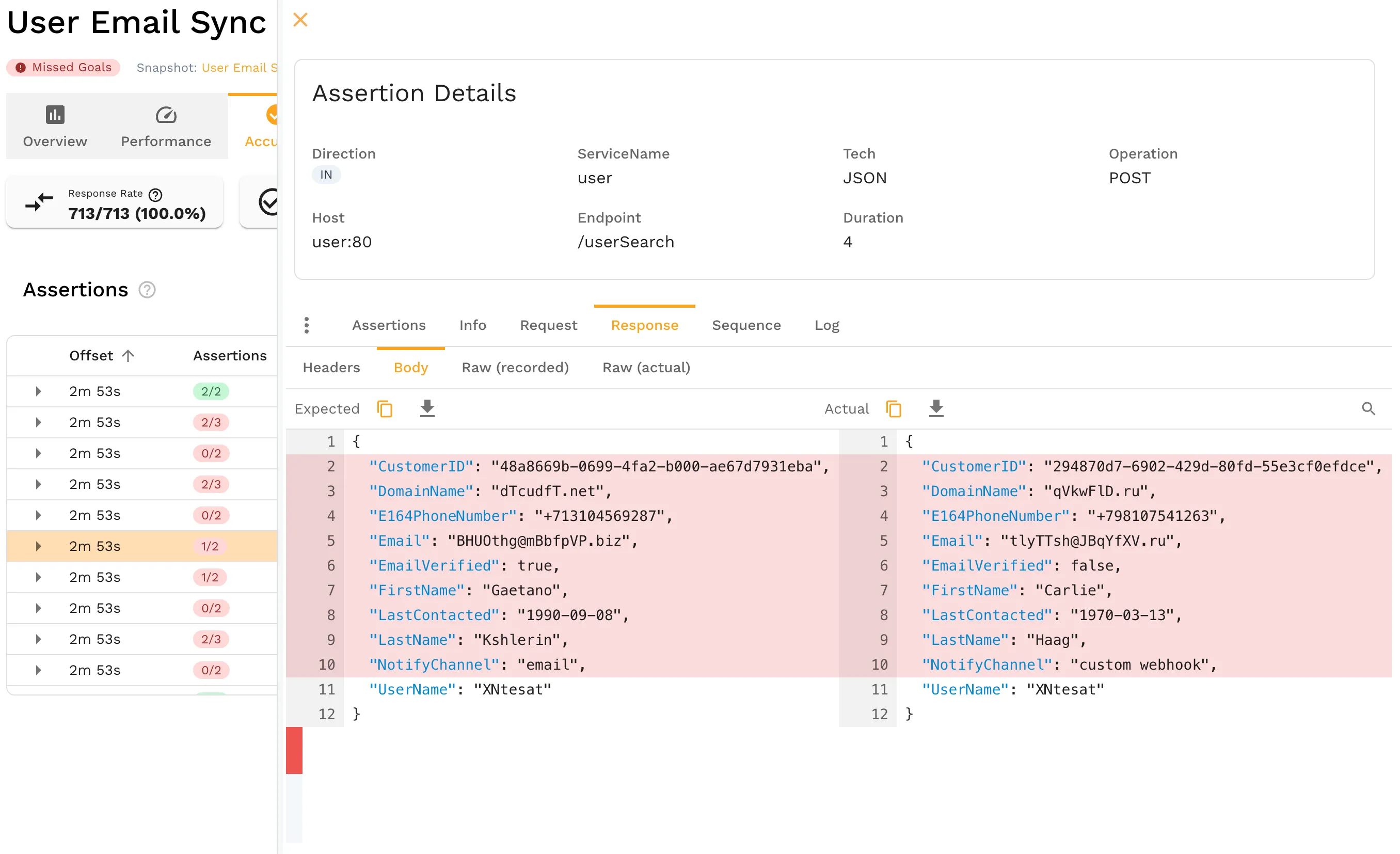
The more code AI generates, the more behavioral surface area exists that static analysis cannot cover. Enterprise teams running 50-200+ microservices with AI-assisted development across multiple teams face a combinatorial expansion of this risk.
How the Two Layers Work Together
Static analysis and runtime validation are not competing approaches. They are complementary layers in a validation pipeline, and they belong in that order.
| Dimension | Static Analysis | Runtime Validation |
|---|---|---|
| When it runs | Pre-commit, in IDE, CI pipeline | Post-build, CI pipeline, pre-deploy |
| What it examines | Source code text | Executing code + real traffic |
| What it catches | Syntax errors, code smells, known CVE patterns | Behavioral regressions, contract violations, edge cases |
| What it misses | Anything that requires execution context | Code style, dependency vulnerabilities |
| Speed | Seconds | Minutes (depends on traffic volume) |
| False positive rate | Moderate (well-tuned rules reduce this) | Low (real traffic is the production context) |
| AI code blind spot | Misses behavioral failures from context gap | Catches exactly those failures |
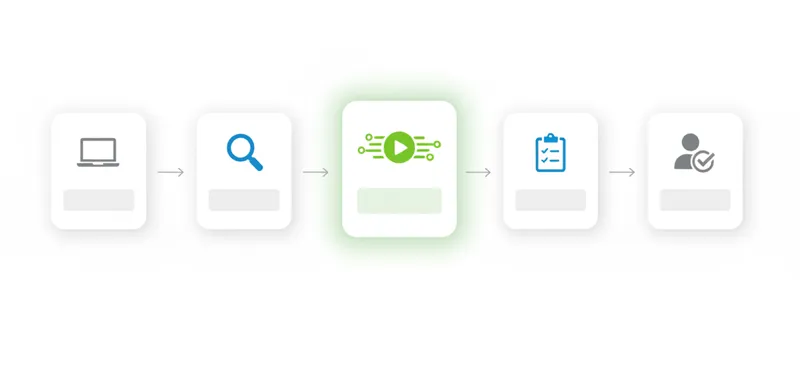
A practical enterprise pipeline looks like this:
- Developer writes or AI generates code
- Static analysis runs in IDE and on commit — catches structural problems immediately
- Unit tests run in CI — verifies function-level logic
- Runtime validation replays production traffic against the change — catches behavioral failures before merge
- Code review happens with both static and runtime results visible — reviewers see actual behavior, not just code
Step 4 is the layer most teams are missing. They go from unit tests directly to staging or production, relying on synthetic test data that doesn’t represent real conditions.
What Enterprise Teams Should Evaluate
If your organization is adopting AI coding tools at scale, here are the questions to ask when evaluating runtime validation:
Coverage questions:
- Can it capture traffic from your actual production services without code changes?
- Does it handle your protocols (REST, gRPC, GraphQL, database queries)?
- Can it isolate individual microservices for independent validation?
Integration questions:
- Does it fit into your existing CI/CD pipeline (GitHub Actions, GitLab CI, Jenkins, Azure DevOps)?
- Can AI coding agents (Cursor, Claude Code, Copilot) access production context via MCP while generating code?
- Does it work alongside your existing static analysis tools, not instead of them?
Enterprise questions:
- How does it handle PII in captured traffic? (Redaction, tokenization, or masking)
- Can it enforce compliance requirements (PCI, SOC 2, GDPR) on test data?
- Does it reduce your staging environment footprint? (Non-production environments often represent the single largest cloud cost after production itself)
Getting Started
You don’t need to rip out your existing tools. Static analysis stays. Unit tests stay. Runtime validation adds the missing layer.
Most teams start by picking a single service that has burned them before — one with a history of production incidents that passed all pre-merge checks. Capture a week of its production traffic, then replay that traffic against the next code change. The first replay usually surfaces at least one behavioral delta that static analysis and unit tests missed entirely. That result is what sells the approach to the rest of the engineering organization.
Start with one service:
- Capture traffic from a production service using Speedscale or
proxymock - Replay that traffic against your next AI-generated code change in CI
- Compare the response to baseline — look for behavioral deltas
If you’re already using AI coding tools like Cursor or Claude Code, Speedscale’s MCP integration gives the AI access to real production traffic while it generates code, closing the context gap before the code is even written.
For a deeper look at the failure patterns AI code introduces, read Silent Failures: Why AI Code Breaks in Production.
For teams ready to see this in action, book a demo.
Frequently Asked Questions
Is runtime validation the same as integration testing?
No. Integration tests use synthetic data in pre-configured environments. Runtime validation replays actual production traffic. The difference is coverage: production traffic contains edge cases, timing patterns, and data shapes that synthetic tests never include. Integration tests verify what you thought to test. Runtime validation verifies what actually happens.
Does runtime validation slow down CI/CD pipelines?
It adds minutes, not hours. A typical replay of captured traffic for a single service takes 2-5 minutes depending on traffic volume. Compare that to the hours or days spent debugging a production incident caused by a behavioral regression that static analysis and unit tests missed.
Can static analysis tools evolve to catch behavioral failures?
Some static tools are adding AI-powered analysis that attempts to reason about runtime behavior. These are useful incremental improvements but fundamentally limited: you cannot determine how code behaves with real data without actually running it with real data. This is the halting problem in practice. An AI reviewing code is still reading code, not running it — it is a more sophisticated static analyzer, not a runtime validator.
What if we don’t have production traffic to replay?
You can start by capturing traffic from any environment where real or realistic requests are flowing — staging, QA, or even local development with proxymock. Production traffic provides the highest fidelity, but any real traffic is better than synthetic test data for catching behavioral regressions.