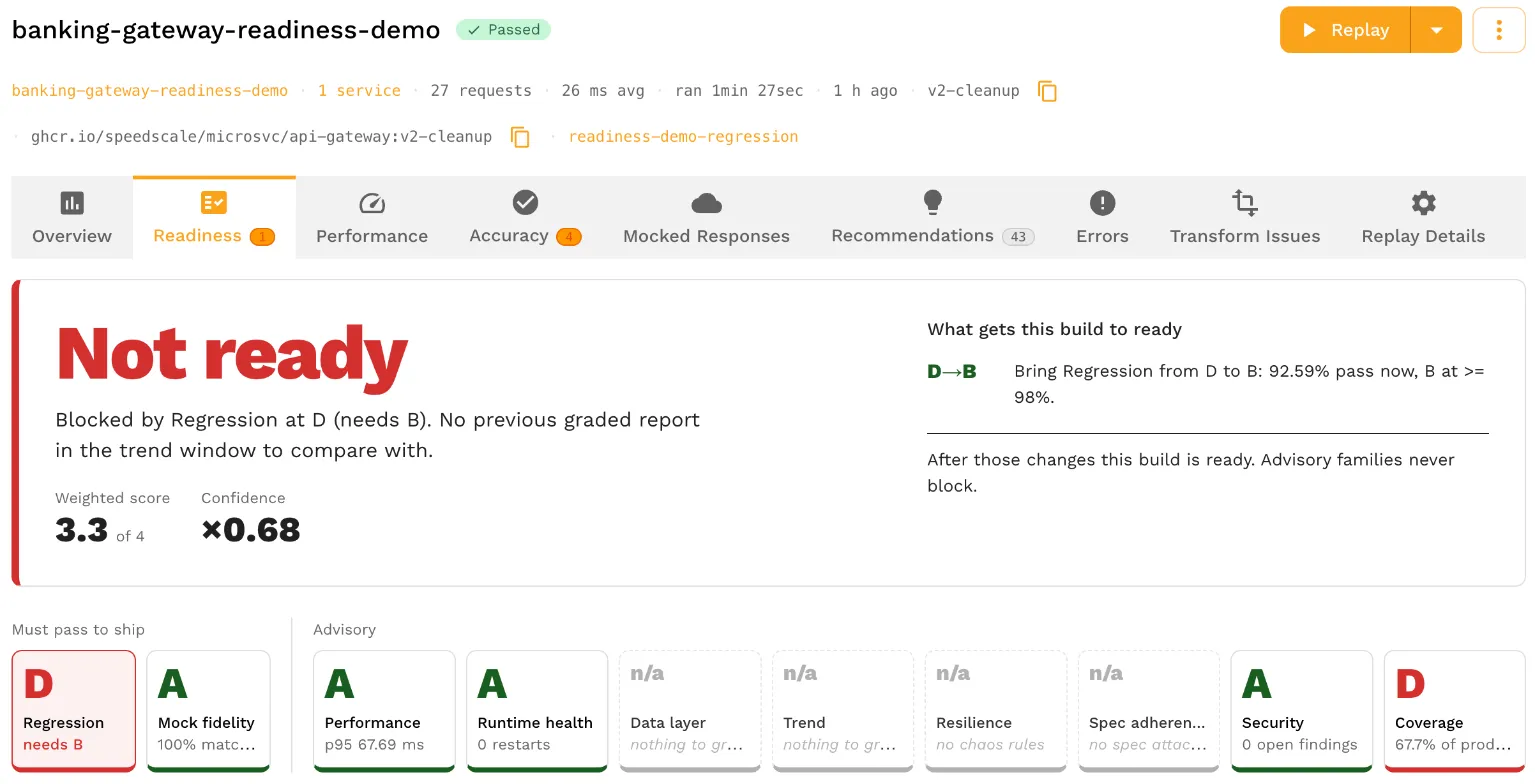
Speedscale’s automatic release readiness scorecard grades a completed replay against the release rules in its test configuration. It returns a Ready or Not ready verdict, letter grades for ten metric families, a weighted score and a confidence factor. This feature provides a concrete and automatic baseline for whether new releases are ready for production.
The underlying test runs recorded traffic against a build, with dependencies mocked from the recording. The scorecard uses the run’s measurements to identify which release criteria the build meets and which findings need attention. The scorecards are automatically generated but also configurable.
Report status and readiness are separate checks
A report’s Passed or Missed Goals status records whether the run met its configured goals. The readiness verdict checks whether each blocking metric family meets its required letter grade. These are independent evaluations of the same run.
For example, a test can require 90 percent of assertions to pass while its readiness rules require Regression to reach B. The default boundary for B is 98 percent. A run with 92.59 percent passing assertions therefore meets the test goal but earns a D in Regression and a Not ready verdict.
The report above uses 27 hand-built fixture requests against a demo banking gateway. Its Regression findings identify the endpoint, the failed assertions and the affected counts. The scorecard’s path to Ready lists the current grade, the required grade and the measured value for each blocking family.
Ten metric families describe the run
Each family groups related measurements into a letter grade from A to F. The families cover application behavior, performance, dependency matching and the conditions under which the test ran.
| Family | What it measures |
|---|---|
| Regression | The share of assertions that passed. |
| Performance | Latency against its goal, with error-rate caps on the grade. |
| Resilience | How requests affected by injected faults behaved within the configured chaos bounds. |
| Spec adherence | Whether replayed HTTP calls conform to the service’s attached OpenAPI document. |
| Security | The highest severity among open findings from static checks and the optional authentication probe. |
| Mock fidelity | How often dependency calls matched the mocks. |
| Coverage | The share of recorded production call volume represented by the endpoints the replay exercised. |
| Runtime health | Kubernetes restarts, out-of-memory kills and readiness waits. |
| Data layer | SQL statement matching, or database mock matching when statement data is unavailable. |
| Trend | Changes in family grades since the previous graded report for the same service and image tag. |
A family without usable input shows n/a. For example, Resilience is n/a without injected faults to assess, Runtime health needs Kubernetes, and Spec adherence needs an attached specification. An n/a family is excluded from the score and cannot block the verdict.
The grading reference lists the boundaries and input requirements for each family.
Configure which grades block a release
The Readiness tab of the test config assigns each family one of three roles:
- Blocks below a floor: a grade below the required letter makes the report Not ready.
- Advises: the grade contributes to the weighted score but cannot block the verdict.
- Off: the family can still show a grade, but it affects neither the verdict nor the weighted score.
By default, Regression and Mock fidelity block below B. Performance, Runtime health, Data layer and Trend advise. Resilience, Spec adherence, Security and Coverage are Off until configured otherwise.
The editor previews proposed changes against the last five reports that used that config, showing which grades and verdicts would change. Saving applies the new rules to subsequent replays; past reports retain their stored grades. The test config documentation covers floors, weights and boundary overrides.
Read the score and confidence alongside the verdict
The weighted score summarizes the enabled families on a four-point scale: A is 4, B is 3, C is 2, D is 1 and F is 0. Families set to Off or graded n/a are excluded. A high average does not override a blocking family that misses its floor.
Confidence is shown separately and combines mock fidelity, production coverage and rerun agreement. It does not change a family letter or the verdict. When Coverage is n/a, its confidence factor defaults to 1; rerun agreement is also 1 for a single run. A high confidence value therefore needs to be read alongside the available inputs and the n/a rows.
Document accepted findings
An acceptance records a known finding with an owner, a reason, an end date and a scope. It can apply to the report’s image tag or to future builds of the service. Applicable findings remain visible under Accepted, alongside the grade calculated without those acceptances.
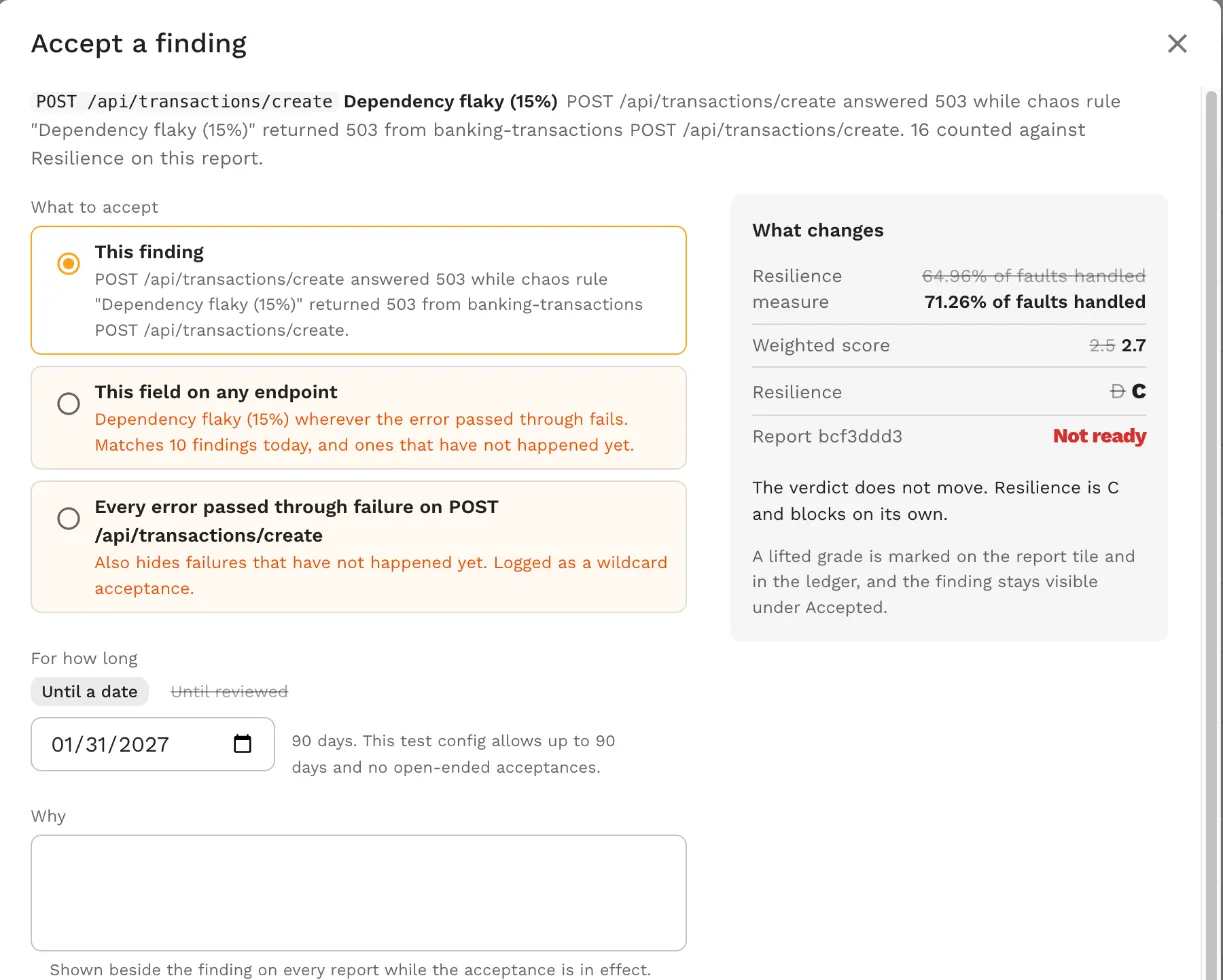
Accepting a finding changes how its family is measured and can raise the letter grade. It does not fix the application or change an already graded report’s verdict. The next replay receives a fresh verdict with the applicable acceptances in effect. The acceptance documentation explains scope, expiry and reopening findings.
Use the verdict as a release gate
The Speedscale cloud analyzer grades reports that finish as Passed or Missed Goals. While a run is in progress, the Readiness tab shows Still grading. Error and Canceled reports have no grade, and reports created before readiness grading need reanalysis. Local proxymock runs are not graded.
A Ready verdict means the blocking families with data meet the configured floors. It applies to the tested traffic and available measurements. Missing inputs and paths outside the test still require review. Small samples also make rate-based grades sensitive to individual failures: in a 54-assertion test, two failures leave 96.30 percent passing, which earns C under the default Regression boundaries.
CI must explicitly check the readiness verdict to use it as a gate. speedctl wait report checks the report status; a Passed report can still be Not ready. The verdict is available in the report JSON at report.readiness.verdict.
How to Use Automatic Release Readiness Scorecards demonstrates the workflow across three demo builds, including a CI check. To apply it to a service, record traffic, select the families that should block a release, and review the findings from each run.
Frequently asked questions
What is a release readiness scorecard?
It grades a test run against the release rules in its test config. Speedscale returns Ready or Not ready, grades ten metric families from A to F when data is available, and shows a weighted score and confidence factor. Families without data show n/a and never block.
Can a build pass its tests and still be Not ready?
Yes. Goals decide whether a report is Passed or Missed Goals, and the verdict is a separate grade. A build can meet a 90 percent pass goal and still fall below the default Regression floor of B, which needs 98 percent.
Which runs get graded?
Reports that finish as Passed or Missed Goals in the Speedscale cloud analyzer. Local proxymock runs and runs that never reach the cloud are not graded. Error and Canceled reports have no grade; older reports need reanalysis.