How to Use Automatic Release Readiness Scorecards
This guide uses Speedscale’s readiness scorecard to compare three builds of a Spring Cloud Gateway service on Kubernetes. It covers a regression that still meets the test’s pass-rate goal, a GET-only retry evaluated under injected dependency failures, and a CI check that requires a Ready verdict.
The example uses api-gateway from the banking demo’s readiness-demo branch. The three image tags identify distinct builds:
v1-baseline: the unmodified gateway.v2-cleanup: removes an endpoint from the authentication allowlist.v3-retry: adds retries to GET requests on the service routes, starting from the baseline source.
For an explanation of verdicts and grading rules, see Automatic Release Readiness Scorecards.
Follow the guide with a coding agent
The expandable Agent prompt blocks provide an alternative to entering the commands manually. Copy the setup prompt and then each step’s prompt into the same Codex, Claude, or other coding-agent conversation. The agent needs terminal access to the demo checkout, Docker, the selected Kubernetes cluster and the configured Speedscale CLIs. Run either the commands or the corresponding prompt once; do not run both for the same step.
Keep the checkout path, cluster name, snapshot ID, image prefix, replay helper and report IDs available between steps. Agent tool calls may start new shells, so use a persistent Bash session or have the agent save non-secret session variables and the helper in a local file and source it for later commands. The reference results below are examples to compare against; the agent should report the values returned by its own runs.
Prerequisites and validation scope
Use Bash for the commands below. Install Git, Docker, kubectl, jq, speedctl and proxymock. Configure both Speedscale CLIs for the same account.
Use a running minikube cluster with the Docker runtime. The build commands use minikube docker-env to make local images available to its nodes. For another cluster, push each image to a registry the nodes can pull from.
Install the Speedscale operator with speedctl install and confirm that the cluster appears in Speedscale. Cluster replays require an active inspector. Readiness grading runs in the Speedscale cloud analyzer; local proxymock runs alone do not produce a verdict.
The reference results were collected on minikube in a development environment with operator v2.5.1296 and an existing demo deployment. The deployment command below was checked with a dry run; a fresh deployment was not validated end to end for these results.
Agent prompt: check prerequisites
Prepare to run the Speedscale readiness-scorecard demo with terminal access.
Check Git, Docker, kubectl, jq, speedctl and proxymock. Use a minikube cluster
with the Docker runtime and the same Speedscale account for both CLIs.
Resolve the intended Kubernetes context and Speedscale cluster name; ask
for any missing target information. Check that the operator and an inspector
are available. Use these official setup guides for missing components:
https://docs.speedscale.com/getting-started/installation/install/cli/
https://docs.speedscale.com/proxymock/getting-started/quickstart/
https://docs.speedscale.com/getting-started/quick-start/
Use existing CLI authentication and report anything that needs user input.
Record the checkout path and cluster name for the following steps. Keep
session state in a persistent Bash session or a local, untracked helper file
that later tool calls can source. Confirm what is ready before continuing.
1. Deploy the demo and disable background faults
Clone the demo and apply its local Kubernetes overlay. Stop the simulator so that its background traffic does not interfere with the comparison. Disable the gateway’s built-in FaultInjectionFilter, which otherwise randomly fails 0.3 percent of requests independently of the test’s chaos rules.
git clone -b readiness-demo https://github.com/speedscale/microsvc.git
cd microsvc
kubectl apply -k kubernetes/overlays/local/

kubectl -n banking-app scale deploy/banking-sim --replicas=0
kubectl -n banking-app set env deploy/banking-gateway FAULT_INJECTION_RATE=0
kubectl -n banking-app patch deploy banking-gateway --type=json -p \
  '[{"op":"replace","path":"/spec/template/spec/containers/0/imagePullPolicy","value":"IfNotPresent"}]'
kubectl -n banking-app rollout status deploy/banking-gateway --timeout=5m
The IfNotPresent image pull policy allows the gateway to use images built into minikube’s Docker daemon. Wait for the gateway rollout to complete before starting a replay.
Agent prompt: deploy the demo
Set up https://github.com/speedscale/microsvc.git at the readiness-demo
branch, using a separate checkout if necessary to preserve existing work.
Confirm kubectl targets the selected minikube cluster. From the repository
root, apply kubernetes/overlays/local/. In namespace banking-app, scale
banking-sim to zero replicas, set FAULT_INJECTION_RATE=0 on banking-gateway,
and set its api-gateway container's imagePullPolicy to IfNotPresent.
Wait for banking-gateway to roll out with a five-minute timeout. Stop and
report a failed command. Return the checkout path, context, namespace and
observed rollout result, and retain the repository root for subsequent steps.
2. Upload the snapshot and test configurations
Load the fixture snapshot and both test configurations from the readiness-demo directory:
cd readiness-demo
speedctl put testconfig test-config-regression.json
speedctl put testconfig test-config-chaos.json
(cd snapshot && proxymock cloud push snapshot --in proxymock --name banking-gateway-readiness-demo)
cd ..

export SNAPSHOT_ID='replace-with-the-snapshot-id-from-the-push-URL'
export CLUSTER='replace-with-your-cluster-name-in-Speedscale'
Replace both quoted placeholder values before running a test. The snapshot contains 27 hand-built inbound requests with two assertions per request. Its fixture-user tokens expire in 2030. These fixtures provide repeatable input; they are not recorded production traffic. For a service-specific evaluation, create a snapshot from recorded traffic.
The configurations exercise different conditions:
readiness-demo-regressionsends the fixture set once. Regression and Mock fidelity use their default blocking floor of B.readiness-demo-chaosrepeats the traffic for three minutes with two virtual users and makes 15 percent of mocked dependency calls answer 503. Resilience blocks below B, while Regression is advisory because the injected failures can break assertions.
Both configurations require at least 90 percent of assertions to pass and p95 latency at or below 2 seconds. The readiness rules are evaluated separately from those goals.
Agent prompt: upload the test inputs
From the demo repository, upload readiness-demo/test-config-regression.json
and readiness-demo/test-config-chaos.json with speedctl put testconfig.
From readiness-demo/snapshot, run:
proxymock cloud push snapshot --in proxymock --name banking-gateway-readiness-demo
Read the snapshot ID from the successful push output and save it as SNAPSHOT_ID.
Set CLUSTER to the previously selected Speedscale cluster name. Return to the
repository root and retain both values for later commands. Report the actual
snapshot ID, cluster name and uploaded config IDs. This is a fixture snapshot;
do not describe it as a production recording.
3. Define the replay helper and establish a baseline
Define a helper that updates the deployment’s image, waits for the rollout, starts a replay and prints its status, readiness verdict and summary. It returns on command failures. A Passed report with a Not ready verdict can still return successfully from this inspection helper; the release gate is added in step 9.
run_build() {
  local report
  kubectl -n banking-app set image deploy/banking-gateway \
    "api-gateway=ghcr.io/speedscale/microsvc/api-gateway:$1" || return
  kubectl -n banking-app rollout status deploy/banking-gateway --timeout=5m || return
  sleep 10
  ID=$(speedctl infra replay banking-gateway --cluster "$CLUSTER" \
    --namespace banking-app --test-config-id "$2" \
    --snapshot-id "$SNAPSHOT_ID" --id-only --build-tag "$1") || return
  speedctl wait report "$ID" --timeout 15m || return
  report=$(speedctl get report "$ID") || return
  printf '%s\n' "$report" | jq -r '.report | "\(.status)\n\(.readiness.verdict)\n\(.readiness.summary)"'
}
Build the baseline image into minikube’s Docker daemon:
eval "$(minikube docker-env)"
R=ghcr.io/speedscale/microsvc/api-gateway
docker build -t "$R:v1-baseline" backend/api-gateway
Run the regression configuration:
run_build v1-baseline readiness-demo-regressionThe reference baseline report was Passed and Ready, with Regression at A: all 54 assertions passed. Mock fidelity was also A. Use this result as the comparison point for the subsequent builds.
Agent prompt: build and test the baseline
Create a reusable Bash helper run_build(image_tag, test_config_id).
It must update deployment banking-gateway's api-gateway container in banking-app
to ghcr.io/speedscale/microsvc/api-gateway:<image_tag>, wait up to five minutes
for rollout and allow ten seconds before replay. Start a Speedscale cloud run
with speedctl infra replay banking-gateway, supplying --cluster "$CLUSTER",
--namespace banking-app, --snapshot-id "$SNAPSHOT_ID", --test-config-id,
--id-only and --build-tag. Wait up to fifteen minutes for the returned report
and fetch it with speedctl get report. Return on command failures; print its
status, readiness.verdict and readiness.summary from the report JSON.
Retain the helper and every report ID across shell calls.
Use minikube docker-env, set R=ghcr.io/speedscale/microsvc/api-gateway, and build
backend/api-gateway as "$R:v1-baseline". Run the helper with v1-baseline and
readiness-demo-regression. Record the observed status, verdict, Regression and
Mock fidelity grades, and assertion counts as the baseline.
4. Remove an allowlisted endpoint and inspect the regression
Apply cleanup.patch, build the modified image, reverse the patch and run the regression configuration:
git apply readiness-demo/cleanup.patch &&
  docker build -t "$R:v2-cleanup" backend/api-gateway &&
  git apply -R readiness-demo/cleanup.patch &&
  run_build v2-cleanup readiness-demo-regression
The patch removes /api/users/check-email from RouterValidator.openApiEndpoints. The resulting allowlist is:
public static final List<String> openApiEndpoints = List.of(
    "/api/users/register",
    "/api/users/login",
    "/api/users/check-username"
);
The reference report returned:
Passed
READINESS_VERDICT_NOT_READY
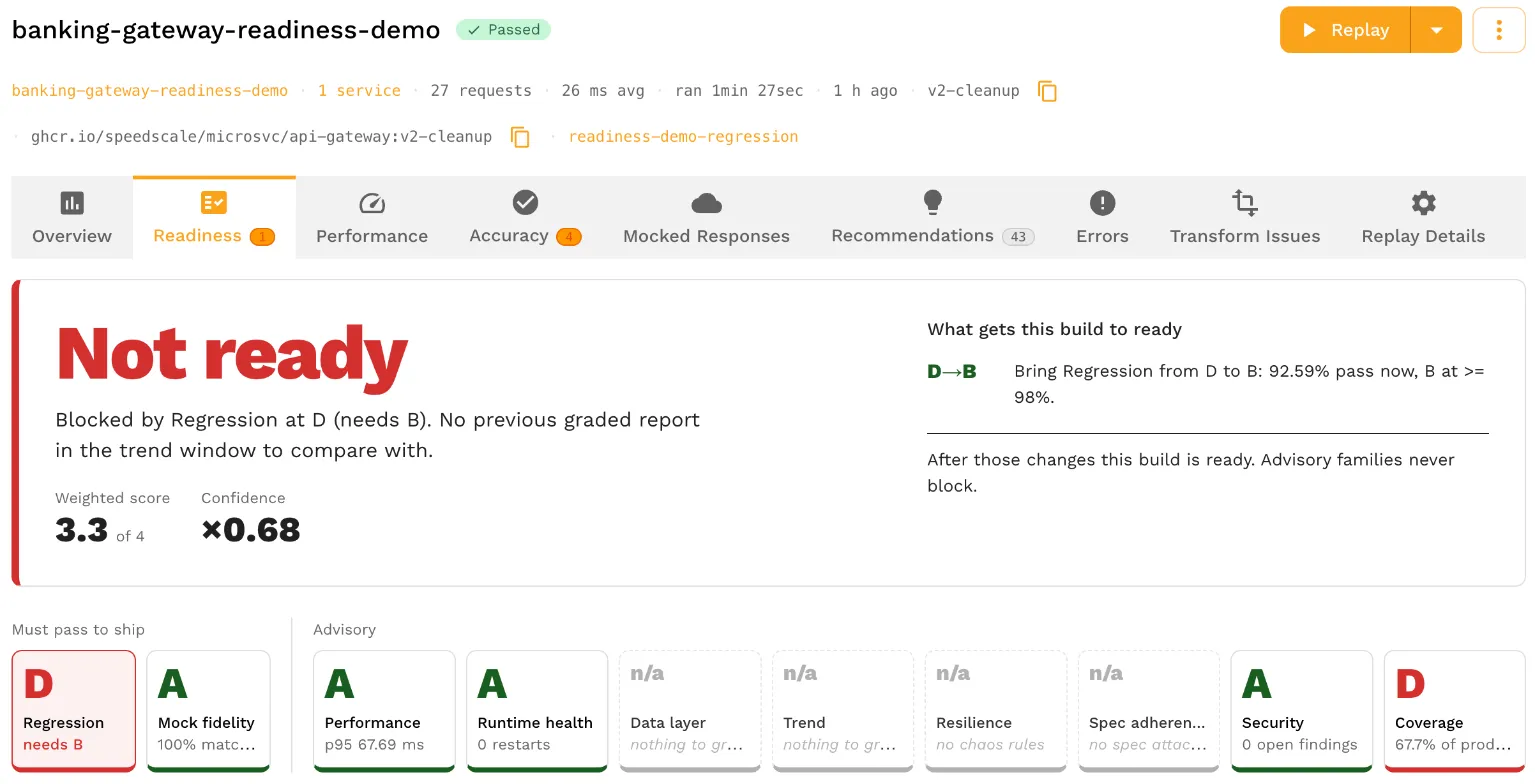
Blocked by Regression at D (needs B).
Both fixture requests to GET /api/users/check-email now require authentication, although the fixture requests contain no credentials. Each fails its status and body assertions, leaving 50 of 54 assertions passing: 92.59 percent.
That rate exceeds the test’s 90 percent goal, so the report status is Passed. It falls below the default Regression B boundary of 98 percent, so the readiness verdict is Not ready. Open the Regression findings to inspect the endpoint and failed checks.
Coverage may provide additional context when the account has recorded traffic for the service. The fixture snapshot alone does not establish that history, so Coverage may show n/a.
The reverse-patch command restores the baseline source before the next build. If the image build failed, reverse cleanup.patch manually before continuing; the command chain stops before restoration on a build failure.
Agent prompt: test the cleanup regression
From the demo repository root, apply readiness-demo/cleanup.patch and build
backend/api-gateway as "$R:v2-cleanup" using the selected minikube Docker daemon.
Reverse only the patch applied for this step after the build, including if
the build fails, while preserving pre-existing edits. After a successful build,
run v2-cleanup with readiness-demo-regression through the saved helper.
Record the report ID, status, verdict, Regression grade and assertion counts.
Inspect the findings for GET /api/users/check-email and explain how removing
it from the authentication allowlist affects the fixture requests. Compare
the observed pass rate with the 90 percent test goal and the Regression B
floor from the actual report. Report the measured result even if it differs
from the guide's reference run.
5. Measure the baseline under injected failures
Run the original image with the chaos configuration:
run_build v1-baseline readiness-demo-chaosThe reference report remained Passed but graded Not ready, with Resilience at F. Of 226 requests affected by faults, 91 were handled and 135 returned 5xx responses, giving a handled rate of 40.27 percent. The configured B floor is 85 percent.
The baseline gateway has no retry policy on the service routes. A dependency’s injected 503 can therefore reach the client directly. This run establishes the failure-handling result to compare against the retry build.
Agent prompt: measure baseline resilience
Use the saved helper to run v1-baseline with readiness-demo-chaos against
the same cluster and snapshot. Fetch the completed report and retain its ID.
Record report status, readiness verdict, Regression and Resilience grades,
the count of fault-affected requests, the count handled and the Resilience
floor. Inspect the reported failure buckets and summarize this as the chaos
baseline. Use the returned measurements rather than the reference percentages;
the injected faults are random.
6. Add GET retries and run both configurations
The supplied retry.patch adds this filter to the three service routes:
f.retry(c -> c.setRetries(2)
    .setMethods(HttpMethod.GET)
    .setStatuses(HttpStatus.SERVICE_UNAVAILABLE));
The filter allows two retries for eligible GET requests and configures SERVICE_UNAVAILABLE as a retriable status. POST requests are excluded. Apply the patch to the restored baseline, build the image, restore the source and run both configurations:
git apply readiness-demo/retry.patch &&
  docker build -t "$R:v3-retry" backend/api-gateway &&
  git apply -R readiness-demo/retry.patch &&
  run_build v3-retry readiness-demo-chaos &&
  run_build v3-retry readiness-demo-regression
If the build fails, reverse retry.patch before continuing. The following table records the reference results; chaos percentages can vary because faults are selected randomly.
| Build | Test | Report | Verdict | Regression | Resilience |
|---|---|---|---|---|---|
| v1-baseline | Regression | Passed | Ready | A, 100% | n/a |
| v2-cleanup | Regression | Passed | Not ready | D, 92.59% | n/a |
| v1-baseline | Chaos | Passed | Not ready | D, 92.92% | F, 40.27% |
| v3-retry | Chaos | Passed | Not ready | C, 96.22% | D, 64.96% |
| v3-retry | Regression | Passed | Ready | A, 100% | n/a |
The retry raised Resilience from F to D while preserving all 54 passing assertions in the regression run. It did not meet the chaos configuration’s B floor. This demonstrates an improvement on the tested requests, rather than complete resilience across every route or failure mode.
Open the retry report’s Resilience findings to inspect the remaining 89 unhandled requests:
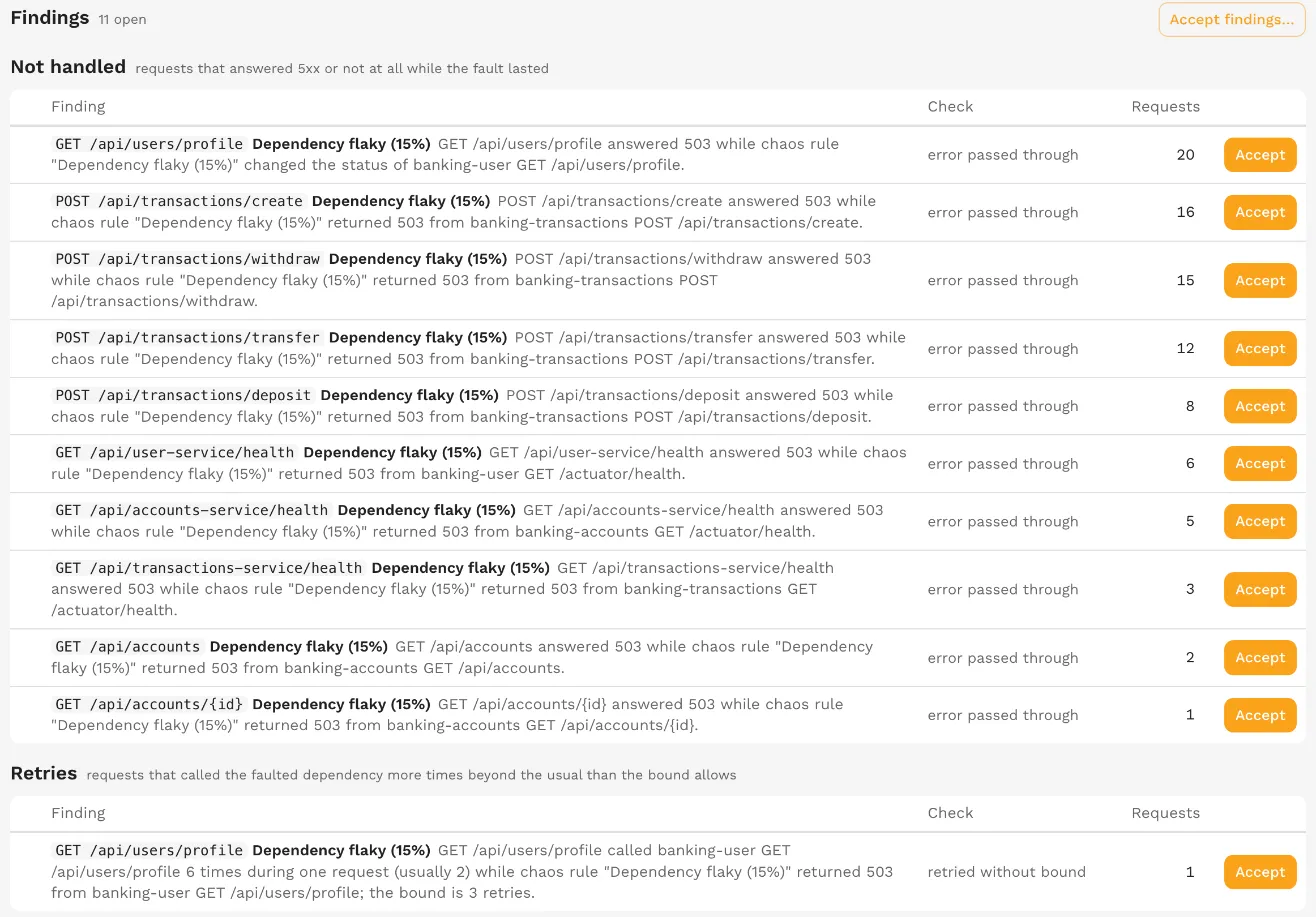
- 51 POST requests: excluded from the GET-only retry policy.
- 21 requests to
GET /api/users/profile: the fixture includes a 503 response that retries cannot resolve. Twenty requests passed through an error, and one exceeded the retry bound. - 14 health-route requests: those routes have no retry filter.
- 3 other GET requests: remained unhandled in this chaos run.
Do not expand the retry policy to POST operations solely to raise the grade. If a withdrawal succeeds but its response is lost, retrying it without idempotency can execute the withdrawal twice. Safe retries require the operation to tolerate repetition, for example through enforced idempotency keys.
Agent prompt: evaluate the GET retry
Confirm the source is restored from the cleanup experiment. Apply the supplied
readiness-demo/retry.patch, which adds two retries for eligible GET requests
on the service routes. Keep POST requests excluded. Build backend/api-gateway
as "$R:v3-retry", then reverse only this step's patch, including on a build
failure. Preserve pre-existing work.
After a successful build, run v3-retry with readiness-demo-chaos and then
readiness-demo-regression, using the same cluster and fixture snapshot.
Retain both report IDs. Produce a table of all five runs with build tag,
test config, status, verdict, Regression and Resilience grades and measures.
Inspect the retry chaos report's remaining findings by endpoint and check.
Explain the measured improvement and remaining blockers without changing
test goals, grade floors or acceptance state.
7. Preview an acceptance for known findings
An acceptance records a decision to tolerate a finding for a defined period and scope. It does not change the application’s behavior. If a team chooses to accept some of the remaining POST failures temporarily, open Accept findings… on the Resilience detail and select the relevant paths.
Assign an owner, a reason and an end date, and check whether the acceptance applies to this image tag or to future builds of the service. In the reference report, four POST findings cover 51 requests:

For grading, the accepted finding counts move to the handled side of the measure. Applying those 51 requests to this report would raise its adjusted handled rate from 64.96 percent to 85.04 percent, slightly above the 85 percent B floor. The original grade remains visible.
The screenshot shows a preview; no acceptances were submitted for these reference results. Saving an acceptance would update the report’s letters while preserving its Not ready verdict. A subsequent replay receives a fresh verdict with any applicable acceptances. Random fault selection means its result could fall on either side of the floor.
8. Compare results in the service trend
Open the service page’s Readiness view and select the date range containing the tests. The grid displays each graded run, its build tag, its verdict and its family grades.
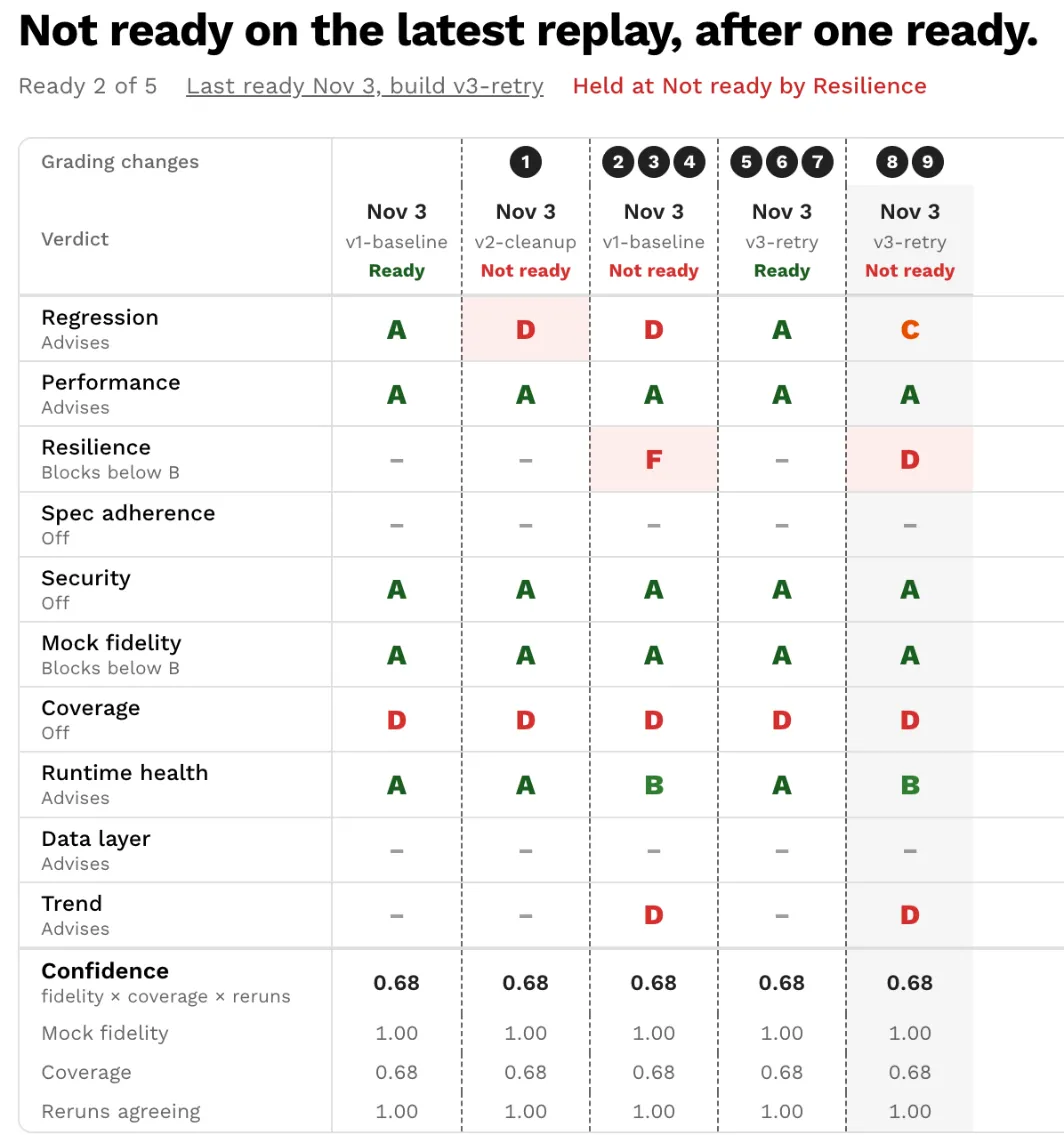
The screenshot places the retry regression run before the retry chaos run; the commands in step 6 run them in the opposite order. The role labels reflect the latest run’s test configuration. Regression therefore reads Advises in this screenshot even though it blocked the cleanup build’s regression report.
Distinguish this grid from the Trend metric family. That family compares a report with the previous graded report for the same service and image tag, even when it used a different test configuration. Alternating regression and chaos on one tag can lower Trend because the chaos run fails assertions that the regression run passed. Trend is advisory by default.
Compare regression runs with regression runs, and chaos runs under the same chaos configuration, before attributing a grade change to the build.
9. Require the readiness verdict in CI
speedctl wait report checks report status. It can exit successfully when a report is Passed but Not ready. Add an explicit verdict check to enforce readiness in CI:
speedctl wait report "$ID" --timeout 15m || exit 1
REPORT=$(speedctl get report "$ID") || exit 1
printf '%s\n' "$REPORT" |
  jq -e '.report.readiness.verdict == "READINESS_VERDICT_READY"' >/dev/null || exit 1
Use the report ID returned by that CI job’s replay. This gate retains the goals check and also requires READINESS_VERDICT_READY. It fails on a missing, Still grading or Not ready verdict, invalid JSON, or an unsuccessful report fetch.
If the release requires both regression and chaos validation, apply the gate to both reports. The retry build’s Ready regression report alone would not catch its resilience failures.
Agent prompt: add the CI gate
Add a Bash CI step that uses the report ID created by that CI job.
Run speedctl wait report with a fifteen-minute timeout and fail the step if
it fails. Fetch the report JSON, failing if the fetch fails, and use jq -e to
require .report.readiness.verdict == "READINESS_VERDICT_READY". A missing,
Still grading or Not ready verdict, or invalid JSON, must fail the gate.
If the release requires both regression and chaos, check both report IDs
independently. Keep the existing goals check as well as the readiness check.
Verify the gate with stubbed report responses for Ready, Not ready, missing
and Still grading verdicts, invalid JSON and failed wait/fetch commands.
Show the local CI change and verification results. Do not start a deployment.
Troubleshooting and interpreting the result
A report ending in Error with “unable to connect after 240 attempts” indicates that the generator could not reach the service within five minutes. Check workload readiness and replay connectivity before drawing conclusions about application behavior. Two of the twelve original validation attempts ended with this error; subsequent attempts completed, but the root cause was not established.
Use the family findings and configured floors to decide which change is required next. The cleanup build reduces Regression from A to D; the retry improves Resilience from F to D while keeping the regression fixture checks green. The same letter represents different measurements in those two cases.
For another service, replace the demo fixtures with a representative recording, establish a baseline under a fixed test configuration, and compare each change under those same conditions. The readiness settings reference documents the roles, floors and acceptance policy used by the gate.
Frequently asked questions
How do I fail a CI job when a build is not ready?
Read the verdict from the report after the run finishes: speedctl get report with jq on .report.readiness.verdict, and exit non-zero unless it is READINESS_VERDICT_READY. speedctl wait report exits 0 for a Passed report even when the verdict is Not ready.
Should I retry POST requests at the API gateway?
Only when the operation is safe to repeat, for example through enforced idempotency keys. A retried POST can run twice. This walkthrough retries GET requests only and previews accepting the remaining POST findings; it does not submit those acceptances.
Why does the same build get different Resilience numbers between runs?
Chaos rules fire on a percentage of calls, so each run faults different requests. Repeat runs with the same config and compare the counts and findings alongside the letter. One run's exact percentage isn't a fixed property of the build.