Speedscale vs. SmartBear ReadyAPI for API Testing
Application programming interface (API) testing helps verify that endpoints behave as expected, handle various inputs correctly, and return the appropriate responses under different conditions. It enables you to identify and fix bugs early in development, preventing regressions as the codebase evolves. With thorough testing, you can verify the API’s functionality, reliability, and performance. The API layer is a critical component as it contains an application’s business logic, and usually, the application’s core functionality depends on it. An issue in an application’s API layer can result in errors or delays for users, potentially damaging customer trust, decreasing retention rates, and negatively affecting the business. To maintain customer trust, it is essential to deliver a reliable API experience to the apps. Speedscale and ReadyAPI by SmartBear are two popular tools for API testing. Speedscale helps developers build and test software quickly by replaying sanitized production traffic. It automatically generates test drivers, data, and mock dependencies from real user traffic, allowing developers to minimize wasted time on scripts. ReadyAPI enables teams to develop, control, and run automated functional, security, and performance tests within a unified platform, enhancing API quality for agile and DevOps teams. This guide compares Speedscale and SmartBear ReadyAPI for API testing in terms of ease of setup, features, developer experience, pricing, integration with CI/CD, and documentation and support.
Ease of Setup
Speedscale has a local proxymock workflow and an operator-based Kubernetes workflow. Check capture and networking requirements for the mode you intend to use.
ReadyAPI’s functional testing product supports authored tests and command-line execution. VirtServer is a deployment option for virtual APIs, not a prerequisite for every ReadyAPI functional test. Compare the installation needed for the actual workflow.
Features
Choosing a tool requires careful evaluation to ensure its feature set meets your API testing needs. For example, if you need to test REST APIs deployed in a cloud-based Kubernetes environment, you should make sure that your tool supports the HTTP protocol and supports installation in a Kubernetes cluster. Moreover, based on your API testing requirements, some features, such as security or performance testing, might be a bonus when choosing the platform if you plan to only perform functional API testing. Let’s compare the two tools’ testing features.
Protocol Support
Compare the relevant operations rather than equating product-wide lists. Speedscale’s technology matrix separates traffic capture, analysis, and replay. ReadyAPI’s functional testing page lists REST, SOAP, Kafka, and JDBC among its supported technologies. A JDBC test step and database wire-protocol replay are different mechanisms; verify the exact client and operation you need.
Functional Testing
Speedscale allows you to capture your API traffic from a runtime environment, including Kubernetes, Docker, AWS, or Google Cloud. The traffic can be reviewed, filtered, and converted to snapshots that can run as tests and mocks without scripting. It has security built in to redact sensitive data and personally identifiable information (PII) from traffic via its data loss prevention (DLP) features. ReadyAPI provides a comprehensive suite of functional testing features that allow manual and automated testing of complex scenarios. Speedscale can use captured traffic for load testing to better understand your app’s scaling limitations. You can use real user data and traffic patterns to automatically generate load tests mimicking real-world scenarios. Load testing enables you to measure latency, throughput, saturation, and error rate reliably and cost-effectively. Speedscale offers convenient load testing through its support for mocking internal and external dependencies for simulating third-party systems. It also supports chaos testing to validate how your service will handle failures. Chaos can be introduced at the API level, allowing you to manipulate request response times, status codes, and data patterns. ReadyAPI uses functional tests with virtual users to simulate load on the API under test. Distributed load tests and cloud tests offer testing scenarios with a large number of users. The maximum number of virtual users you can simultaneously use for load testing depends on your license. Confirm the current virtual-user entitlement for the package being evaluated.
Developer Experience
An intuitive user interface enables developers to quickly ramp up and use the tool efficiently without unnecessary hurdles or delays. For example, developer productivity would be high if the tool made it easy to trigger new tests and view and analyze reports for past tests. Speedscale offers a highly intuitive graphical user interface that simplifies the API testing process. 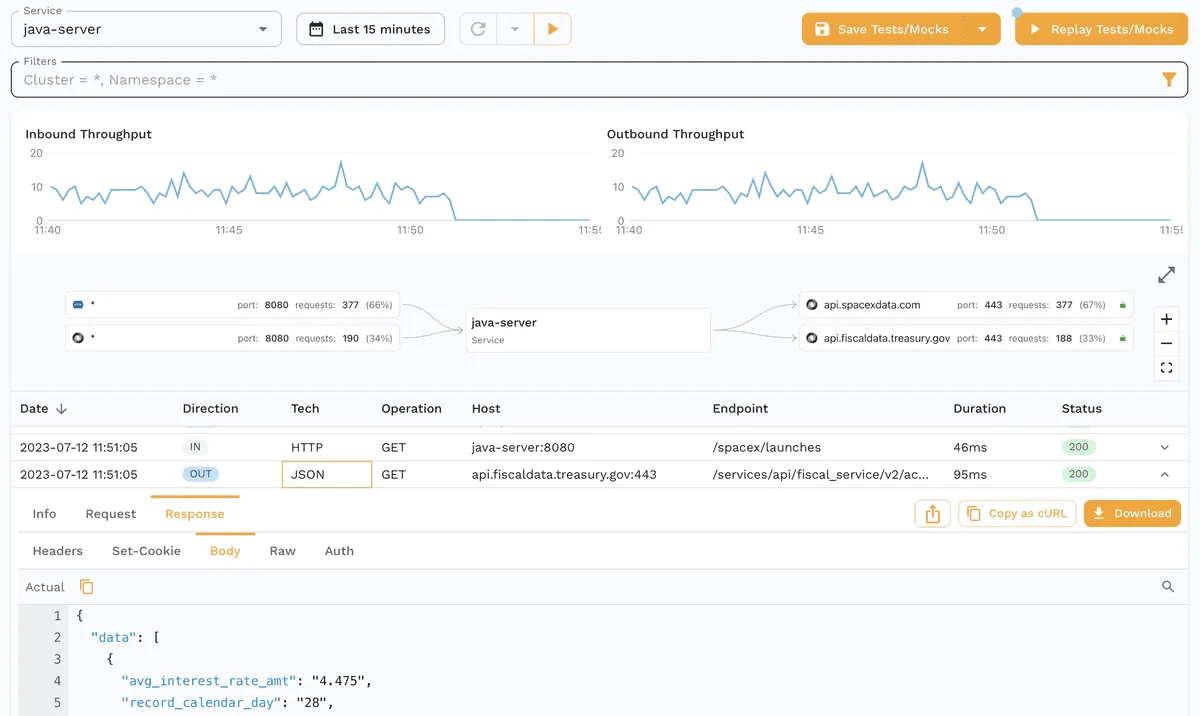 The interface allows you to simulate and replay traffic, mimicking real-life scenarios. It also lets you drill down into message payloads to identify regressions and contract changes. You can use the dashboard to view each call’s exact details, including message payloads, headers, cookies, authentication tokens, and more. You can take a tour of the platform to better understand its capabilities. SmartBear ReadyAPI offers a unified interface to create functional, security, and load tests for your APIs.
 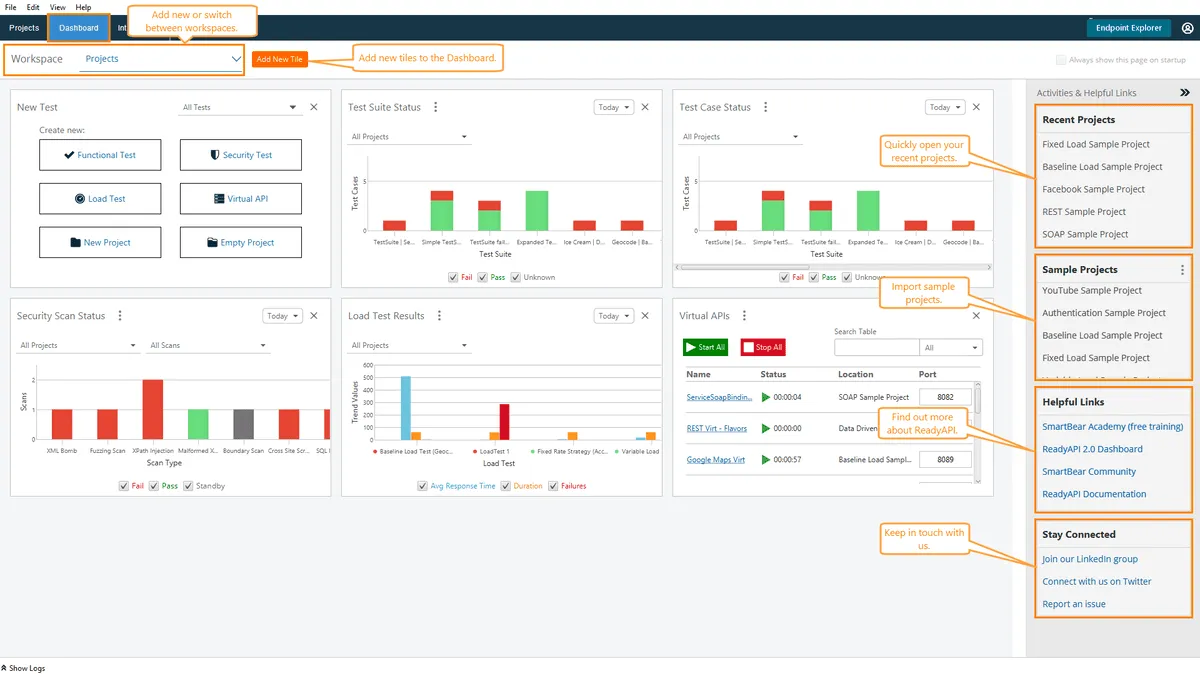 You can use its portal to import APIs with different specifications, schemas, and protocols. It offers point-and-click functionality for adding assertions to tests by simply right-clicking and choosing one of its built-in assertions.
Pricing
Use the current Speedscale pricing and ReadyAPI pricing pages for an evaluation quote. Confirm functional testing, performance testing, virtualization, CI execution, and deployment entitlements separately. Historical per-license prices and traffic rates do not establish the cost of your current workload.
Integration with CI/CD
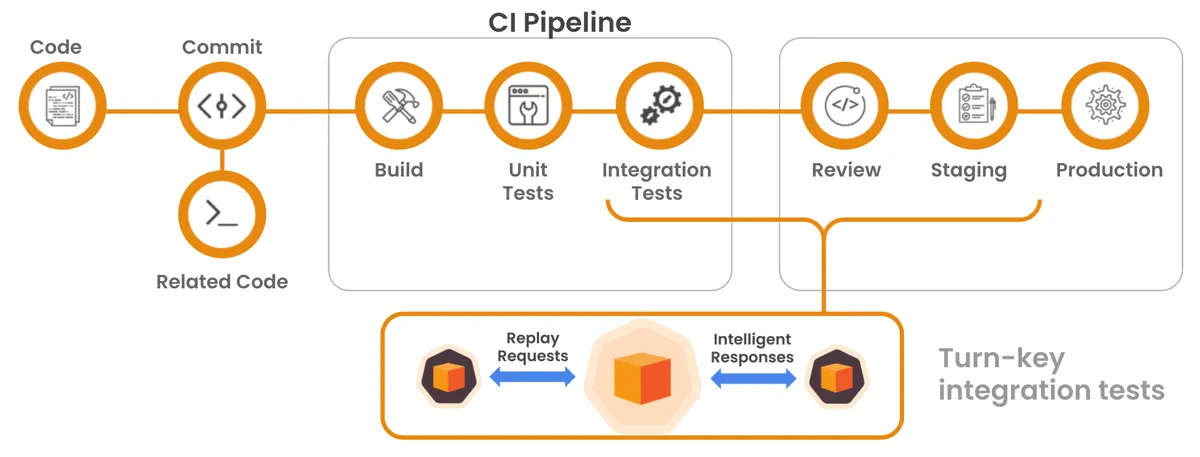 In API testing, CI/CD integration enables continuous integration and continuous delivery of code changes. This ensures that APIs are consistently tested and validated, which helps detect errors early and improves software quality and reliability. Speedscale natively supports CI/CD integration with several popular platforms, including CircleCI, GitHub Actions, GitLab, and Jenkins. Refer to this guide to integrate Speedscale with your workflows to enable high-velocity deployment. SmartBear ReadyAPI supports CI/CD integration with Jenkins and Azure DevOps. For more details on a specific CI/CD platform, refer to the integrations guide. Both offer command-line automation. Evaluate the runner, licensing, artifacts, and failure handling your pipeline requires rather than inferring compatibility from a short integration list.
Documentation and Support
Speedscale’s documentation covers setup, capture, replay, and traffic controls. Use the contact page to discuss support expectations for your plan. SmartBear’s functional testing overview links its current capabilities and support resources. Compare the documentation for your exact deployment and confirm support terms during the evaluation.
Conclusion
This guide introduced API testing solutions by Speedscale and SmartBear ReadyAPI. Speedscale offers cloud-native integration and real-world traffic simulation, which is helpful for teams using Kubernetes that are looking to automate complex testing scenarios. ReadyAPI supports manual and automated API testing and offers several security features that enable you to test cross-site scripting, fuzzing, and SQL injection. Choosing between the two solutions largely depends on your technical requirements, infrastructure capabilities, and desired depth of testing capabilities. With both tools offering documented CI/CD integration and comprehensive documentation, the decision may come down to the specific test features you wish to use and the cost of the tool. Speedscale is a strong candidate for those invested in a Kubernetes-centric development environment.
Frequently asked questions
Can I reuse existing API tests?
Keep useful ReadyAPI projects in their existing runner while evaluating a recorded-traffic workflow alongside them. Existing tests can exercise the application while traffic is recorded. Speedscale also documents Postman collection v2.1 import, but that should not be treated as an automatic conversion of ReadyAPI project files, Groovy scripts, or assertions. Verify migration with representative tests.
How do recorded tests differ from explicitly authored assertions?
A recording supplies observed inputs and responses; it still needs a reviewed baseline and meaningful pass criteria. Authored assertions express an expected rule, including behavior that has not yet been observed. Combine the two: use captured traffic to drive realistic cases and assertions to check business requirements. A recording alone does not establish that the original behavior was correct.
When is service virtualization important?
Use it when an unavailable, costly, or unstable dependency prevents a repeatable test. ReadyAPI supports creating and running virtual APIs, with VirtRunner and VirtServer options for automation and remote execution. Speedscale uses recorded dependency exchanges as mocks. Choose which dependencies remain real according to the behavior you need to validate, particularly state and authorization.
Sources: Postman import, Regression testing with a baseline, ReadyAPI functional testing, ReadyAPI virtualization, proxymock architecture.