Refactor Safely with AI: Using MCP and Traffic Replay to Validate Code Changes
So as software engineers using AI coding assistants, we’re quickly learning of a new anti-pattern: Hallucinated Success.
You give your agent (e.g. Claude via terminal or various IDE code assistants) the command “refactor the billing controller.” The agent happily complies, churning out nice clean code. The agent even goes so far as to write a new unit test suite that passes at 100%. You integrate it. Your test suites pass. Your production code breaks. Why?
Because the agent wrote the code and the verification. If it misunderstood the requirements, it wrote a test suite that verified it misunderstood. It graded its own homework. The problem is further compounded by the non-determinism of AI code generation: the same prompt may produce a different output on a different try. We need to put the agent in a tight iterative loop with an immutable source of truth that it cannot touch. We propose the “Ralph Wiggum Loop” (try… fail… “I’m helping!”… try again), but the immutable source of truth isn’t unit tests. The immutable source of truth is recorded production traffic. The Ralph Wiggum method is a slight variation on normal AI-assisted coding because it requires the agent to try to solve the problem repeatedly until it reaches a certain score on a metric. This is better than normal context engineers because it provides the agent with a grading mechanism that does not grade on a curve.
In this post, we will discuss a simple architecture that uses a free traffic replay tool called proxymock that interfaces directly with the AI agent via Model Context Protocol (MCP).
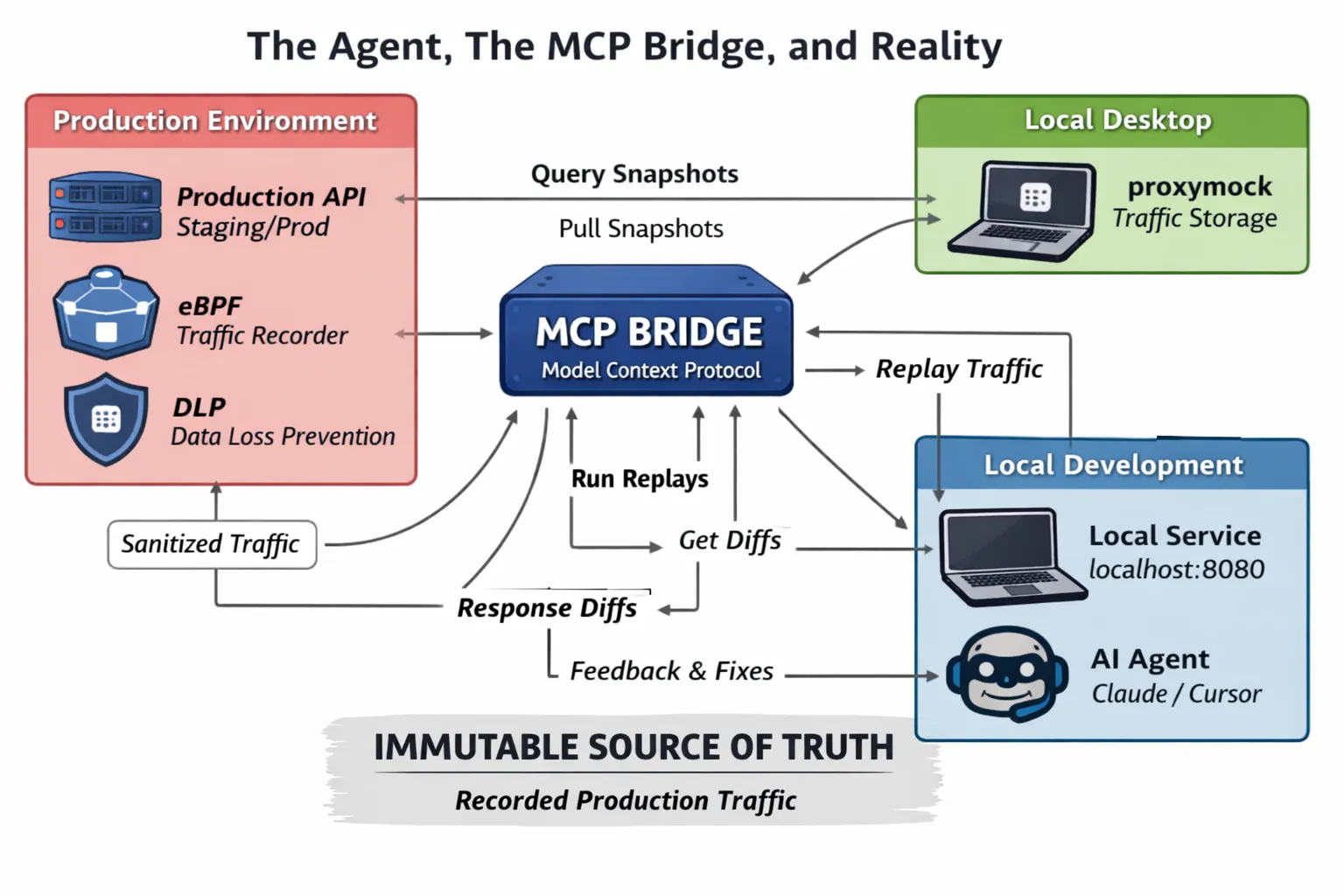
The Agent, The MCP Bridge, and Reality
To get the Ralph Wiggum loop working, we need a high-fidelity signal. “Tests failed” simply will not do, as in order to get the effect we need, we want the AI to know exactly what changed in the response payload compared to what production currently does.
Here is what we’re working with:
graph TB
    subgraph "Production Environment"
        Prod[Production API<br/>Staging/Prod]
        eBPF[Speedscale eBPF Agent<br/>Traffic Recorder]
        DLP[Data Loss Prevention DLP]
        Prod -->|Records Traffic| eBPF
        eBPF -->|Filters via DLP| DLP
        DLP -->|Sanitized Traffic| Cloud
    end

    subgraph "Cloud Storage"
        Cloud[Speedscale Cloud<br/>Traffic Archive]
    end

    subgraph "Local Desktop"
        Proxy[proxymock<br/>Traffic Storage]
        Cloud -->|Syncs Traffic Data| Proxy
    end

    subgraph "Local Development"
        Local[Local Service<br/>localhost:8080]
        AI[AI Agent<br/>Claude/Cursor]
    end

    subgraph "MCP Bridge"
        MCP[MCP Server<br/>]
    end

    Proxy -->|MCP Tools| MCP
    MCP -->|Query Snapshots<br/>Run Replays<br/>Get Diffs| AI
    AI -->|Modifies Code| Local
    MCP -->|Replay Traffic| Local
    Local -->|Response Diffs| MCP
    MCP -->|Feedback| AI
- Production Environment: The Speedscale eBPF agent is running in your production/staging environment, passively recording live traffic. The DLP module is used to filter out sensitive information before it goes out of the production environment. This way, PII, credentials, and other sensitive information are never sent out of your production environment.
- Cloud Storage: The Cloud is used to store the traffic data from the production environment. This is a centralized repository for all the traffic data that is being recorded.
- Local Desktop (proxymock): The proxymock is running on your local machine, and it is used to sync traffic data from the Cloud and store it locally as “snapshots.”
- Local Development: This is your local machine, where you have the service you are modifying running on localhost, along with your AI agent (Claude/Cursor).
- The Bridge (MCP): This is the key part. We are not just sending logs to the AI. The AI is using MCP tools to query proxymock running locally on your machine. The MCP tools are exposed by proxymock, and they are used by our agent:
- pull_remote_recording Creates a snapshot of the traffic that is already recorded by the eBPF agent, which is stored locally in proxymock, filtering by duration and endpoint patterns, to create a “regression test.”
- replay_traffic This step replays the test scenarios against a local target, returning a high-level pass/fail summary.
- compare_rrpair_files This step allows the AI to drill down into the failures, returning the exact request that was made, as well as the diff of the expected production response versus the actual localhost response.
The Practical Workflow: Refactoring a Legacy Endpoint
Let’s work through a practical example of how we might ask our AI agent to refactor a legacy endpoint. We’ll ask it to refactor a messy endpoint, /api/v1/user/{id}/details, that contains a lot of legacy SQL code, as well as some strange JSON formatting.
Note: The steps, prompts, and responses that we’ll be working with are just examples. Your AI coding agent will likely phrase things differently, so don’t worry if it doesn’t match what is described below.
Step 0: Install proxymock and Activate ralph-loop Plugin
Before we can start working with proxymock and MCP, we’ll need to install it. Follow the proxymock Getting Started guide for installation instructions for your platform.
Activate the ralph-loop plugin in Claude
To use the /ralph-loop command format shown in Step 2, you’ll need to activate the ralph-loop plugin within Claude (or equivalent with your preferred AI tool). For detailed instructions on how to activate the plugin, see this video guide.
Note: In order to record traffic from a production environment, as described in Step 1, you will need to install Speedscale Enterprise. The eBPF agent that records the production traffic is part of Speedscale Enterprise, not the proxymock tool.
Step 1: Establish the Baseline (The Human’s Job)
Before we unleash our AI minions, we need to take a snapshot of the service’s current operation. With the Speedscale eBPF agent recording the production traffic and sending it to your proxymock tool, we ask our AI to create a snapshot from the last 5 minutes of real world reads on that endpoint.
Example interaction (your AI agent’s exact wording will differ):
create a snapshot of the last 5 minutes of production traffic for the frontend service using proxymock

> Checking available proxymock tools to capture the last 5 minutes of production traffic.
> Reviewing the proxymock instructions and tool schemas to capture production traffic:
> Using pull_remote_recording to pull the last 5 minutes of production traffic. Checking the codebase for the frontend service name:
> ...
> Snapshot captured and downloaded successfully. Snapshot ID is b38d3ae7-366a-4d90-b718-479fa65b379a.
This snapshot is immutable and is a real world regression test. The new code must be able to reproduce this snapshot, or it is wrong.
Step 2: Initiate the Ralph Wiggum Loop (The Agent’s Job)
Next, we’ll initiate our AI agent loop to refactor our code. We’ll give it the task to complete along with the MCP tools. Here’s an example of how we might give it a prompt to refactor the code:
EXAMPLE AGENT PROMPT:
/ralph-loop "Refactor the GetUserDetails handler in user\_service.go to use the new ORM repository. Ensure backward compatibility. Use the available proxymock MCP tools to verify your work against the proxymock snapshot b38d3ae7-366a-4d90-b718-479fa65b379a." --completion-promise "DONE"Iteration 1: The Confident Failure
The AI agent analyzes the code, refactors it, runs the server on port 8080, and then checks its work.
EXAMPLE MCP RESULT:
Checking process logs for replay progress:
...
Found errors in the recorded traffic. Analyzing error responses to identify breaking API changes:
...
Found 334 API failures (17% failure rate) out of 1,958 total requests:
(details of failures)
After much lamentation and gnashing of teeth, the AI coder sees it failed spectacularly. A normal unit test might just say Expected 200 OK, got 500 Internal Error. But via MCP, the AI can dig deeper.
Iteration 2: The Informed Fix
Armed with the exact diff from production traffic, the AI corrects the code, adding JSON serialization tags to the Golang struct to ensure backward compatibility. It rebuilds and restarts the local server.
Example of what the MCP might return (your results will vary):
EXAMPLE MCP RESULT:
*\[The MCP returns detailed diffs showing that for users with a specific 'suspended' status in production, the legacy endpoint returned an empty JSON object* `{}`, *but the new code returns* `null`.\*\]At this point it will continue running the regression test until it fixes the issues or times out.
Iteration 3: Success
The AI applies the fix for null handling.
Example final response (your agent will phrase this differently):
EXAMPLE AI FINAL RESPONSE:
"Refactor complete. Verified against 1,958 requests from production snapshot b38d3ae7-366a-4d90-b718-479fa65b379a with 100% fidelity. Submitting PR."Conclusion
By employing these sorts of tools, such as proxymock, which allow us to replay traffic, and making the information these tools provide accessible to our AI via MCP, we are fundamentally changing the game of AI development. We are moving away from the AI’s definition of success and instead towards a more objective standard.
The “Ralph Wiggum Loop” allows our AI to fail quickly, but the information provided by MCP allows it to understand why it is failing, so it can correct itself. This is how we are able to move from “AI-assisted toy apps” to securely developing mission-critical applications with AI.