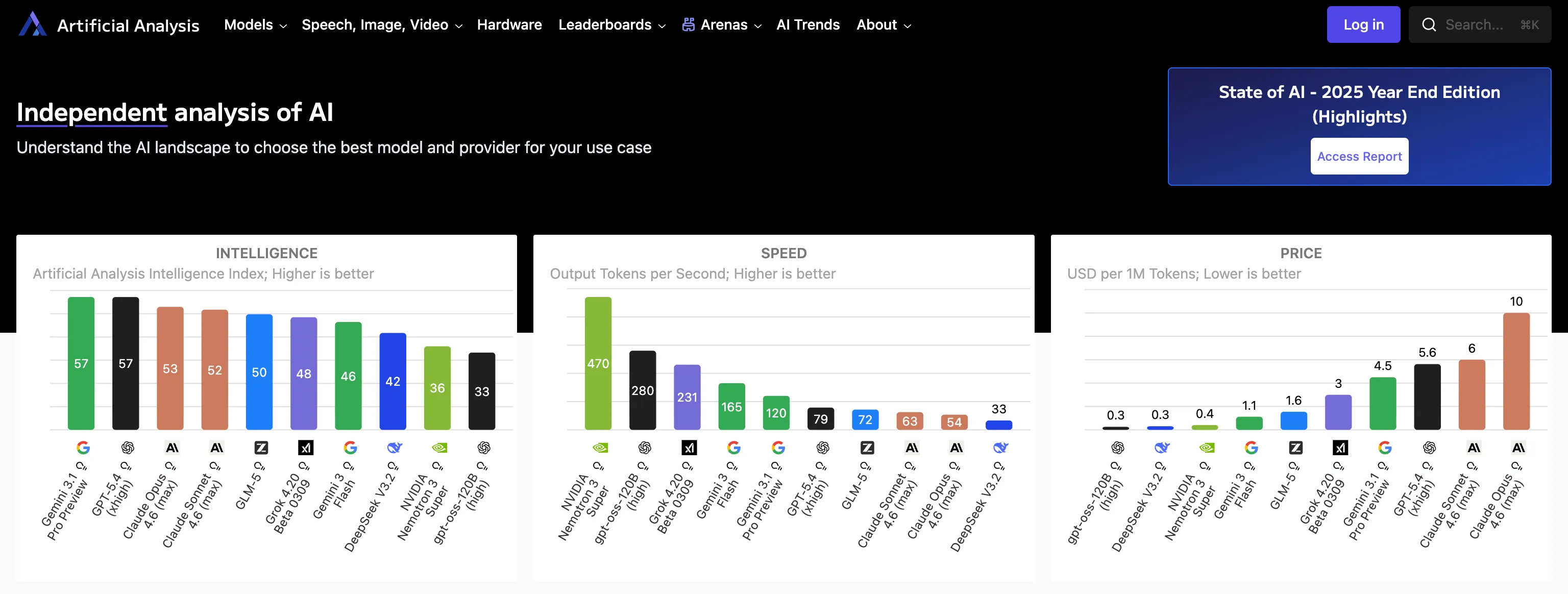
Most teams know they are spending money on AI in production. Far fewer realize how much they are spending outside production. It’s easy to get lost as you evaluate which model has the best responses, is fast enough, and cheap enough to run in production.
That is because the AI bill usually shows up as a giant blob. It is easy to see the total. It is much harder to see how much of that total comes from developers rerunning flows locally, CI pipelines replaying the same scenarios on every pull request, or performance tests hammering expensive model endpoints in staging.
That hidden non-prod spend is the real problem. And the fix is straightforward: use real LLMs for production traffic and provider evaluation, but use LLM simulation for development, CI, and load testing.
The Hidden Cost Problem
If you are running a real user workflow in production, paying for the real model is obviously a cost you expect to pay. You also realize you must run evals on the responses and so there’s some development costs involved in choosing the right model, and testing new releases.
The problem starts when the exact same live LLM API calls keep happening outside production.
That is where teams get surprised. They are not only paying for customer traffic. They are paying for engineers (or OpenClaw) testing the same feature branch over and over, automated regression runs in CI, staging checks before release, and load tests that were supposed to be about the application but ended up hitting the model thousands of times.
Because all of that usage rolls into one large AI bill, many teams never notice how much of it comes from non-prod environments until the number is already painful.
A Concrete Example
The Speedscale LLM simulation demo makes the problem very easy to see.
The application is a support-ticket triage workflow with an AI model called for extra intelligence. A Next.js frontend sends a support case to a FastAPI backend. The backend calls a tools service for order and return-policy context, then runs a three-step LLM pipeline.
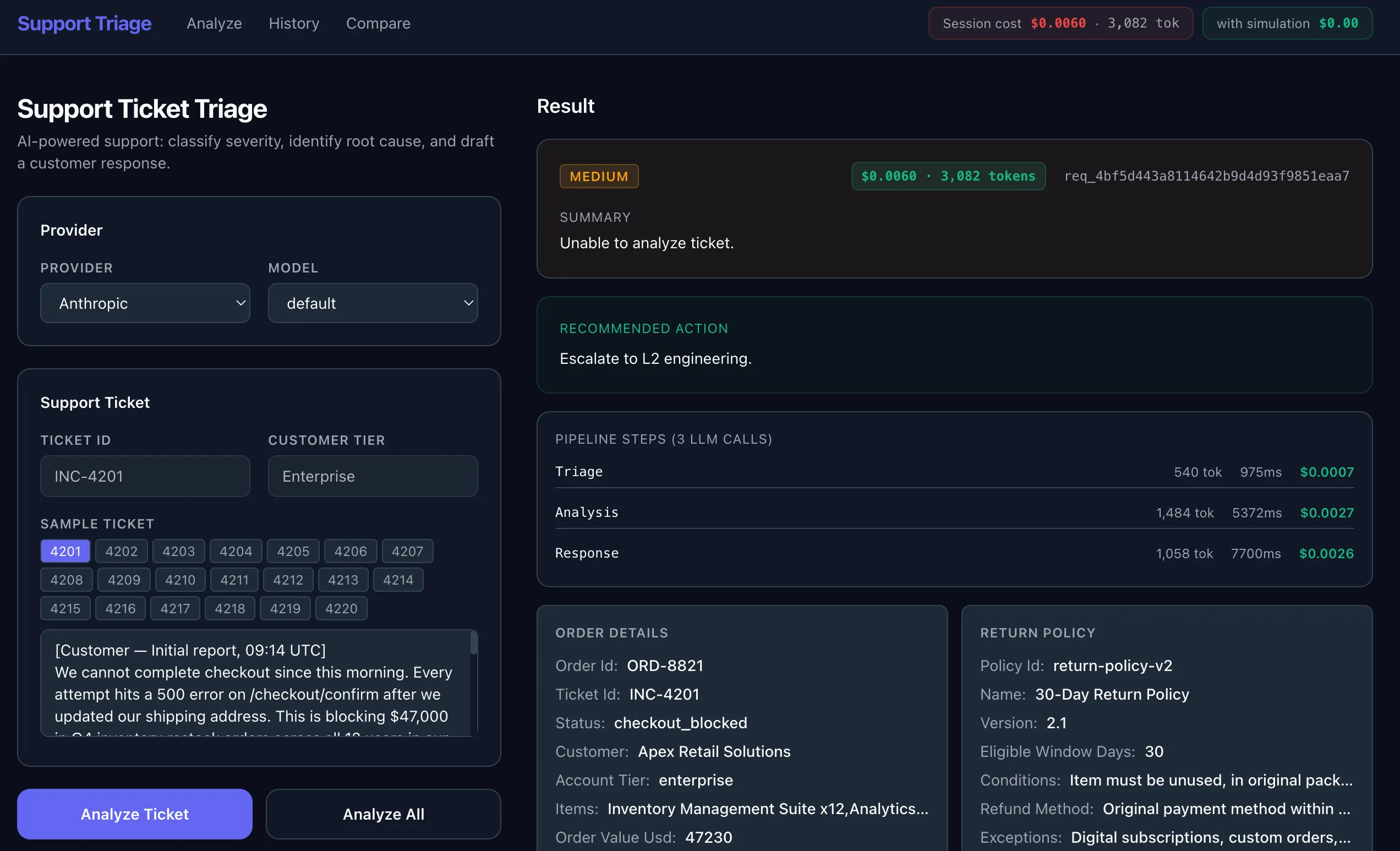
The demo can run those steps against OpenAI, Anthropic, Gemini or xAI/Grok. It also tracks timing, token usage, and projected cost.
That means one small workflow can turn into a lot of model traffic very quickly. The repo’s Analyze All flow runs 20 sample tickets across every configured provider. With 4 providers enabled and 3 model calls per ticket, that is 240 LLM calls from a single button press.
That is fine when you are intentionally comparing providers or evaluating prompt quality. It is not fine when that same workflow runs repeatedly during development or gets baked into non-prod automation.
A mid-size support center running Claude Sonnet at 10,000 tickets per day can spend around $180K per year on LLM API calls. Most teams expect production traffic to drive that spend. They do not expect a meaningful chunk of it to come from development and testing activity.
Why Teams Miss It
Developers often treat the LLM like any other downstream API. They add the call, get the feature working, and keep using the live endpoint everywhere because that is the easiest path early on. CI inherits the same behavior. Staging inherits the same behavior. Load tests are run against staging which is effectively connected to a production cost center. Before long, the most expensive dependency in the stack is being exercised in places where realism is not actually the goal.
That is why this category of cost sneaks up on people. The model is expensive, but the real issue is frequency. Non-prod systems repeat the same flows over and over.
The Right Fix: LLM Simulation
This is where LLM simulation belongs.
The goal is not to replace real provider evaluation forever. The goal is to stop paying real-provider prices in environments where you are not trying to learn anything new about the provider.
In development, CI pipelines, and load tests, you usually are not asking questions like:
- Is Claude better than GPT for this prompt?
- Did Gemini improve the quality of the answer?
- What is the true production token cost of this workload?
Instead, you are usually asking questions like:
- Does the application still parse the response correctly?
- Does fallback logic work when the first provider fails?
- Does the UI behave correctly with realistic latency?
- Can this workflow survive batch execution at scale?
Those are application questions, not provider-quality questions. They do not require a live model every time. Simulating the response works great for this use case.
The Simulation Has to Be Realistic
A useful simulation cannot just return hello world. It needs to preserve the things your application actually depends on: realistic LLM responses, actual latency, typical status codes, and the kinds of quirks you see from the production APIs. Otherwise, you are not testing the real wrapper logic around the model. You are testing against a toy stub.
That is why Speedscale starts with a real captured run.
Capture Once, Reuse Everywhere
Once the backend is instrumented, Speedscale shows the runtime interaction that actually happened, including the internal tools service and the outbound LLM calls. No code changes are required, just flip on the recording when you want some fresh responses. And it works with HTTP/S encrypted traffic with a local cert unique to your environment.
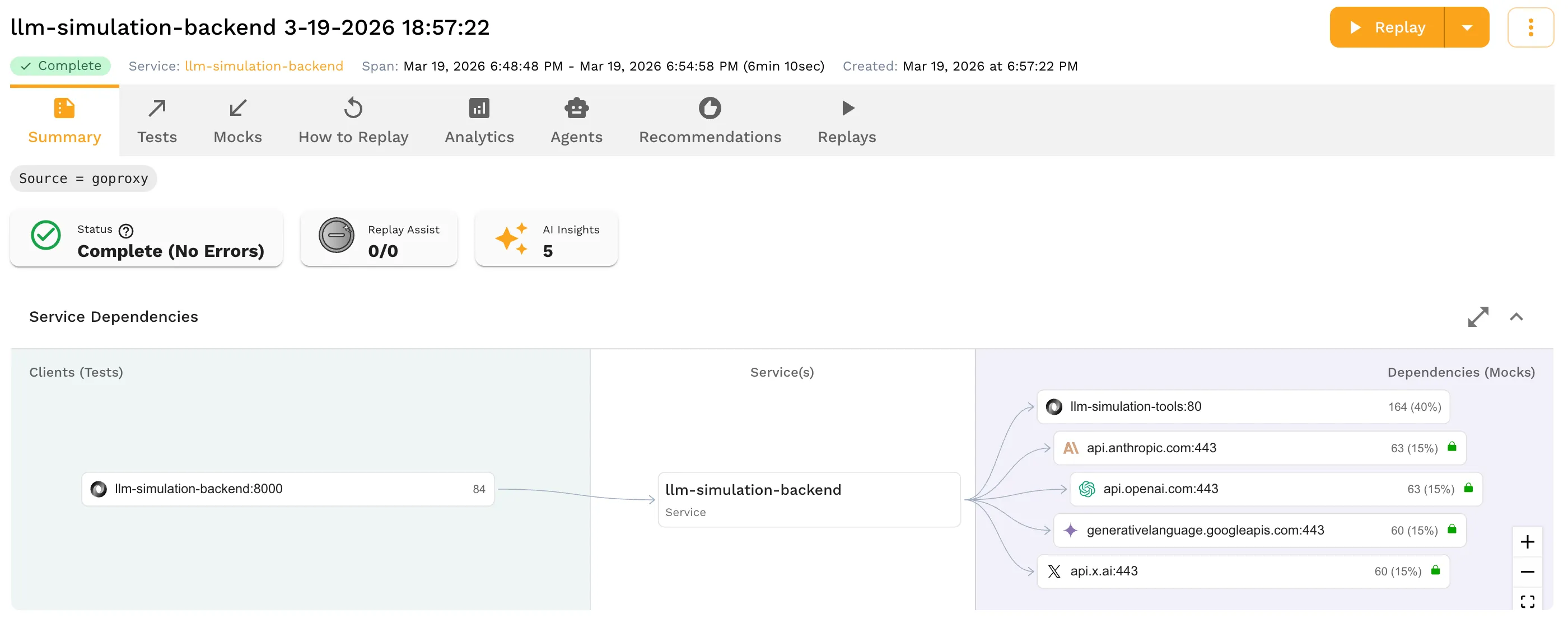
You can open any of the AI API calls and inspect the full request and response, headers, latency, token usage, and timing details.
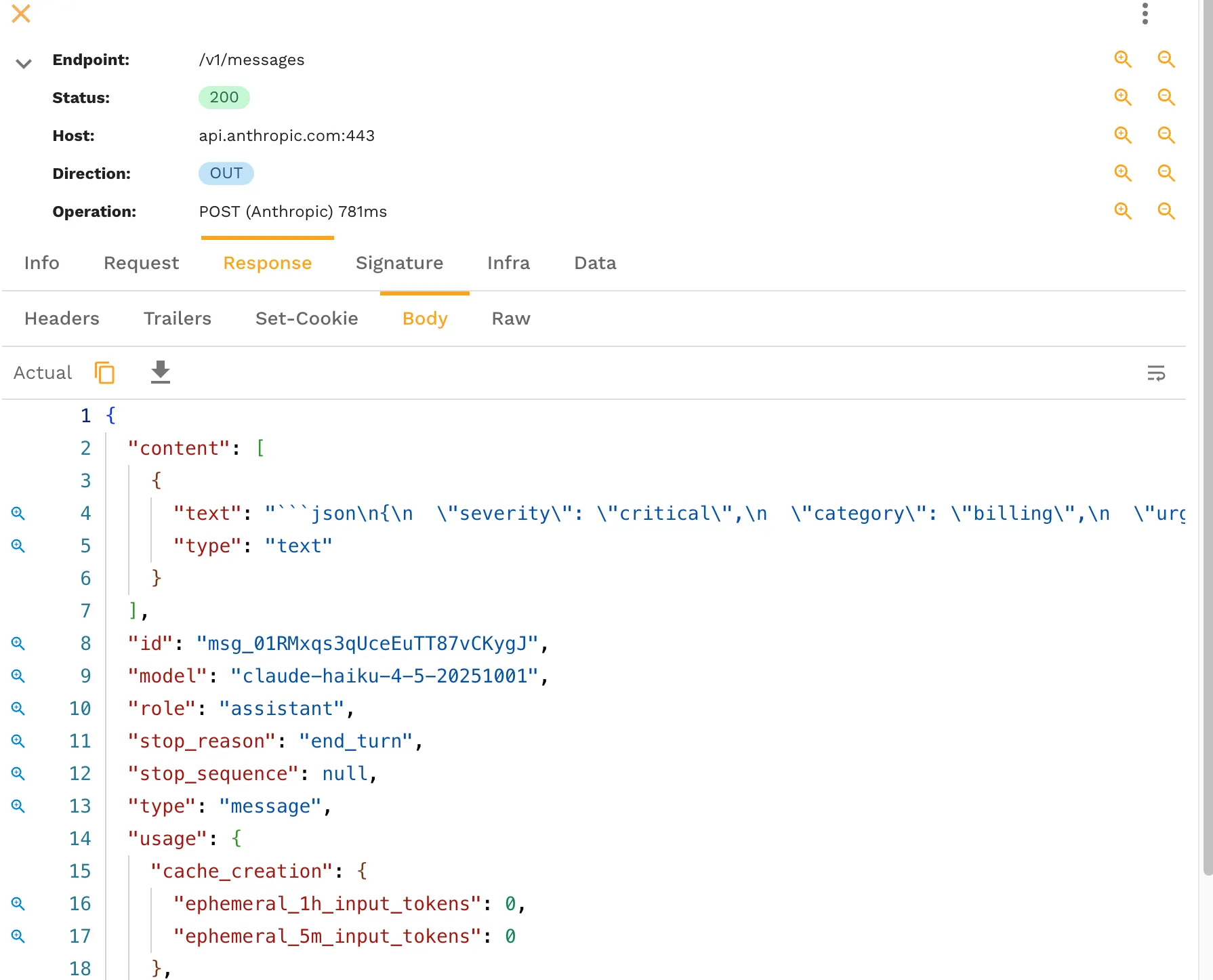
The captured request and response becomes the basis for the simulation. Instead of hand-writing fake responses, you save the real runtime behavior and replay it as a mock.
That is the key difference. The simulation is grounded in what the application actually saw.
Safe Enough for Real Teams
There is an obvious concern here: if you capture real LLM traffic, do you also capture secrets? Sensitive values like provider API keys are redacted, so you keep the useful shape of the call without exposing secrets into source control or lower environments.
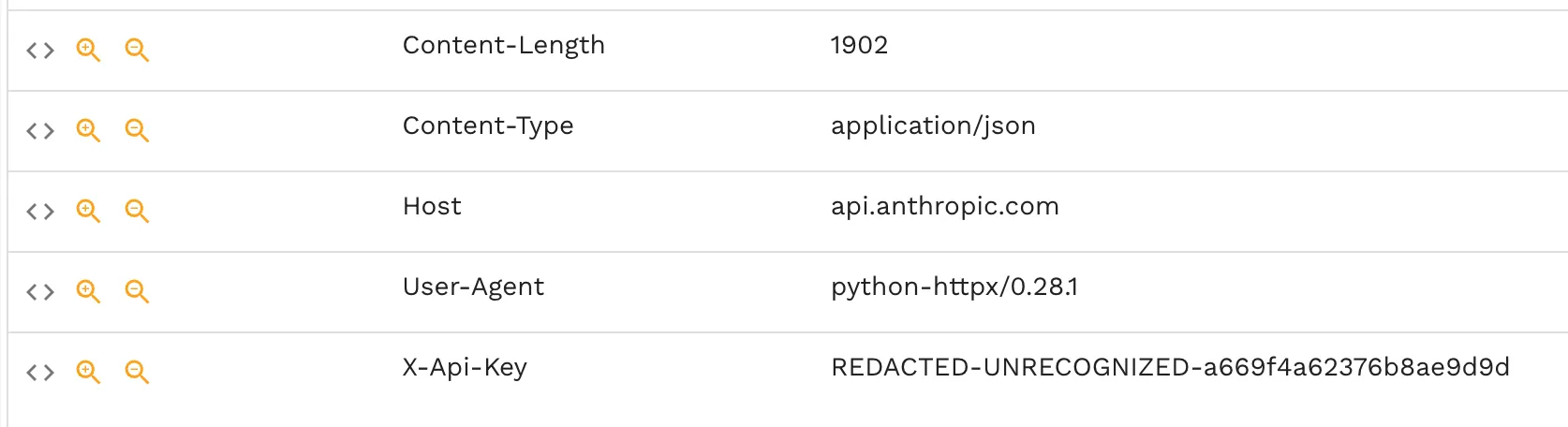
That matters because the whole point of LLM simulation is reuse. If the data is not safe to move into development, CI, and staging, it does not solve the problem.
Where Simulation Pays Off Fast
The best non-prod use cases are the ones that repeat constantly.
Development
Developers need fast feedback while changing prompt wrappers, response parsing, fallback logic, and UI behavior. Paying for live provider calls every time someone refreshes a screen or reruns a branch is wasteful. Simulation gives the team stable, realistic responses without turning local development into a metered activity.
CI Pipelines
CI is where hidden AI spend compounds. The same scenarios run again and again for every pull request. That is exactly the wrong place to keep a live LLM in the loop unless the test is explicitly about provider behavior. Simulation gives you predictable regression coverage at a cost that does not scale with every branch build.
If your team is trying to make AI code verification part of the normal workflow, this is the difference between a sustainable loop and an expensive one.
Load Tests
Load tests are often the worst offender because they multiply traffic by design. If the purpose of the test is to validate your application’s throughput, queuing, retry behavior, or infrastructure scaling, then flooding live LLM providers is usually measuring the wrong thing at the wrong price. This is exactly where load testing should use simulated LLM behavior instead of real provider calls.
When You Should Still Use the Real LLM
Simulation is not a replacement for all real model traffic.
You should still call the real model when you are evaluating the model itself: prompt quality, provider quality, live latency, true production cost, or output quality on real customer data.
That is a smaller set of tests, and it should stay a smaller set of tests.
The practical split is simple:
- Use live LLMs for production traffic and evaluation.
- Use LLM simulation for development, tests and mocks, CI pipelines, and load tests.
That split keeps realism where realism matters and removes unnecessary spend where it does not.
The Bottom Line
The hidden AI bill is not only a production problem. It is a non-prod problem that most teams do not see because the invoice is aggregated into one giant number.
If your developers, CI system, and performance tests are all hitting live LLM endpoints, you are probably paying more than you think for work that does not need a real model call.
LLM simulation is the clean fix. Capture a real interaction once, preserve the behavior your application depends on, redact the sensitive bits, and replay it everywhere you need cheaper, faster, repeatable feedback.
If you want to apply that pattern in your own environment, start with Speedscale’s tests and mocks, AI code verification, and load testing workflows. For the CI angle, testing AI code in CI/CD is the next useful read.