How to Test Your React Frontend When the Backend Is Offline
The Frontend Developer’s Nightmare
Picture this: You’ve spent hours perfecting your React component. The animations are smooth, the responsive design works flawlessly, and you’re ready to test the user flow. You click “Submit” and… nothing happens. Or worse, you get a cryptic CORS error.
The problem? Your backend isn’t running. Again.
When I’m working on our dashboard app these kinds of problems happen regularly:
- Cryptic API errors because everyone is dropping new code into staging constantly
- Database connection errors because PostgreSQL isn’t started
- Service dependency hell where one microservice failure cascades through your entire stack
- Environment inconsistencies even if it works locally, it fails in a weird way in staging
- Slow feedback loops waiting anywhere from 5 minutes to 5 hours just to test a simple form
I remember one project where testing a configuration form required spinning up 12 different services. Twelve! Just to verify form validation worked.
There has to be a better way.
What if you could test your React frontend completely offline, with real API responses, without touching any backend code? That’s exactly what we’re going to set up in this guide using traffic recording and mocking.
The Solution: Record Once, Mock Forever
Instead of trying to run everything, we can break the problem down into smaller parts using traffic recording and mocking. Here’s the approach:
- Record the interactions between your React app and the backend during normal operation
- Mock those interactions so you can run your React app without any backend services
This gives you the best of both worlds:
- Real, production-like API responses (not fake test data)
- Zero backend dependencies when developing
- Instant setup and teardown
- Consistent, repeatable test scenarios
We’ll use proxymock, a free tool that makes this incredibly simple.
Live Demo: Testing React in Complete Isolation
Watch the full walkthrough of testing React frontends in isolation using proxymock.
I’ve built a complete demo application that you can follow along with. It’s a simple CRM system with accounts, contacts, and opportunities - just complex enough to be realistic.
Architecture:
- Frontend: React with Vite
- Backend: Go API server
- Database: PostgreSQL
You can find all the code and detailed instructions in my CRM Demo repository.
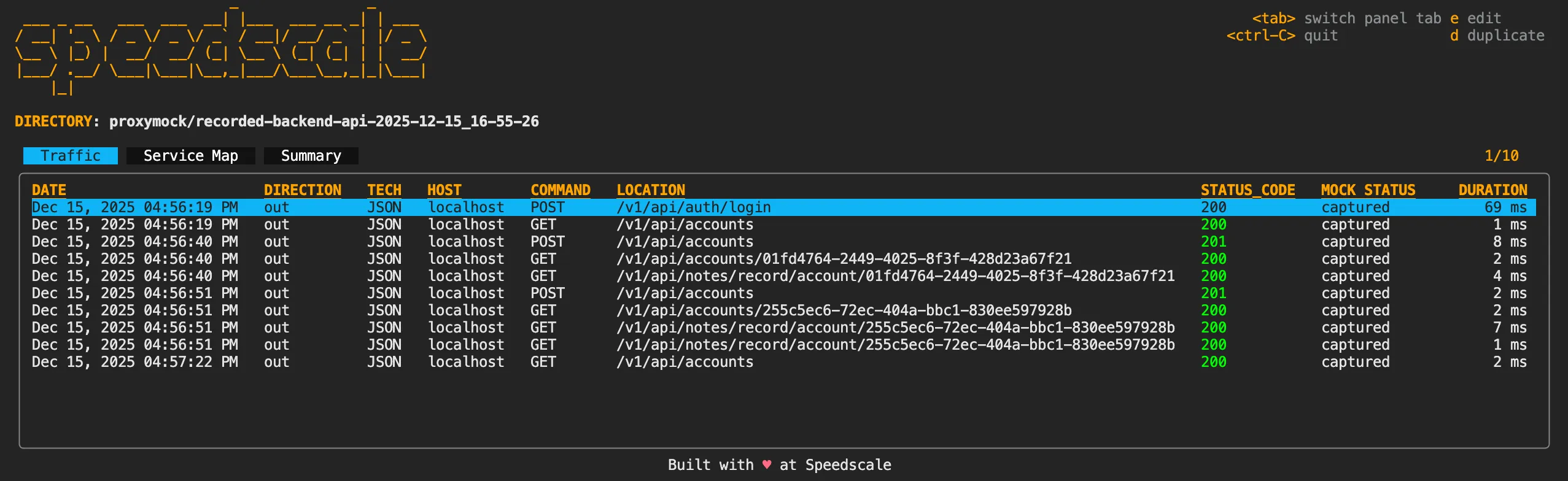
Phase 1: Recording Real Traffic
First, we need to capture real interactions between our React app and the backend. This is surprisingly simple.
Terminal 1 - Start the Core API Service:
cd core-service
make run
Terminal 2 - Start proxymock Recording:
proxymock record \
  --map 18080=http://localhost:8080 \
  --out proxymock/recorded-backend-api-$(date +%Y-%m-%d_%H-%M-%S)
This tells proxymock to listen on port 18080 and forward traffic to your API on port 8080, recording everything that passes through.
Terminal 3 - Start React with the Proxy Port:
cd frontend
export VITE_API_PORT=18080
make start
The key here is that we’re telling Vite to use port 18080 (our proxy) instead of 8080 (the real API). proxymock sits in the middle, forwarding requests while capturing them.
Now just use your application normally. I’ll log in and create a couple of accounts:
- Login with
admin@example.com/password - Create “Account 1” in the tech industry at
account1.com - Create “Account 2” in banking at
account2.com
As you interact with the app, proxymock is silently recording every HTTP request and response. Each interaction gets saved as a markdown file that’s both human-readable and machine-parseable.
Stop all three processes when you’re done. You now have a complete recording of your API interactions.
Phase 2: Running React Without Any Backend
This is where it gets exciting. Let’s run our React app with zero backend dependencies.
Terminal 1 - Start the Mock Server:
proxymock mock \
  --in proxymock/recorded-backend-api-<timestamp> \
  --map 18080=http://localhost:8080 \
  --out proxymock/results/mocked-backend-api-$(date +%Y-%m-%d_%H-%M-%S)
Notice we’re not starting the Go API server this time. We don’t need it. We don’t need PostgreSQL either.
Terminal 2 - Start Just the React App:
cd frontend
export VITE_API_PORT=18080
make start
Now open your browser and test the application. When you log in, you’ll see… zero accounts. Why?
Because that’s the exact state when we first logged in during recording. The mock server is replaying the real responses from that session.
Now recreate the same accounts:
- Create “Account 1” in tech
- Create “Account 2” in banking
Go to the accounts list and you’ll see both accounts appear. Check the dashboard - it shows two accounts.
Here’s what just happened: Your React application made real HTTP requests to the mock server. proxymock matched those requests against its recordings and returned the exact responses that the real backend would have provided.
You just fully tested your React frontend without running a single line of backend code.
The Data: Human-Readable and AI-Friendly
One of the most powerful aspects of proxymock is that all recordings are stored as markdown files. Let’s look at one:
REQUEST
POST http://localhost:8080/v1/api/accounts HTTP/1.1
HTTP HEADERS

{
  "name": "Account 1",
  "industry": "Tech",
  "website": "account1.com",
  "phone": "",
  "address": ""
}
RESPONSE
HTTP/1.1 201 Created
HTTP HEADERS

{
  "id": "01fd4764-2449-4025-8f3f-428d23a67f21",
  "name": "Account 1",
  "industry": "Tech",
  "website": "account1.com",
  "phone": "",
  "address": "",
  "city": "",
  "state": "",
  "zip": "",
  "country": "",
  "created_at": "2025-12-15T16:56:40.307469-05:00",
  "updated_at": "2025-12-15T16:56:40.307469-05:00",
  "created_by": "9e90c93f-42d5-422f-ad18-e4b0b581f5c7"
}
SIGNATURE
http:host is localhost
http:method is POST
http:queryparams is -NONE-
http:requestBodyJSON is {"address":"","industry":"Tech","name":"Account 1","phone":"","website":"account1.com"}
http:url is /v1/api/accounts
This format is:
- Human-readable - You can open any recording in a text editor and understand exactly what happened
- Version-controllable - Check recordings into git alongside your code
- AI-friendly - Tools like Claude Code can read and analyze these files to help debug issues
Speaking of Claude Code, you don’t even need to memorize the CLI commands. You can just tell Claude:
- “Start proxymock recording mapping port 18080 to http://localhost:8080”
- “Stop the proxymock recording”
- “Replay traffic from proxymock/recorded-backend-api-…”
Advanced: Database-Level Mocking
While mocking the HTTP API layer is powerful for frontend development, sometimes you need to test your backend code in isolation too. proxymock can also record and mock database interactions using the PostgreSQL wire protocol.
This is particularly useful when you want to:
- Test your API server without a database
- Run automated tests without database setup/teardown
- Replay production traffic against your backend
- Debug database-related issues
Recording Database Traffic
This time we’ll record on both sides: React ↔ API and API ↔ Database.
Terminal 1 - Start proxymock with Database Recording:
proxymock record \
  --app-port 8080 \
  --proxy-in-port 18080 \
  --map 15432=tcp://localhost:5432 \
  --out proxymock/recorded-database-$(date +%Y-%m-%d_%H-%M-%S)
Note we’re mapping port 15432 (proxy) to 5432 (PostgreSQL).
Terminal 2 - Start API with Database Proxy:
cd core-service
export DB_PORT=15432
make run
Watch the proxymock output - it’s already capturing traffic! The Go API connects to the database on startup, and those queries are being recorded immediately.
Terminal 3 - Start React:
cd frontend
export VITE_API_PORT=18080
make start
Now interact with the app. Create “Account 3” as a restaurant at account3.com. Every database query - the INSERT statements, SELECT queries, prepared statements - gets recorded.
You can inspect the recorded database traffic:
proxymock inspect proxymock/recorded-database-<timestamp>You’ll see the full conversation between your API and PostgreSQL:
- Connection initialization
- Prepared statements
- Bind operations
- Query execution
- Result sets
Testing Backend Without a Database
Now for the magic: testing your Go API without PostgreSQL running.
Terminal 1 - Start Database Mock:
proxymock mock \
  --in proxymock/recorded-database-<timestamp> \
  --map 15432=postgres://localhost:5432 \
  --out proxymock/results/mocked-database-$(date +%Y-%m-%d_%H-%M-%S)
Terminal 2 - Start API (No database needed!):
cd core-service
export DB_PORT=15432
make run
Your API server starts successfully and handles requests, even though PostgreSQL isn’t running. proxymock responds to database queries with the recorded responses.
Terminal 3 - Replay the Traffic:
Instead of manually clicking through the UI, let’s replay the recorded API traffic automatically:
proxymock replay \
  --in proxymock/recorded-database-<timestamp> \
  --test-against http://localhost:8080 \
  --out proxymock/results/replayed-database-$(date +%Y-%m-%d_%H-%M-%S)
proxymock even acts as a test client, sending all the recorded HTTP requests to your API and comparing the responses.
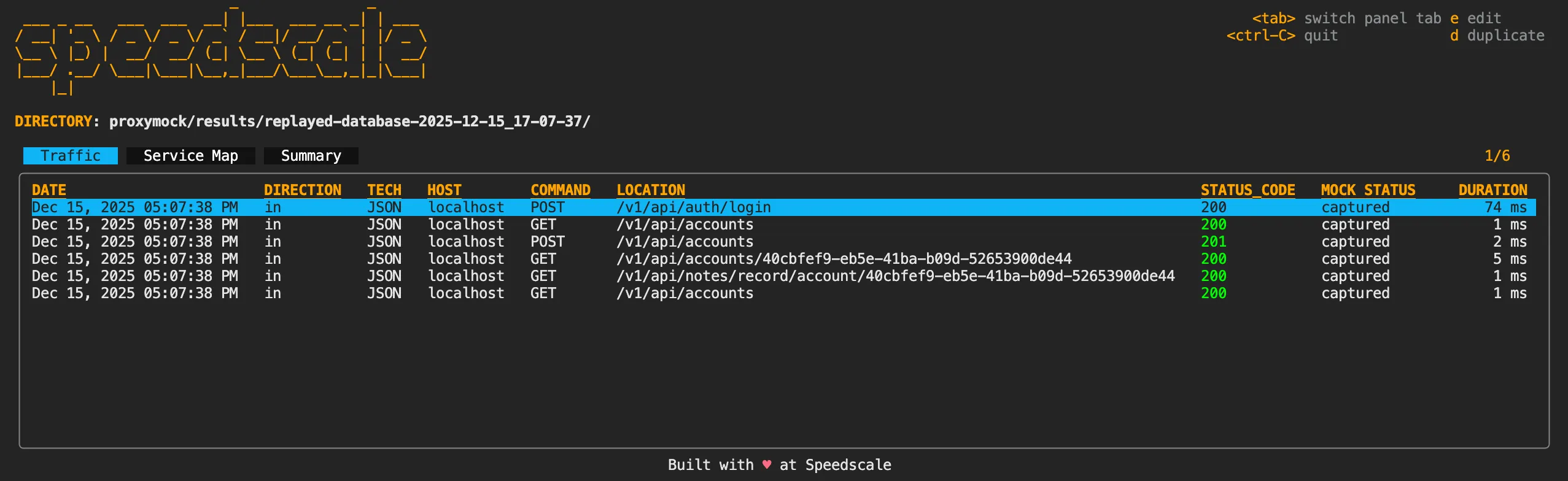
Six different API calls executed automatically, testing your backend without any manual browser interaction and without a real database.
Why Developers Love This Approach
For Frontend Teams:
- Test React components instantly without backend startup time
- Debug UI issues with confidence (it’s definitely your code, not the API)
- Develop offline on planes, coffee shops, or during backend outages
- Consistent test scenarios eliminate “works on my machine” problems
For Backend Teams:
- Test API endpoints without database setup complexity
- Replay real production traffic to reproduce bugs
- Faster CI/CD pipelines without database containers
- Validate API changes against recorded frontend expectations
For Full-Stack Teams:
- Frontend and backend teams work independently with API contracts
- Exact traffic recordings make debugging dramatically easier
- Recordings serve as living documentation of real API behavior
Port Reference
Here’s how the ports map in our demo:
| Component | Real Port | Proxy Port |
|---|---|---|
| Go API | 8080 | 18080 |
| PostgreSQL | 5432 | 15432 |
| React Dev Server | 3000 | (direct) |
In this simple demo scenario, proxymock ports are prefixed with “1” to make them easy to remember and avoid conflicts.
Getting Started
Ready to try this with your own React application? Here’s the quick-start:
1. Install proxymock: Download from the proxymock installation. It’s a single binary with no dependencies.
2. Record your traffic:
proxymock record \
  --map <proxy-port>=http://localhost:<api-port> \
  --out recorded-$(date +%Y-%m-%d_%H-%M-%S)
3. Update your frontend to use the proxy port:
# For Vite
export VITE_API_PORT=<proxy-port>

# Or update your .env file
VITE_API_URL=http://localhost:<proxy-port>
4. Use your app normally to generate traffic, then stop recording
5. Run with mocks:
proxymock mock \
  --in recorded-<timestamp> \
  --map <proxy-port>=http://localhost:<api-port>
Now start just your frontend and test away!
Real-World Impact
Teams at startups and Fortune 500 companies use this approach daily:
- New developer onboarding in under 30 minutes instead of 2+ hours
- Conference demos that work reliably without WiFi dependencies
- Automated integration testing against dozens of real-world scenarios
- API contract validation ensuring backend changes don’t break the frontend
- Performance testing with consistent response times, no backend variables
Stop Wasting Time on Backend Setup
Remember that contact form that took 12 services to test? With proxymock, you can test the exact same functionality in under 30 seconds.
The workflow is simple:
- Record once - Capture real API interactions while your backend is running
- Mock forever - Test your React frontend anytime, anywhere, without backend dependencies
What you get:
- Instant feedback - Test UI changes immediately, no backend startup time
- Real responses - Not fake test data, but actual API responses from production-like scenarios
- Offline development - Code on airplanes, coffee shops, or during backend outages
- Consistent testing - Same API responses every time, eliminating “works on my machine” issues
Your recordings become living documentation of how your API actually works. Check them into git, review them in PRs, and let AI tools like Claude analyze them when you hit roadblocks.
The best part? This isn’t just theory. Teams at companies from startups to Fortune 500s use this exact approach to ship faster and with fewer bugs.
Ready to stop fighting backend services and start building features? Try proxymock today.
Try It Yourself
Demo Repository: github.com/kenahrens/crm-demo proxymock: docs.speedscale.com Community: Join our Slack at slack.speedscale.com
Have questions about proxymock or want to share how you’re using traffic mocking in your projects? Join our community - we’d love to hear from you.