Production Traffic Capture
Record HTTP, gRPC, GraphQL, and database traffic from Kubernetes, ECS, or local environments. Automatic PII redaction keeps compliance teams happy.
AI coding tools generate code 10x faster—but they've never seen your production traffic. Speedscale captures real request/response patterns and replays them against AI-generated changes, so you ship code that actually works.
Three steps to validate AI-generated code against production reality.
Record your production reality
Capture real API traffic, database queries, and third-party interactions from production or staging. PII is automatically redacted. No synthetic data, no guesswork—just actual request/response pairs that represent how your system really works.
Build production context instantly
Speedscale auto-generates realistic service mocks from captured traffic. Your AI coding tool gets a complete backend environment—databases, third-party APIs, microservices—without spinning up expensive infrastructure or hitting live systems.
Validate AI code against reality
Replay captured traffic against AI-generated code changes. Compare responses byte-for-byte. Catch regressions in behavior, latency, and contract compliance before the code ever reaches production.
# 1. Capture traffic from production
proxymock record -- java -jar MYJAR.jar

# 2. AI writes code
claude OR opencode OR cursor OR copilot

# 3. Run the mock server to simulate reality
proxymock mock -- java -jar MYJAR.jar

# 4. Replay realistic scenarios to find new defects
proxymock replay --fail-if "latency.p95 > 50" --fail-if "requests.failed > 0"

2 EVALS PASSED
 ✔ passed eval "latency.p95 > 50.00" - observed latency.p95 was 46.00
✔ passed eval "requests.failed > 0.00" - observed requests.failed was 0.00The difference between code that compiles and code that works in production.
| Capability | Standard AI Coding | Traffic-Aware AI Coding |
|---|---|---|
| Test data source | Synthetic data, mocked responses, developer assumptions | Real production traffic patterns, actual API behaviors, genuine edge cases |
| Environment fidelity | Unit tests pass in isolation; integration breaks in staging | Production context replicates topology, dependencies, and data shapes |
| Edge case coverage | Limited to scenarios developers anticipate | Includes every edge case that production has actually encountered |
| Third-party API testing | Manual mocks that drift from reality; expensive sandbox calls | Auto-generated mocks from real API responses; zero live API costs |
| Regression detection | Catches syntax errors and type mismatches | Catches behavioral regressions, latency spikes, and contract violations |
| CI/CD integration | Tests pass but production fails; 'works on my machine' | Traffic replays run in every PR; validation reports block bad merges |
| Time to confidence | Days of manual QA after AI generates code | Minutes to validate against thousands of real scenarios |
Diff view shows expected vs. actual responses for every replayed request
Latency histograms reveal performance regressions before they hit users
Contract violations highlighted with exact field mismatches
One-click export to share with AI agents for automated fixes
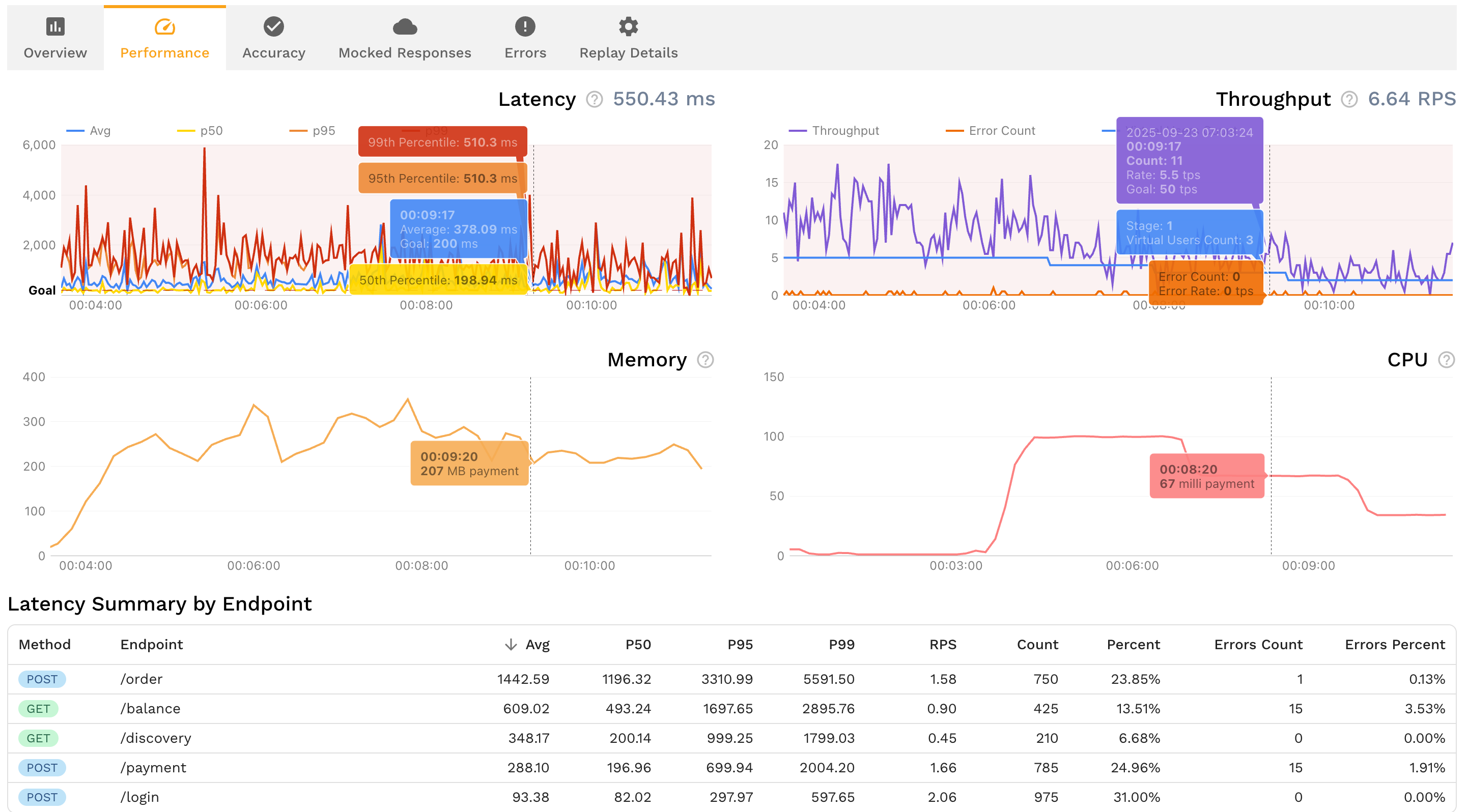
Everything you need to verify AI-generated code against production reality.
Record HTTP, gRPC, GraphQL, and database traffic from Kubernetes, ECS, or local environments. Automatic PII redaction keeps compliance teams happy.
Turn captured traffic into realistic mocks of Stripe, Salesforce, Postgres, Redis, and any other dependency. No manual stub maintenance.
Replay traffic and diff actual vs. expected responses. Catch payload mismatches, missing fields, and schema violations that static analysis can't see.
Give Claude Code, Cursor, Copilot, and other AI coding tools direct access to traffic snapshots and replay results via Model Context Protocol.
Multiply captured traffic 10x or 100x to stress-test AI-generated code. No synthetic load scripts that miss production's actual traffic shape.
Attach machine-readable test results directly to GitHub, GitLab, or Bitbucket PRs. Reviewers see exactly which calls passed or failed.
The earlier you catch issues, the cheaper and faster they are to fix. Runtime validation integrates at every stage—from local development to production deployment.
Give Claude Code, Cursor, and Copilot direct access to production traffic via Model Context Protocol. AI agents see real request patterns and edge cases while writing code, generating better implementations from the start. Validate changes instantly in your local environment before committing.
Run traffic replay locally through the Proxymock MCP server before submitting your pull request. Verify that AI-generated code handles real production scenarios, catches regressions, and maintains API contracts—all before your code enters team review.
Automate runtime validation in GitHub Actions, GitLab CI, or Jenkins. Every pull request runs traffic replay against AI-generated changes. Validation reports attach automatically to PRs, blocking merges that introduce regressions or break contracts. Reviewers get evidence, not assertions.
Run final runtime validation when deploying to staging or production environments. Capture fresh traffic from the deployment target, replay it against the new version, and validate performance, contracts, and behavior under production load before releasing to users.
The earlier you validate, the faster and cheaper issues are to fix. Runtime validation with production context shifts detection left—from expensive production incidents to quick local fixes.
Production scenario coverage with traffic replay vs. 40-60% with synthetic tests
Reduction in production incidents by catching issues before deploy
Less time writing tests—auto-generate from captured traffic
AI coding tools like Claude Code, Cursor, and GitHub Copilot generate syntactically correct code at remarkable speed. But they share a blind spot: they have never seen your production traffic. The LLM that wrote your new endpoint has no knowledge of the emoji usernames in your database, the retry storms your payment gateway triggers under load, or the malformed headers your mobile clients send on flaky connections.
This is the Observability Gap applied to AI development. Your observability stack already recorded these production behaviors — the edge cases, the latency distributions, the actual dependency responses. But that knowledge sits in dashboards instead of flowing into your test suite. Static analysis catches syntax errors and type mismatches. Unit tests validate isolated logic. Neither catches the integration and behavioral regressions that only surface when AI-generated code meets real-world traffic patterns.
Runtime validation with production traffic replay closes this gap. Instead of testing AI code against synthetic data and developer assumptions, you test it against the actual requests and responses your system processes every day. The result: AI-generated code that doesn't just compile — it works correctly when your real users hit it.
The hardest bugs to catch in AI-generated code live at the boundaries between components. An AI agent rewrites your order processing service. Every unit test passes. The linter is clean. But in production, the service receives a batch of 200 orders where 3 have coupon codes the mock never generated and 12 have shipping addresses with Unicode characters. The failures cascade through downstream services that expected a different response shape.
Traffic replay catches these integration failures because the test inputs are real. You're not guessing what payloads might break — you're replaying the exact traffic that production already handled. When a regression appears, you see the exact request that caused it and the exact field that changed. AI agents can use this feedback via Model Context Protocol (MCP) to fix the issue immediately, creating a closed loop between code generation and production-grade validation.
Capture real API traffic from your production or staging environment using an eBPF-based collector or a local proxy like proxymock. Then replay that captured traffic against the AI-generated code changes. The replay compares actual responses to expected baselines — catching behavioral regressions, latency spikes, and contract violations that unit tests and static analysis miss. This runs locally during development and automatically in CI on every pull request.
Static analysis (linters, type checkers, SAST tools) examines code without executing it. It catches syntax errors, type mismatches, and known vulnerability patterns. Runtime validation executes the code against real production traffic and compares the actual behavior to expected baselines. Static analysis tells you the code is well-formed; runtime validation tells you the code handles real-world inputs correctly. AI-generated code typically passes static analysis easily but fails under production traffic patterns the LLM never trained on.
Partially. AI agents can run unit tests and static analysis against their own output, but they cannot verify behavior against production traffic patterns they've never seen. This is why external validation with real traffic is essential. Tools like Speedscale provide AI agents with production context via Model Context Protocol (MCP), letting the agent see replay results and fix regressions in a closed loop — but the validation data comes from production, not from the AI itself.
Integration bugs happen when AI-generated code interacts with real dependencies — databases, third-party APIs, downstream microservices — in ways the AI didn't anticipate. Traffic replay catches these by replaying actual multi-service call chains captured from production. Instead of testing each component in isolation with synthetic mocks, you test the full interaction using real request/response pairs. When a response shape changes or a timeout behavior differs from what the AI expected, the replay diff shows exactly where the contract broke.
Give your AI coding tools the production context they need. Capture production traffic, validate every change, and ship with confidence.
Step-by-step guide to integrating Proxymock into your CI/CD pipeline for AI code validation.
ComparisonWhy static analysis alone isn't enough for AI-generated code and how runtime validation fills the gap.
Deep DiveThe silent failure patterns in AI-generated code and how to catch them before production.
AnalysisThe context gap in AI code generation and why production traffic is the answer.
ROI AnalysisHow traffic replay testing delivers 9x ROI through reduced infrastructure and incident costs.
ToolFree CLI for local recording, testing, and mocking APIs from real traffic.