
Somewhere in your service is a branch that has never executed. Not a rare one, a never one. It handles a dependency being unavailable: it reads from a cache, it returns a stale value, it marks the response degraded so callers know not to trust it too far.
It was written carefully. It was reviewed. Whether it works is an open question, because nothing in the test suite makes that dependency fail, and the dependency does not fail on request. The first execution of that code will be during an outage, which is the single worst time to discover a bug in it.
This guide closes that question in one command, using a lab that ships with a real bug in exactly that branch.
Chaos engineering, one layer down
What follows is a chaos experiment in the ordinary sense. The Principles of Chaos Engineering define the discipline as experimenting on a system to build confidence that it withstands turbulent conditions, and prescribe a method: establish a steady state, hypothesize it holds, introduce a variable, then look for the difference. Every step below maps onto that. The steady state is six SKUs answering with fresh inventory data. The variable is one dependency failing. The difference is the whole point.
The variable is where this parts company with most chaos tooling. Read the canonical list of disruptions to introduce and they are all infrastructure: “servers that crash, hard drives that malfunction, network connections that are severed.” The tools built over the last decade reflect that. Netflix’s Chaos Monkey started by terminating instances. LitmusChaos and Chaos Mesh, both CNCF incubating projects, kill pods, throttle bandwidth, exhaust CPU, and corrupt disk IO. Gremlin and AWS Fault Injection Service do the same commercially and inside one cloud.
That work is genuinely valuable and this does not replace it. But notice what the whole category is good at: breaking the platform your service runs on. The failures it produces are the ones your service can usually see coming, because they arrive as timeouts, connection errors, and missing endpoints, and defensive code handles those reasonably well.
Chaos Mesh gets closest to the layer this guide works at: its HTTPChaos can abort or delay HTTP calls. Even then you describe the fault abstractly, in a spec. What none of these tools do is take the response your dependency actually sent, on a real day, and perturb that.
That is the gap this fills. The chaos here is injected into recorded dependency traffic, one endpoint at a time, which makes the blast radius a filter query instead of a namespace.
What you will build
The companion chaos lab
is a storefront that answers GET /api/stock/{sku} by asking an inventory service
how many units are on hand. If inventory is unavailable it falls back to the last
good answer it saw and marks the response degraded.
flowchart LR
  C["client"] --> S["storefront<br/>:8080"]
  S --> P["proxymock<br/>mock server"]
  P --> I["recorded inventory<br/>responses"]
  P -. "chaos rule<br/>scoped to /v1/inventory" .-> P
  S --> K["lastKnown cache<br/>(the branch that never runs)"]
You will record one ordinary session where nothing fails, then make inventory and only inventory fail on every call, and read what the storefront claims against what inventory actually did. The two do not agree, and the disagreement is the bug.
Prerequisites
- Go 1.23 or newer, and
curl - proxymock v2.5.892 or newer, installed, initialized, and on
PATH - No Docker, no cluster, no Speedscale account. Every command here is local.
Clone mock-lab and work from its chaos
directory. The storefront binds 127.0.0.1:8080 and the inventory fixture
localhost:8090; proxymock’s proxy is on 4140 and its health endpoint on
4141.
1. Record one ordinary session
make captureThe inventory fixture starts, proxymock record runs the storefront as a child
process, six SKUs are looked up, and everything stops. You get six inbound stock
lookups and six outbound inventory calls.
Nothing rare is in this recording, deliberately. Every SKU resolves, inventory
answers 200 every time, and there is no failure anywhere in it. This matters:
the failure you are about to inject does not need to have happened on the day the
traffic was captured. That is the difference between chaos and waiting for luck.
2. Watch the storefront work
make mock          # leave this running
make baseline      # in a second terminal
Six healthy answers:
{"sku":"SSC-4110","available":42,"in_stock":true,"degraded":false,"source":"inventory"}This is the state every test suite has ever seen, and every one of them passed.
3. Take inventory down, and nothing else
Stop make mock, then:
make mock-chaos    # leave this running
make baseline      # in a second terminal
The whole intervention is one flag:
--chaos '(url CONTAINS "/v1/inventory"): status=503,percent=100'Everything before the colon selects traffic and everything after it decides what
happens to it. The scope is a filter query, the same syntax the Requests grid and
--query-string use, and every group must be parenthesized. It selects the
outbound inventory calls and nothing else in the recording.
Now check what inventory is really saying:
make chaos-evidenceHTTP/1.1 503 Service Unavailable
X-Speedscale-Chaos: effect=status code;status=503;rule=chaos-1That header is how you tell an injected failure from a real one. It names the effect and the rule that fired, it is absent on untouched responses, and it is persisted onto the recorded pair, so it stays readable long after the terminal scrollback is gone.
And here is the storefront’s answer for all six SKUs, with its only dependency
returning 503 on every single call:
{"sku":"SSC-4110","available":42,"in_stock":true,"degraded":false,"source":"inventory"}degraded:false. source:"inventory". Not a warning in the log. The fallback
cache, which exists and is correct, never ran.
4. Reconcile the two facts
Two things are true at once:
- inventory returned
503on every call, with a marker on each one to prove it - the storefront reported fresh, undegraded data from inventory for every SKU
Notice what did not change: the response contract. Same fields, same types, same
200 OK to the client. No status assertion catches this. No response diff between
releases catches it. The numbers are not even wrong, because they are the recorded
body, which a 503 does not erase.
The lie is in the metadata. The storefront told its callers this data was current while its dependency was down.
The cause is four lines up the stack:
resp, err := client.Get(fmt.Sprintf("%s/v1/inventory/%s", base, sku))
if err != nil {
	return level, fmt.Errorf("calling inventory: %w", err)
}
defer resp.Body.Close()

if err := json.NewDecoder(resp.Body).Decode(&level); err != nil {
err is only non-nil when the request could not be completed at all. A 503 is a
completed request. The status is never read, the body decodes cleanly, and the
caller gets a stockLevel and a nil error.
This is why pointing a service at a dead port is a weaker test than it looks. A dead port produces a transport error, which is the one failure mode this code does handle. Chaos here injects the failure mode that looks like success.
5. See it in proxymock web
The header on the wire is one view. The run itself is the other.
make mock-chaos-record    # leave running
make baseline             # a few times, in a second terminal
make web                  # in a third
Open http://127.0.0.1:7788 and go to Requests.
Then use the RUN dropdown in the toolbar to select a results/mocked-*
directory. This is the step to get right. The dropdown defaults to
recording, which is the session you captured in step 1, back when nothing
failed. There is no chaos in it and there never will be, so a reader who skips
this sees an empty Chaos column and concludes the feature does not work. The
perturbed traffic is in the run you just produced, not in the recording it was
served from.
With the right run selected, the Chaos column marks every perturbed response, the toolbar filter narrows to just those, and opening a row names the rule that fired and what it changed.
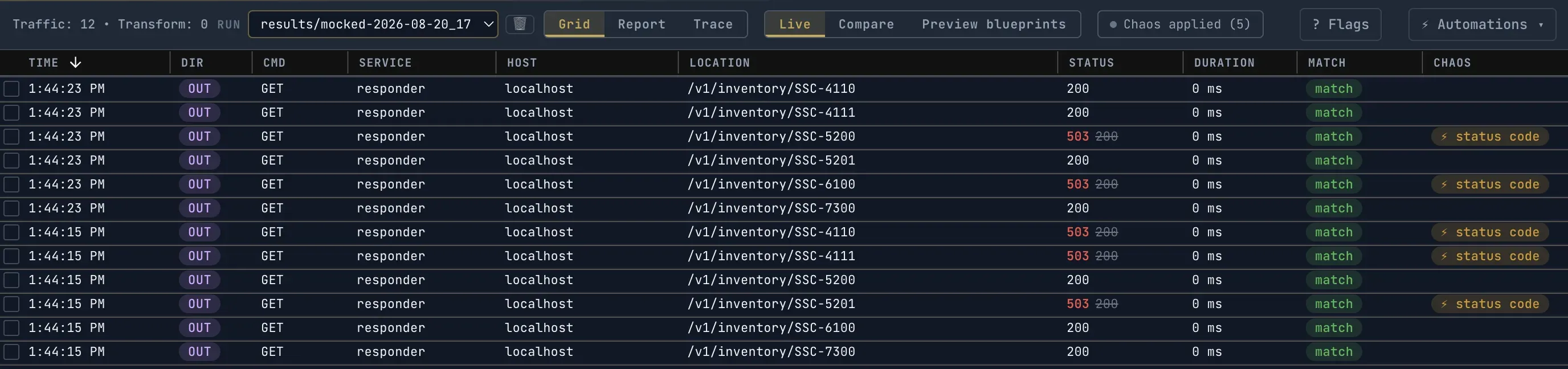
This variant uses percent=50, so the grid holds both kinds of row and the filter
has something to do. That is the view worth having: injected failures are
labelled, so an injected 503 is never mistaken for a real one.
Two details in that grid are worth a second look. The MATCH column reads
match on the chaosed rows as well as the healthy ones, which is correct: chaos
is applied after the request matches a recorded pair, so a perturbed response is
always a mock hit and never a miss. And the counter reads Chaos applied (5) out
of twelve requests rather than exactly half, because percent=50 is a per-request
probability, not a quota.
One thing looks like a disagreement and is not. The STATUS column shows 503,
what the client actually received, with a tooltip reading Chaos sent 503; the mock recorded 200. The file on disk still says 200. Both numbers are true and
the grid keeps both, because the recorded pair is mock input for a later run and
rewriting it would change what a re-replay does.
6. Fix it, and prove both properties
The fix is the smallest possible one: read the status. Open cmd/app/main.go,
find fetchStock, and add three lines between the defer and the decode:
	defer resp.Body.Close()

	// Add this. A 503 is a completed request, so err is nil and the body
	// below decodes cleanly into a stockLevel that means nothing.
	if resp.StatusCode != http.StatusOK {
		return level, fmt.Errorf("inventory returned %d", resp.StatusCode)
	}

	if err := json.NewDecoder(resp.Body).Decode(&level); err != nil {
No new imports: net/http and fmt are both already in the file. That is the
entire fix, and it is the whole reason the rest of this exercise is worth doing,
because nothing about the response contract told you those three lines were
missing.
Now prove it. Stop whichever make mock-* process is still running, then start
the flaky variant rather than the total outage:
make mock-flaky    # leave running
make baseline      # a few times, in a second terminal
Every make mock-* target rebuilds the binary first, so your edit takes effect
on that command. There is no separate build step.
That target runs this rule:
--chaos '(url CONTAINS "/v1/inventory"): status=503,percent=50,seed=lab'Half the calls fail, so a single run exercises the healthy path, the degraded
path, and the transition between them, which the total outage in step 3 cannot
do. Run make baseline a few times and watch the answers change: a fixed
storefront produces all three states below and never claims degraded:false on a
call that failed.
inventory failed, nothing cached yet
  {"error":"inventory unavailable"}

inventory answered, cache updated
  {"sku":"SSC-4110","available":42,"in_stock":true,"degraded":false,"source":"inventory"}

inventory failed, cache served and labelled
  {"sku":"SSC-4110","available":42,"in_stock":true,"degraded":true,"source":"cache"}
The third line is the one that was missing before. Same SKU, same number, and now the response says where the number came from and that it should not be trusted as current.
Two properties, both proven by that output. The fallback runs, and it tells the truth about itself.
Two things that look like chaos stopped working
The errors disappear after the first run. The first make baseline hits SKUs
that have never resolved, so a chaosed call has nothing to fall back to and
returns {"error":"inventory unavailable"}. That run also caches every SKU that
succeeded, so on later runs a chaosed call serves the cached value instead. The
error state is the cold-cache state, and you only get it once.
A run with no errors in it is not a run with no chaos in it. After the fix, a
chaosed call still returns 200 with a body. The signal moved: look for
"degraded":true,"source":"cache" rather than for an error. Two of those lines
means two calls were perturbed, which is exactly what you were trying to prove.
Before the fix there was no signal at all, which was the bug.
The pattern also changes every time you run it, and that is not chaos being
random. The roll is keyed on an occurrence counter kept per rule and signature
inside the responder process, so your first make baseline is occurrence 0 for
each SKU and your second is occurrence 1. seed=lab means that restarting the
mock server and replaying the same sequence gives the same verdicts, not that
every invocation against a running server gives identical answers.
To check the wire directly rather than inferring from the storefront’s answers:
make chaos-evidenceThat prints the X-Speedscale-Chaos header straight off the mock server, which
is the authority on whether a given response was perturbed.
On reproducibility
seed=lab makes the run repeatable, with a limit worth stating rather than
discovering.
The roll is a pure function of the rule, the request signature, and the occurrence count, with no clock in it. The Nth lookup of a given SKU always gets the same verdict. It is not a promise that two runs are bit-identical: a run that issues a different number of requests for a signature diverges after that point.
The unit that repeats is the responder process, not the command you type. That
counter lives in the running mock server and keeps incrementing across every
make baseline you fire at it, which is why the pattern moves each time. Restart
the server and send the same sequence, and the verdicts come back identical.
That is stronger than ordering-based reproducibility, which is worthless the moment the responder serves requests concurrently, and weaker than full determinism. In practice it means a failure you find this way is one you can hand to a teammate along with the command that produced it.
What this does not do
It does not hide the consequences. If the storefront cannot absorb the injected
failure, the failure is reported normally, because that is the entire question you
came to answer. Chaos-affected traffic is excluded from drift and match-rate
analysis, since an injected 503 is not mock drift, but never from pass or fail.
It also is not a substitute for killing pods. Infrastructure chaos and application chaos find different bug classes, and the honest position is to run both.
Clean up
make cleanStop the make mock-* process. Nothing else is left running, and nothing was
installed outside the lab directory.
The reference documentation covers the full scope syntax, the rest of the effects, and the rule editor. If you want the argument for why this layer is worth testing separately, that is in Break One Dependency, Not The Whole Cluster.